RDM "Object reference not set to an instance of an object"

Just upgraded to 2025.1.21.0
during the installation I needed to install .NET update 9.0.4
After install When I start I get
"Object reference not set to an instance of an object"
All Comments (8)
oke,
When I reset the layout I can see my connections again..
but restarting the application I still get the error
"Object reference not set to an instance of an object"
modifying is not possible.
Hello,
We have already fixed an error similar to this recently. Would it be possible for you to update to the latest version (RDM 2025.1.31.0) and see if you still reproduce the issue? If you still do, we would need the full error stack so we can have more of an idea of what is happening.
To view the full error you would need to press the detail button as follows and send us the full message: 
If you are not getting this specific error prompt then the error might be available in the "Help" section of the ribbon in the "Application logs" section.
Best Regards,
Michaël Beaudin
cfb3cc74-5e01-4fd2-ae2f-98d7b507ce33.png
I got the error after I upgraded to this version.
the error I get is:
NullReferenceException - Object reference not set to an instance of an object.
at Devolutions.RemoteDesktopManager.Managers.VariableManager.<>c.<.cctor>b__5_46(ConnectionEngine _, Connection connection, VariableMode _, Boolean _, Boolean _)
at Devolutions.RemoteDesktopManager.Managers.VariableManager.Replace(ConnectionEngine engine, String text, String variable, ProcessVariableAction action, Connection connection, VariableMode variableMode, Boolean isUri, Boolean isAddhoc, Int32 nesting, Boolean skipXmlEncoding)
at Devolutions.RemoteDesktopManager.Managers.VariableManager.FormatGlobal(ConnectionEngine engine, String value)
at Devolutions.RemoteDesktopManager.Business.FileExportBackupDescriptor.ReplaceVariables(String value)
at Devolutions.RemoteDesktopManager.Business.FileExportBackupDescriptor.get_IsConfigured()
at Devolutions.RemoteDesktopManager.Managers.BackupManager.IsDataSourceConfigured(BaseConnectionDataSource dataSource)
at Devolutions.RemoteDesktopManager.Managers.BackupManager.ResetBackgroundBackupTimer(BaseConnectionDataSource dataSource)
at Devolutions.RemoteDesktopManager.Managers.BackupManager.OnDataSourceChanged(Object sender, DataSourceChangedEventArgs args)
at Devolutions.RemoteDesktopManager.Managers.DataSourceManager.InvokeDataSourceChanged(BaseConnectionDataSource dataSource)
at Devolutions.RemoteDesktopManager.Managers.ConnectionManager.set_DataSource(BaseConnectionDataSource value)
at Devolutions.RemoteDesktopManager.Managers.ConnectionManager.set_DataSource(BaseConnectionDataSource value)
at Devolutions.RemoteDesktopManager.Managers.LockManager.ApplicationLogon(Boolean unlockMode)
at Devolutions.RemoteDesktopManager.Forms.FrmMainDocumentManager.FrmMainRibbon_Shown(Object sender, EventArgs e)
at DevExpress.XtraEditors.XtraForm.OnShown(EventArgs e)
at System.Windows.Forms.Control.InvokeMarshaledCallbackHelper(Object obj)
at System.Threading.ExecutionContext.RunInternal(ExecutionContext executionContext, ContextCallback callback, Object state)
--- End of stack trace from previous location ---
at System.Threading.ExecutionContext.RunInternal(ExecutionContext executionContext, ContextCallback callback, Object state)
at System.Windows.Forms.Control.InvokeMarshaledCallbacks()
------------------------ extended stack ------------------------
at Devolutions.RemoteDesktopManager.Forms.FrmErrorMessage.ShowErrorMessage(ConnectionEngine engine, Exception exception, String message, String title)
at Devolutions.RemoteDesktopManager.Forms.FrmErrorMessage.ShowErrorMessage(ConnectionEngine engine, Exception exception, String title)
at Devolutions.RemoteDesktopManager.Managers.LogManager.OnThreadException(Object sender, ThreadExceptionEventArgs t)
at System.Windows.Forms.Application.ThreadContext.OnThreadException(Exception ex)
at System.Windows.Forms.Control.InvokeMarshaledCallbacks()
at System.Windows.Forms.Control.WndProc(Message& m)
at DevExpress.XtraEditors.DForm.WndProc(Message& m)
at DevExpress.XtraEditors.XtraForm.WndProc(Message& msg)
at DevExpress.XtraBars.Ribbon.RibbonForm.WndProc(Message& msg)
at Devolutions.RemoteDesktopManager.Forms.FrmMainDocumentManager.WndProc(Message& m)
at System.Windows.Forms.Control.ControlNativeWindow.WndProc(Message& m)
at System.Windows.Forms.NativeWindow.Callback(HWND hWnd, MessageId msg, WPARAM wparam, LPARAM lparam)
at System.Windows.Forms.NativeWindow.DefWndProc(Message& m)
at DevExpress.Utils.Taskbar.Core.FilterWindow.WndProc(Message& m)
at System.Windows.Forms.NativeWindow.Callback(HWND hWnd, MessageId msg, WPARAM wparam, LPARAM lparam)
at Windows.Win32.PInvoke.DispatchMessage(MSG* lpMsg)
at System.Windows.Forms.Application.LightThreadContext.FPushMessageLoop(msoloop uReason)
at System.Windows.Forms.Application.LightThreadContext.RunMessageLoop(msoloop reason, Boolean fullModal)
at System.Windows.Forms.Application.ThreadContext.RunMessageLoopInner(msoloop reason, ApplicationContext context)
at System.Windows.Forms.Application.ThreadContext.RunMessageLoop(msoloop reason, ApplicationContext context)
at Devolutions.RemoteDesktopManager.Program.Main(String[] args)
afbeelding.png

afbeelding.png
Hello,
After investigating this issue, it would seem that this error stems from the fact that you have a faulty "global" variable in your data source backup configuration ("File -> Data sources -> select your data source which is opening at start-up -> Backup").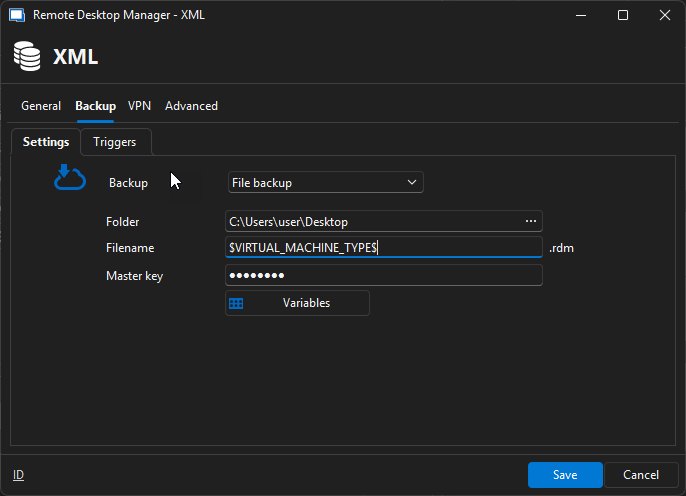
We believe either $VIRTUAL_MACHINE_ID$ or $VIRTUAL_MACHINE_TYPE$ to be the faulty variable and that they should actually not be available in the global variables. These variables are targeting the fields "Server" and "Type" in the properties of an entry in the section "Assets -> Network".
Starting from RDM 2025.1.32.0, we will make it so this null reference exception should not happen anymore when using these variables and we will remove them from the global variable section as to avoid confusion.
For now, we would recommend removing these variables from any fields in your data source's backup configuration since, as mentioned before, they need to be in an entry's properties to work. If you do not have any of these variables in your backup configuration, then please do let us know which variables you are using so we can investigate them.
Best Regards,
Michaël Beaudin
cec364d9-f1f5-499b-a7ae-485ea425c669.png
thank you!!
This was the case!! I removed the variable and now RDM startsup fine!!
Thank You again.
Hello,
Glad to know that your issue was fixed :). Do not hesitate to open another thread if you encounter other issues and we will do our best to help you.
Best Regards,
Michaël Beaudin