[SSH] After logon run su user with different password

Hi everyone,
I would like to automatic logon on Linux server with root user.
We don't allow connection SSH for root and the user used for connection isn't sudoer (both for security purposes).
What I do ? I created in my RDM :
- 1 credential entry with my user password
- 1 credential entry with my root password
- 1 session with my server and linked my credential user
When I launch the session, I would like to user the macro to run :
- su
- root password
I know I can use variable but it seems like RDM doesn't provide variable to use specific password for another credential entry that isn't linked to the session. Something like $Credential$:[Name]$PASSWORD$ when name=the name of the wanted credential.
Thanks in advance.
Recommended Answer
Hello,
We added in 2025.1 a new feature for elevated credentials which should help you in this scenario: https://docs.devolutions.net/rdm/kb/general-knowledge/elevated-credentials/
In addition to the "open using elevated credentials" feature, in SSH entries you can also configure how to use the elevated credentials to elevated with "su" for example: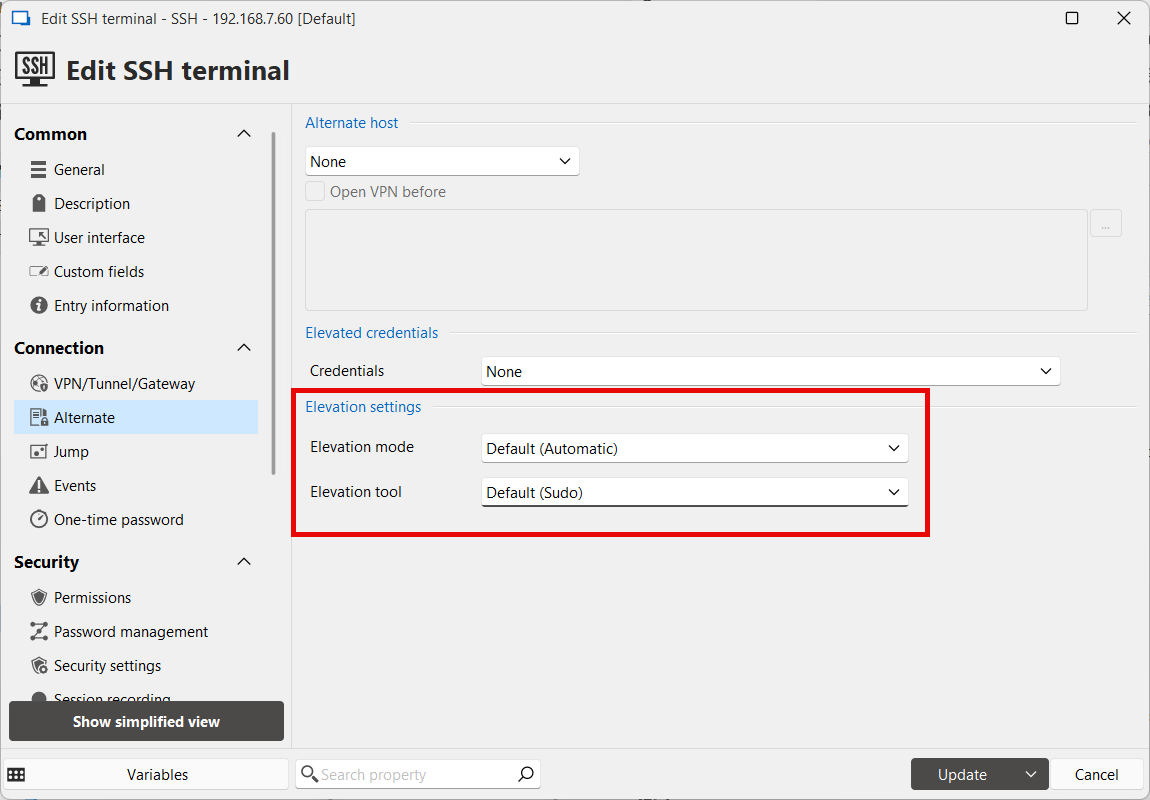
When this is configured you will see a menu for it in the context menu of the tab when the entry is opened.
You can also use the following variables if you'd prefer to use a macro:
$ELEVATED_USERNAME$
$ELEVATED_PASSWORD$
The regular restrictions on the password variable apply and you will need to make sure the "Allow password in variables" settings are properly configured.
Regards,
Hubert Mireault
29a126a7-1b61-40d9-a3a7-14a97f1b7c5e.png
All Comments (5)
Hello,
We added in 2025.1 a new feature for elevated credentials which should help you in this scenario: https://docs.devolutions.net/rdm/kb/general-knowledge/elevated-credentials/
In addition to the "open using elevated credentials" feature, in SSH entries you can also configure how to use the elevated credentials to elevated with "su" for example:
When this is configured you will see a menu for it in the context menu of the tab when the entry is opened.
You can also use the following variables if you'd prefer to use a macro:
$ELEVATED_USERNAME$
$ELEVATED_PASSWORD$
The regular restrictions on the password variable apply and you will need to make sure the "Allow password in variables" settings are properly configured.
Regards,
Hubert Mireault
29a126a7-1b61-40d9-a3a7-14a97f1b7c5e.png
Hi Hubert,
Thank you for your answer. That's exactly what I needed. I just update my RDM and see this new functionality.
However, it's seems that the variable isn't recognized as it is display as text when I try it when I test for debug :
user@MYSERVER:~$ $ELEVATED_PASSWORD$
-bash: $: command not found
I enable in Security / Security parameters, the option "Allow password in variables" in the SSH entry parameters.
Did I miss something ?
Regards
You will need to make sure the "Allow password in variables" is also enabled on the credential entry you're linking to in the elevated credentials section, not only on the SSH entry itself.
Please refer to this documentation topic: https://docs.devolutions.net/rdm/kb/how-to-articles/rdm-typing-macro-perform-authentication/
Here is the relevant section:
If the regular $PASSWORD$ variable was working, I would assume the System Settings were configured properly, and you only need to make sure the "Allow password in variable" is enabled in your credential entry.
Let me know if this works for you!
Regards,
Hubert Mireault
1863ea7a-459e-4a47-9680-31a4fffb4212.png
I didn't test other variables password until now because I couldn't linked different credential for the session until the update.
I checked both and it work perfectly, thank you for your answers and have a great day.
Kindly regards.
That's great, I'm glad this works for you! I'll mark this topic as resolved, have a great day and don't hesitate to contact us if you encounter another issue.
Regards,
Hubert Mireault