NLA error when use Smart Card to connect through RD Gateway

I cannot connect to RD server through RD Gateway using the same smart card. The error is:
The remote computer that you are trying to connect to requires Network Level Authentication (NLA), but your Windows domain controller cannot be contacted to perform NLA. You can try connecting to the remote computer using your username and password instead.
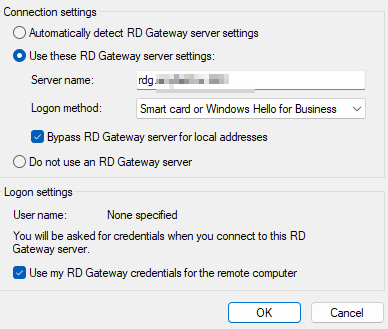
- Standard Windows Remote Connection works for this configuration (see screenshot of working config)
- RDM works with Smart Card for the host and password for RD Gateway
I think I tried all combinations of checkboxes in RDM - no luck. Any ideas?
].png)
 - S1M1 (Administrator).png)
2025-04-13 16_17_18-Edit RDP (Microsoft Remote Desktop) - S1M1 (Administrator).png
2025-04-13 15_58_05-RD Gateway Server Settings.png
2025-04-13 15_52_53-Remote Desktop Manager [S1M1 (Administrator)].png
Recommended Answer
Hi, I found an issue.
First, here is more details:
- If machine in the domain network, RD Gateway worked
- When machine is in the foreign network, I got this NLA error.
This settings solved the problem: - S1M1 (Administrator).png)
Even though I didn't setup my RD Gateway to be specifically a KDC proxy, it seems it is by default (Windows Server 2016) and it works.
2025-04-18 13_21_10-Edit RDP (Microsoft Remote Desktop) - S1M1 (Administrator).png
All Comments (2)
Hello,
Thank you for reaching out to Devolutions Support.
Could you please confirm the data source type and version you use with RDM?
Can you send a screenshot of the RDP entry properties?
Looking forward to your response.
Best regards,
Stephan
Hi, I found an issue.
First, here is more details:
- If machine in the domain network, RD Gateway worked
- When machine is in the foreign network, I got this NLA error.
This settings solved the problem:
Even though I didn't setup my RD Gateway to be specifically a KDC proxy, it seems it is by default (Windows Server 2016) and it works.
2025-04-18 13_21_10-Edit RDP (Microsoft Remote Desktop) - S1M1 (Administrator).png