Reset TOTP/MFA after User lost phone/authenticator

Hello,
we will set mandatory MFA for users, so I am (again) testing things/scenarios.
We use RDM and SQL as datasource.
I configured: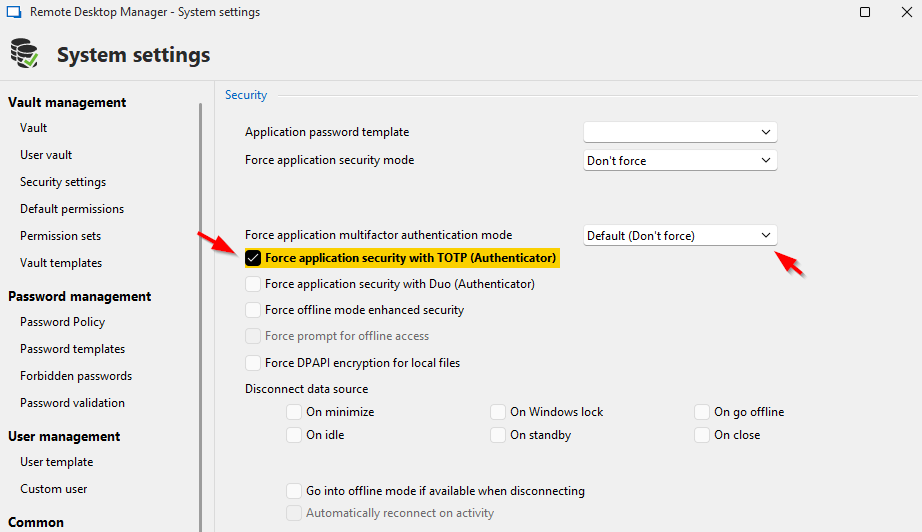
It works, but if I like to reset MFA for a certain user, it does not work - or at least, i do not understand the system.
I tried to delete .enc, .stv, I tried to deactivate MFA through administration -> user (but I think, this is only for the users, who configured MFA by themselves).
So, in the end - how could I reset MFA for a user, who lost his authenticator?
Second question: What about "Force application security with TOTP (Authenticator) "Default (Don't force)
Switching does nothing - or at least, I don't understand the mechanism. What's the purpose?
Best regards,
Daniel
49530da2-2c5f-46b9-90d4-9251a85123a5.png
All Comments (9)
Hello,
Thank you for contacting us on that matter!
I'm letting you know that I'm investigating this behaviour and will let you know with more details as soon as possible.
In the meantime, could you please provide me with the following information?
- The current version of your RDM
Thank you for letting us know. If you have any other questions, feel free to let us know.
Best regards,
Maxim Robert
Hello,
Version is: 2025.1.30.0 64-bit - regarding "client", where I like to deactivate/reset MFA for the user
Version is 2025.1.29.0 64-bit - on the "admin-client", where I do the administrative tasks
So far, what helps, but this can not be the best way:
- Deleting "C:\Users\%username%\AppData\Local\Devolutions\RemoteDesktopManager"
- Re-Connection (manual) oder import of the .rdd to have the Database attached again
a) There must be a way, to reset the MFA as admin/remote for the user. Right?
b) Is it possible, to create one "special" admin without MFA for the worst case
(I did ask this in the past, but didn't remember the best-practice)
c) Why does the user have the ability to configure MFA through File -> Settings?
This locked me in my tests also out, when OTP is lost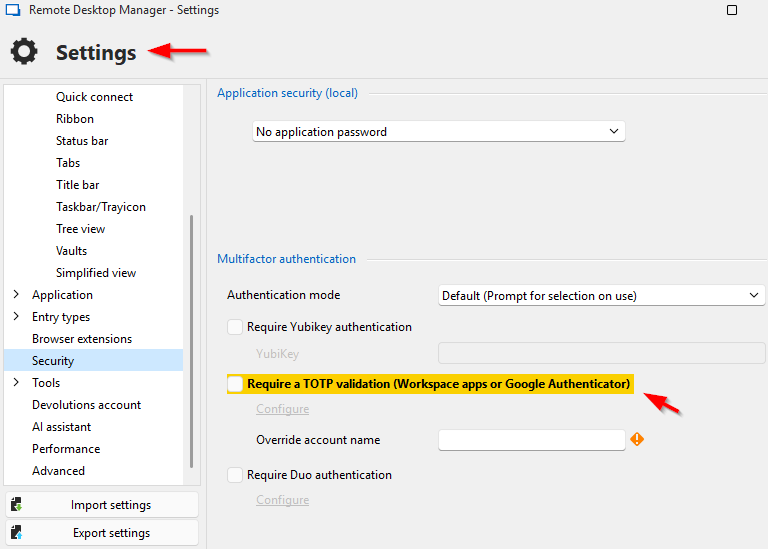
Regards,
Daniel
fc6ec003-6a05-459f-bd7f-a1ae5511df85.png
4cf9a256-db3b-45c3-8ad4-5eab1fe0ec31.png
7cf96ce6-f0bf-44a9-b75c-25d4e5746743.png
Hello,
Thank you for your response!
To my knowledge, removing the Data Source MFA for your users as an Admin is only possible. It is not possible to remove the MFA set under File > Settings since that MFA is configured locally.
Under System Settings, you can force the user to configure a Data Source MFA instead of configuring the Force Application Multifactor. This allows you to remove it if anything happens. 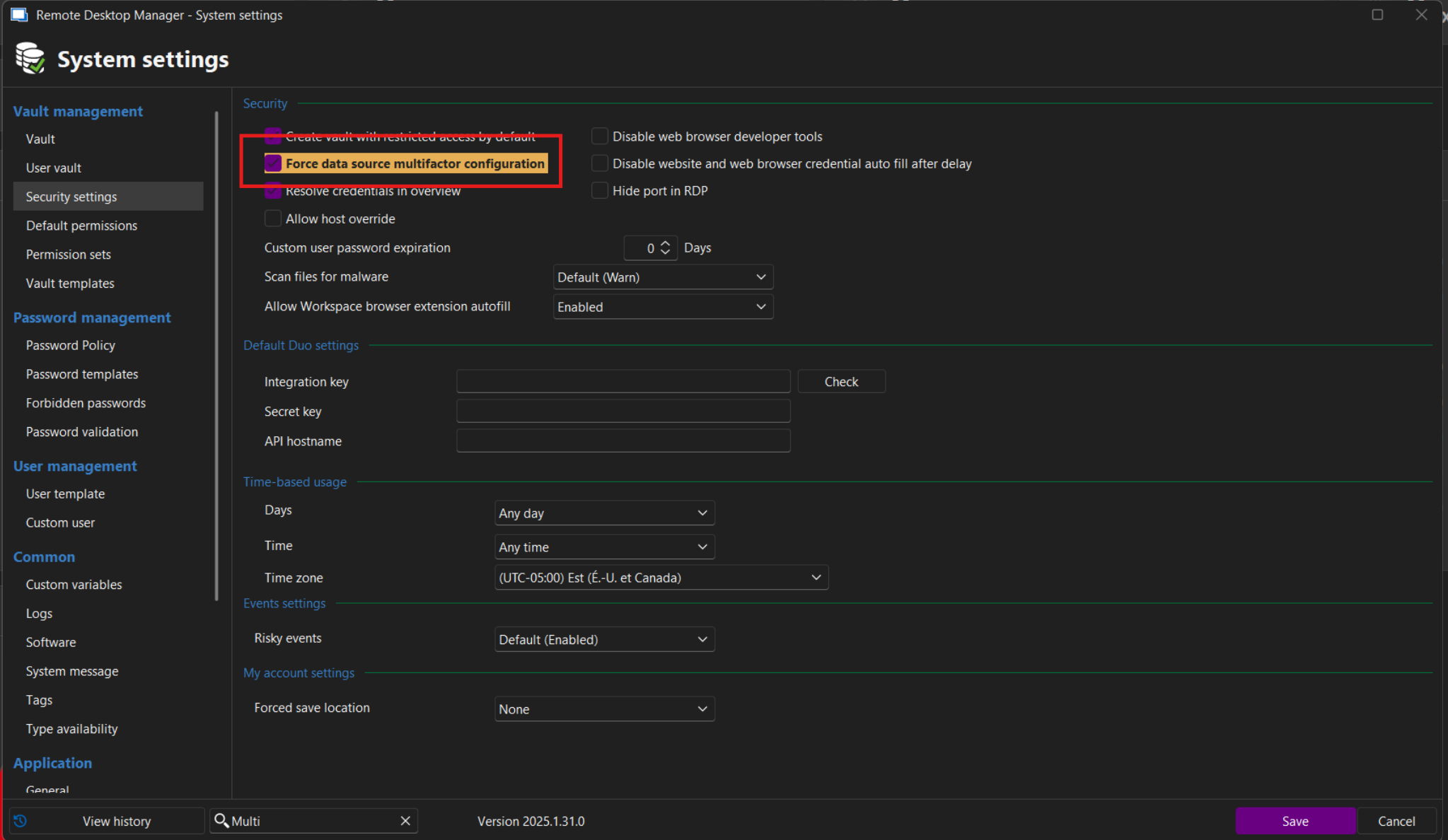
If you configure this option, even Admins will need to configure the MFA. To my knowledge, it is not possible to specify which users need to configure it on an SQL Server Data Source.
If you have any other questions, feel free to let us know.
Best regards,
Maxim Robert
Capture d’écran 2025-04-17 164746.png
Hi,
thanks for your suggestion. This seems to work.
Now the next questions:
What is the best practice to prevent a desaster, like: The adminstrator lost access?
Does Devolutions have a "workaround"?
Is there a reset mechanism?
When we activate MFA, we will at first notice the keys for at least 2 admins.
Usualy we do all the password documentation in RDM, so at least 1 admin needs access, to reset MFA for the other admin.
Even, that the case is not very likely, I would be prepared and have a "plan b".
Best regards,
Daniel
Hello,
Thank you for your response!
I sent you a direct message with a solution. Please let me know if you haven't received it.
Best regards,
Maxim Robert
Hello Maxim,
thanks.
I replied - did not work for me. Details in the PM.
Best regards,
Daniel
Hello,
I would like to follow up again.
Maxim, you wrote (PM):
Indeed, the MFA can be removed by deleting the ***, ***, ***, and *** files under this path:
C:\Users\%username%\AppData\Local\Devolutions\RemoteDesktopManager

Then, when RDM is reopened, the MFA should be removed.

Please let me know if this solution doesn't work for you. If you have any other questions, please let us know.
As I mentioned, this doesn't seem to be working. I might be doing something wrong, so I'm happy to receive any suggestions or advice.
Also, I'm wondering, what happens, if "someone" gets access to an admin-computer with RDM?
If this variant works, RDM and all the data could be accessed?
What would be good, if there would be an MFA email-reset for licensed customers.
Best regards,
Daniel
Hello,
Thank you for your response, and sorry for the delay.
I created an internal ticket and sent you a link to schedule a session with me to discuss your questions. Please let us know if you haven't received our email.
I appreciate your patience and your collaboration. If you have any other questions, please let us know.
Best regards,
Maxim Robert
Hello Maxim,
I got your invitation and booked a session.
Thanks and regards,
Daniel