SSH session to Huawei MA5600 shows blank screen (no error) in RDM, but works with PuTTY and PowerShell
SSH session to Huawei MA5600 shows blank screen (no error) in RDM, but works with PuTTY and PowerShell

Hi everyone,
I’m experiencing a strange issue when connecting via SSH to a Huawei MA5600 series device using Remote Desktop Manager.
When I initiate the SSH connection from RDM, the session opens, but the screen stays completely black. There’s no error message, and nothing is displayed — it just sits there doing nothing. The same SSH connection works perfectly fine when I use PuTTY or even when I use SSH from PowerShell directly on the same machine.
I’ve already tried the following:
- In the SSH entry, under Terminal > Configuration, I enabled Override terminal type and tested with different values (e.g. xterm, vt100, ansi), but no change.
- Other device models connect just fine using the same configuration in RDM, so it seems specific to the Huawei MA5600.
Has anyone encountered a similar issue or know if there’s a compatibility quirk with these Huawei devices in RDM?
Any suggestions are welcome. Thanks in advance!
All Comments (8)
Hello,
Thank you for reaching out to us regarding this,
Could you please specify the version of RDM you are currently using?
What type of data source are you using?
Is this a new entry, or was this working without issues for you previously in RDM?
Let me know,
Best regards,
Samuel Dery
Issue resolved by disabling the sending of environment variables in the SSH session configuration.
The problem was identified after enabling verbose logging. The log showed that the session was hanging right after sending the environment variable LANG=es_ES.UTF-8. Apparently, the Huawei MA5600 does not handle this properly and stops responding without any error.
Once I disabled environment variable transmission, the SSH prompt appeared immediately and everything worked as expected.
For reference, I’m using Remote Desktop Manager version 2025.1.29.0 (64-bit).
Thanks in advance to anyone who took the time to read or think about this!
Hello,
Thank you for your reply and for sharing the resolution with others,
Feel free to let us know if the issue returns,
Best regards,
Samuel Dery
Hello.
The same problem happened in Remote Desktop Manager version 2025.2.14.0 (64-bit). The solution of disabling variable settings does not work
Did you enabled verbose logging? Can you send the output?
[18.06.2025 13:25:53] Devolutions.ProtocolsSharp: 2025.6.9.2 OS: Windows
[18.06.2025 13:25:53] Terminal font: Courier New [Courier New, fixed=True]
[18.06.2025 13:25:53] Starting SSH, verbose level: 4
[18.06.2025 13:25:53] Setting up connection
[18.06.2025 13:25:53] Connecting to: 192.168.1.1:22 (IPV_ANY)
[18.06.2025 13:25:53] SSH version banner: SSH-2.0-HUAWEI-1.5

[18.06.2025 13:25:53] Sending kex init
[18.06.2025 13:25:53] Received kex init
[18.06.2025 13:25:53] Selected algorithms: diffie-hellman-group14-sha256, ecdsa-sha2-nistp256, aes256-ctr, aes256-ctr, hmac-sha2-256, hmac-sha2-256, none, none
[18.06.2025 13:25:53] Sending diffie-hellman kex init
[18.06.2025 13:25:53] Received diffie-hellman kex reply
[18.06.2025 13:25:53] Successfully authentified server
[18.06.2025 13:25:53] Sending new keys message
[18.06.2025 13:25:53] Received new keys message
[18.06.2025 13:25:53] Sending userauth service request
[18.06.2025 13:25:53] Received service accepted message
[18.06.2025 13:25:53] Sending userauth init request
[18.06.2025 13:25:53] Received userauth banner:
##########################################
#               Welcome!                 #
#   This is the property of MyCompany.    #
#                                        #
#     Unauthorized users prohibited.     #
##########################################

[18.06.2025 13:25:53] Received userauth failure: password;partial
[18.06.2025 13:25:53] Starting password authentication
[18.06.2025 13:25:53] Sending userauth password request
[18.06.2025 13:25:53] Received userauth success
[18.06.2025 13:25:53] User authenticated successfuly by password
[18.06.2025 13:25:53] Sending session channel open request: 0|-
[18.06.2025 13:25:53] Received channel open confirmation: 0~2 WS 200000|131072 MPS 32000|32768
[18.06.2025 13:25:53] Sending pty request: 0|2 xterm-256color, 167x46
[18.06.2025 13:25:53] Received channel success: 0|2
[18.06.2025 13:25:53] Sending environment variable request: LANG=ru_RU.UTF-8 0|2
At the same time, the skip environment variable setup checkbox is active, which previously solved the problem.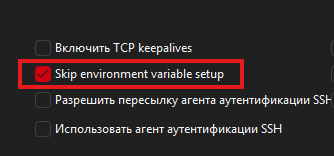
552d1db9-500c-4440-a9a5-ee589e0ad6d3.png
[18.06.2025 13:25:53] Devolutions.ProtocolsSharp: 2025.6.9.2 OS: Windows
[18.06.2025 13:25:53] Terminal font: Courier New [Courier New, fixed=True]
[18.06.2025 13:25:53] Starting SSH, verbose level: 4
[18.06.2025 13:25:53] Setting up connection
[18.06.2025 13:25:53] Connecting to: 192.168.1.1:22 (IPV_ANY)
[18.06.2025 13:25:53] SSH version banner: SSH-2.0-HUAWEI-1.5
[18.06.2025 13:25:53] Sending kex init
[18.06.2025 13:25:53] Received kex init
[18.06.2025 13:25:53] Selected algorithms: diffie-hellman-group14-sha256, ecdsa-sha2-nistp256, aes256-ctr, aes256-ctr, hmac-sha2-256, hmac-sha2-256, none, none
[18.06.2025 13:25:53] Sending diffie-hellman kex init
[18.06.2025 13:25:53] Received diffie-hellman kex reply
[18.06.2025 13:25:53] Successfully authentified server
[18.06.2025 13:25:53] Sending new keys message
[18.06.2025 13:25:53] Received new keys message
[18.06.2025 13:25:53] Sending userauth service request
[18.06.2025 13:25:53] Received service accepted message
[18.06.2025 13:25:53] Sending userauth init request
[18.06.2025 13:25:53] Received userauth banner:
##########################################
# Welcome! #
# This is the property of MyCompany. #
# #
# Unauthorized users prohibited. #
##########################################
[18.06.2025 13:25:53] Received userauth failure: password;partial
[18.06.2025 13:25:53] Starting password authentication
[18.06.2025 13:25:53] Sending userauth password request
[18.06.2025 13:25:53] Received userauth success
[18.06.2025 13:25:53] User authenticated successfuly by password
[18.06.2025 13:25:53] Sending session channel open request: 0|-
[18.06.2025 13:25:53] Received channel open confirmation: 0~2 WS 200000|131072 MPS 32000|32768
[18.06.2025 13:25:53] Sending pty request: 0|2 xterm-256color, 167x46
[18.06.2025 13:25:53] Received channel success: 0|2
[18.06.2025 13:25:53] Sending environment variable request: LANG=ru_RU.UTF-8 0|2
At the same time, the skip environment variable setup checkbox is active, which previously solved the problem.
@non606282
In the last message you can see [18.06.2025 13:25:53] Sending environment variable request: LANG=ru_RU.UTF-8 0|2
Something is not working with the check. Sorry but I can't help.
@non606282 ,
Seems that you have opened a new thread regarding this issue
https://forum.devolutions.net/topics/45056/connection-to-huawei-routers-via-ssh-freezes
We will respond in this new topic.
Best regards,
Jeff Dagenais