Azure AAD login via Bastion error "The sign-in method you're trying to use isn't allowed"
Azure AAD login via Bastion error "The sign-in method you're trying to use isn't allowed"

When signing into an Azure VM using AAD authentication via Bastion, the following message occurs, and login fails:
"The sign-in method you're trying to use isn't allowed. Try a different sign-in method or contact your system administrator."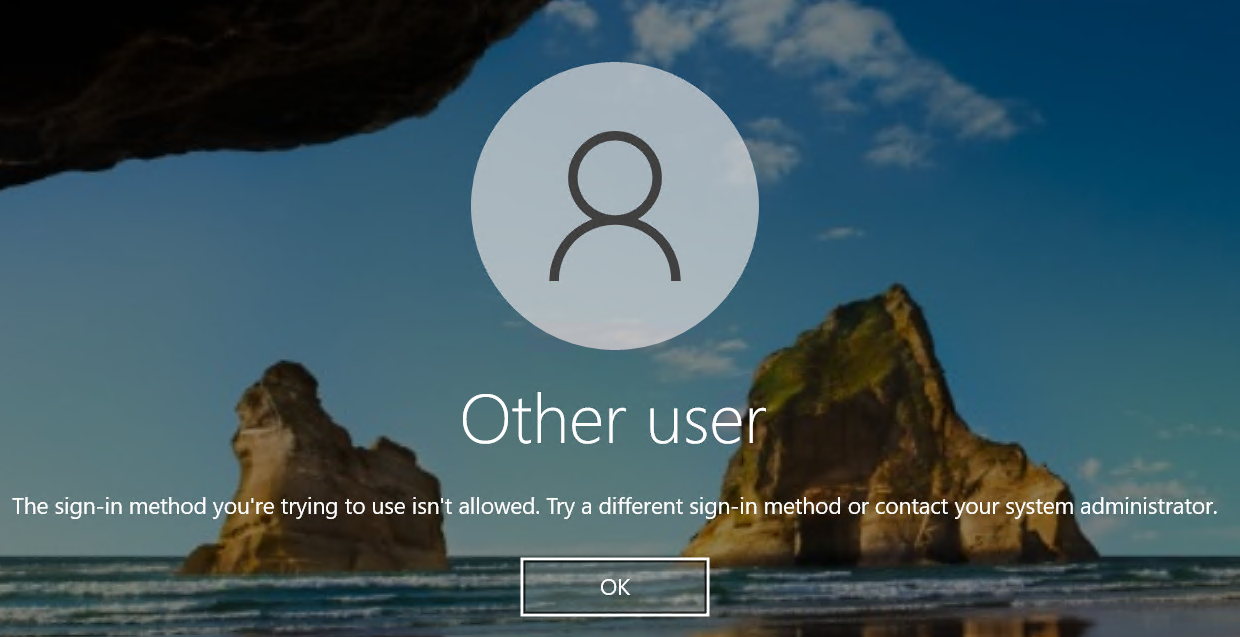
Logins with domain accounts, and/or local machine accounts work fine, issue only occurs with AAD account.
Have checked that connection invoked via powershell is working as expected:
az network bastion rdp --name "mybastionname" --resource-group "rmyresourcegroup" --target-resource-id /subscriptions/xxxxx/resourceGroups/xxxxx/providers/Microsoft.Compute/virtualMachines/myvmname --auth-type AAD --configure
Suspect only occurs in versions after 2025.1.25.0, but cannot confirm 100%
Any advice on resolution would be appreciated!
Sign-In Method.png
All Comments (12)
Hello,
Thank you for reaching out to us regarding this,
Could you please specify the version of RDM you are currently using?
What type of data source are you using?
Additionally, I would like to confirm whether you can connect without issues from outside RDM using this method?
Let me know,
Best regards,
Samuel Dery
Hello,
Thank you for reaching out to us regarding this,
Could you please specify the version of RDM you are currently using?
What type of data source are you using?
Additionally, I would like to confirm whether you can connect without issues from outside RDM using this method?
Let me know,
Best regards,
Hi,
Firstly, thanks for the very quick response!
RDM version is 2025.1.29.0 64-bit
Data source is a local database (connections.db)
If I use powershell "az network bastion rdp" command, I can log in successfully with the Azure AD credentials that are failing via RDM.
Hope I interpreted your questions OK?
Cheers,
Nick
Hi Nick
I've taken a quick look at this; the `--auth-type AAD` parameter you use in you az bastion command was not familiar to me - Microsoft must have added that since I last looked at this stuff. So obviously we are not handling that case properly on our implementation.
From looking at the Microsoft implementation, they're passing this parameter up to Bastion and it must be setting something in the downloaded .rdp file (which in itself is interesting, because I had thought they were doing away completely with that mechanism).
So, in short; currently we don't support it; there's a little bit of work to do on our side but I don't think it will be very challenging. I'll need a few days to properly research and integrate that on our side. I'll open a ticket for it and you can expect the changes in an upcoming minor update.
In the meantime, thanks for your patience and please let me know if you have any questions or something isn't clear
Best regards,
Richard Markievicz
Thanks Richard,
Let me know if I can provide any further information to assist you.
Cheers,
Nick
Hello Nick
I've made some changes here that I hope will help. The changes will be available in the upcoming 2025.1.32 release. Unfortunately, I don't have an appropriate test environment right now to validate that this works so I'll depend on your feedback here to know if things are better, or if we need to iterate further.
Once that version is released and you've updated, you'll need to ensure your Azure Bastion "connection mode" is set to "RD Gateway". MFA auth won't work over a TCP tunnel, it seems to be a feature of the RD Gateway itself.
Next, in the "General" tab of the RDP session, check the "Azure AD / Entra ID Host" option. I'm piggybacking off this existing setting to pass the AAD authentication option to the Bastion. I assume this does some setup on the backend as well as setting the proper properties in the generated .rdp file.
This existing setting also does some work to properly format the username in the way Azure AD expects. This part I'm not sure about - there's been a lot of confusion here in the past with exactly what format user names it will accept, and it also depends on your directory configuration as I understand it.
Like I said - once the update is out, please give it a try and let me know the outcome.
And in the meantime don't hesitate with further questions or comments
Kind regards,
Richard Markievicz
Hi Richard,
Thanks for the update.
Happy to help with any testing, if that's of use to you.
Cheers,
Nick
HI,
Have updated to the latest release, changed Bastion mode to "RD Gateway", and updated connections for Azure AD hosts to use the "Azure AD / Entra ID Host" option on General tab.
The connection now proceeds as expected.
The following screen gets displayed, but doesn't include current connected accounts. But that's not a biggie - the "sign in with another account" option brings up the account picker with connected accounts and the connection succeeds from there.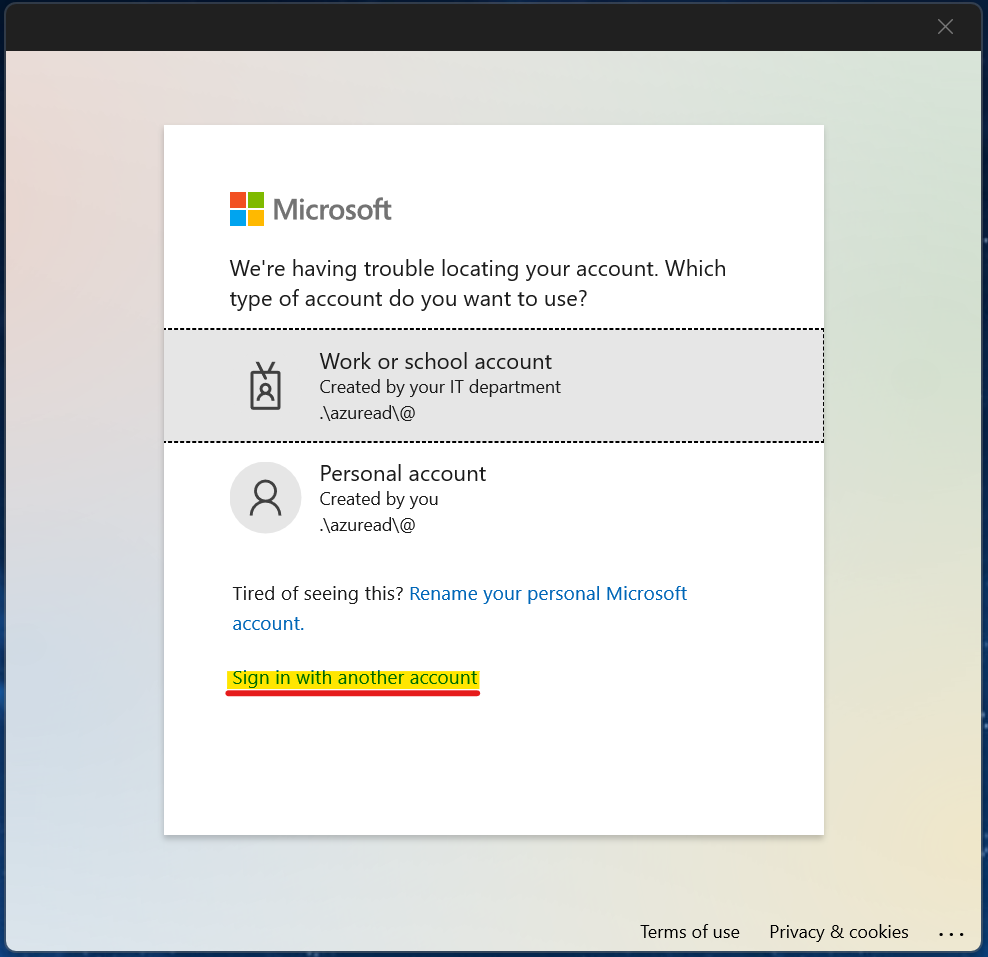
All in all, it looks like your changes have been very successful. Not sure why the screen above is appearing, but clicking through it is really not traumatic... 8-)
Cheers,
Nick
a03c6a59-357e-48db-afc0-9e745d550dab.png
Hello Nick
Thanks for the update! I'm glad the connection is working for you now.
The credential dialog is almost certainly due to how we're formatting the credentials that we pass. I might be able to do something about that.
Presumably your username is just a regular email address like user@domain.com?
Is that what you have configured in the RDP session in RDM? Or do you have separate values for the username and domain field? If you can let me know what you have in there - i.e. what you expect to work - I might be able to tweak this.
Thanks and kind regards,
Richard Markievicz
Hello again Nick
Actually - what this looks like - is you don't have a username specified in the RDP session in RDM, and you expect to just be prompted to choose from the current connected accounts. Is that right?
Kind regards,
Richard Markievicz
Doh, yes, putting a username and domain in makes it work more sensibly... user error. Please ignore me...
For clarity, putting the username and password in on the separate fields in the configuration: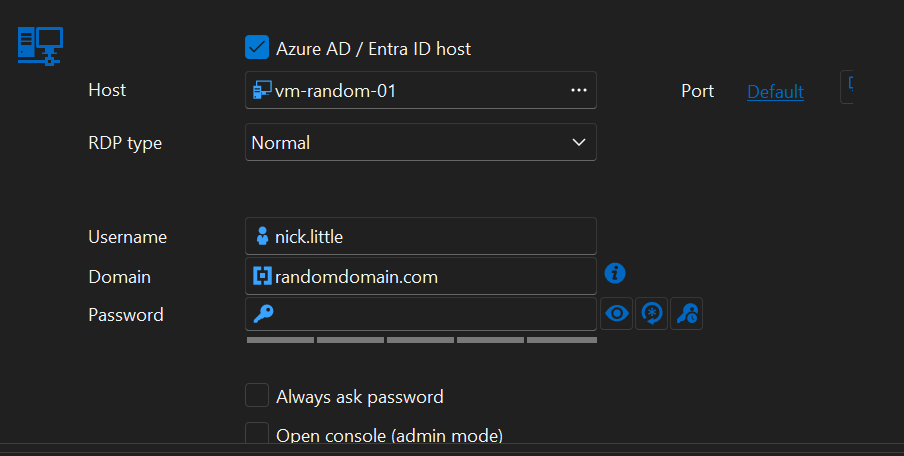
This works as expected.
fba77feb-d523-44a7-9fc7-a5d2e23f2254.png
Hi Nick
Thanks for the update!
So, as I mentioned before, that "Azure AD / Entra ID" host checkbox is existing functionality that I'm piggybacking on for this change. Actually it's quite a simple option because all it does is reformat the username into the form typically expected by Azure AD (that is ".\AzureAD\username@domain.tld").
Obviously there's a minor bug there, because if you have that box checked but you don't have a username and domain configured on the session, it's just formatting the empty strings and sending ".\AzureAD\@" which is what we see in your screenshot from the login page above.
Overall I'd consider it a bug - I'd have to experiment here but I expect what we should do in that case is, is just send empty strings and I guess that Azure will show you the account selection page directly which is what you asked about before.
I'll make a ticket for that but since this is working for you now, I'll consider the original issue resolved. That being said, don't hesitate to come back with further questions or comments.
Kind regards,
Richard Markievicz