[FEATURE REQUEST] Websites with Alternate credentials, plus ALTERNATE PROFILES?
[FEATURE REQUEST] Websites with Alternate credentials, plus ALTERNATE PROFILES?
1 vote

I couldn't see if or how this could be scripted as a before open event, so led me to think perhaps this would need a feature request.
I have started to consolidate my website entries using alternate credentials for elevation purposes, as I already use separate profiles that map up with credentials used which I mainly use to reduce the numbers of auth prompts, but after setting up my alternate creds I then thought, this is just going to use the same profile set on the entry isn't it which should have cookies etc for the default creds used. Granted it's not a massive issue in most cases although unless I'm using private sessions open with alternate credentials still uses the standard credentials, it would be handy if there was another profile field which was either always visible or only visible if the alternate credentials feature fields were not null?? This way I could then set the websites alternate profile to a preexisting profile previously used for the alternate credentials previously created with the pre consolidated entries??
Side note, I noticed in RDM an open with elevated credentials as well, but I haven't seen a credential entry or setting called Elevated, how is that used??
Thanks, RDM team in advance, looking forward to your thoughts...
JK
Devolutions Force Member (and Long time Devolutions Fan)
All Comments (21)
Hello John,
The profile field in websites supports variables. If the thing that should distinguish your profiles is the username, you could use something like this for example: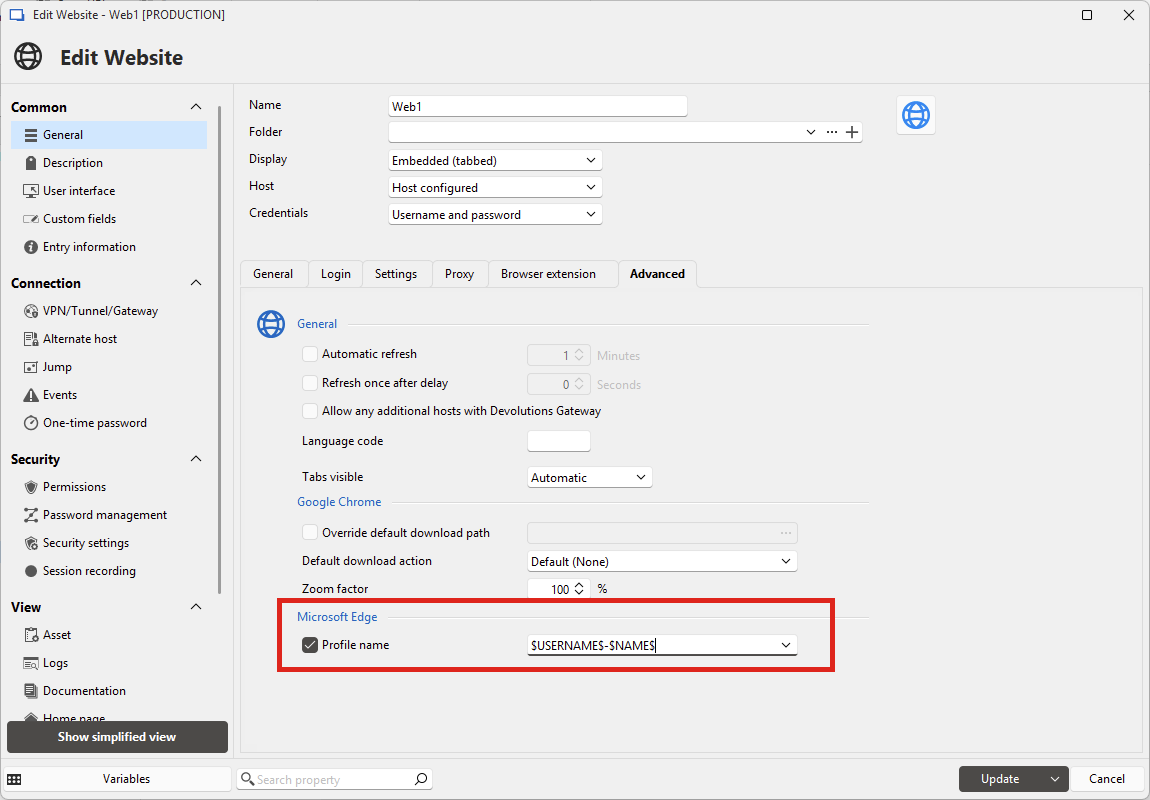
In this case, depending on the username you choose, it would affect which profile is used. I'm not sure how you configure your entry to use alternate credentials, but let me know if this leads you to finding a good solution. Otherwise it would be helpful to know more about how you configured your entry.
For your other point regarding the "open with elevated credentials", if you go in the "alternate" section of your entry, you can configure a set of elevated credentials. This is a new feature in 2025.1. At the moment this is mainly used for that feature, but the SSH Terminal entry also supports elevating the user when already connected by performing a command using these credentials.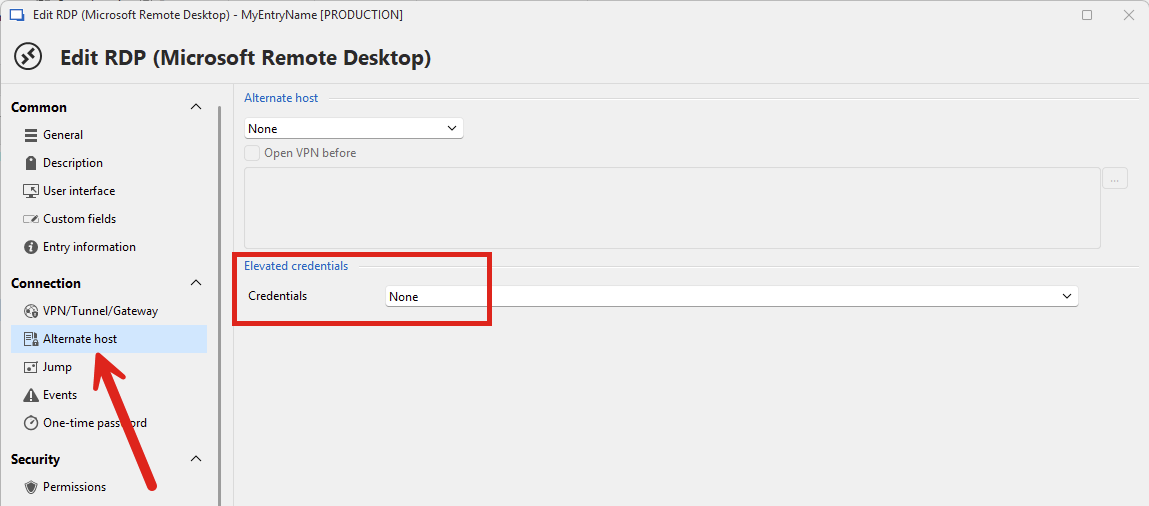
Regards,
Hubert Mireault
b9ca056c-da29-415b-ae77-aa4b4326d164.png
b7ce880e-4870-425e-b063-ba8f25d507c5.png
Hubert,
Thanks for that, didn't think to use variables at the time doh! Def sounds promising ill see how I get on, as to the elevated creds question, I see it now, appears I got mixed up with RDM's option naming but somehow even though I were using Elevated Creds feature, open with alternate creds still worked?
Ill get back to you if I get stuck, pls mark this as resolved or dismissed as a feature request...
JK
Devolutions Force Member (and Long time Devolutions Fan)
Thanks for the feedback John, I'll mark the thread as "not planned", but if you have any additional issue making this work just let us know. It's possible you'll stumble on a part that's missing for your scenario and we'd be happy to either steer you in the right direction or work on an improvement to make it work.
Regards,
Hubert Mireault
Seems this field doesn't like variables like entry names don't either, I tried but it just stored the Variable name and not it's called value??
JK
Devolutions Force Member (and Long time Devolutions Fan)
What you're describing seems normal to me, the variable in the profile field should only be resolved when you run the entry, not when saving it. Did you try it out and check if the profile was created with the correct name?
Regards,
Hubert Mireault
I did yeah and even after running the entry there isn't additional profiles created using the resolved variables?? Shouldn't it also create the profile entry in RDM as well as WebView2 cache (which I hadnt checked I will now just to be sure, however ideally it would be nice to see it in RDM to know it worked you know)
JK
Devolutions Force Member (and Long time Devolutions Fan)
No defiantly isn't working as with the variables in the profile name it doesn't even open, I'm assuming Webview2 doesn't like the profile name? Also nothing new is created in the cache paths??
Do you think a pre-open event script should be used to generate the string before open perhaps, Ill see if that works? Is there a variable for the Profile at all?
JK
Devolutions Force Member (and Long time Devolutions Fan)
Hello John,
I tested on my end with the following configuration:
- Name of the entry: Web1-ProfileVariable1
- Credentials: configured with a password list, with one username being "user1" and the other "user2"
- Profile field: $NAME$-$USERNAME$
When I run my website entry, I get prompted to choose between my two users. I picked "user1" for the first test. I logged onto a website and closed the entry. Then, I reopened it and chose the same user. I was already logged onto the website, showing the cache was successfully created and reused.
When I then did the same steps but chose "user2" instead, the cache used was different, so I wasn't already logged in, showing it's not using the same cache.
Furthermore, when I look at the directory, I see both cache paths with the correct expected names:
Maybe in your case there's some characters that aren't allowed in file paths, so it breaks? Is there any special characters in the profile paths you're trying to construct?
Regards,
Hubert Mireault
ff91c60b-20b2-40d4-ae8f-48f9c80e40db.png
Hello John,
I tested on my end with the following configuration:
- Name of the entry: Web1-ProfileVariable1
- Credentials: configured with a password list, with one username being "user1" and the other "user2"
- Profile field: $NAME$-$USERNAME$
When I run my website entry, I get prompted to choose between my two users. I picked "user1" for the first test. I logged onto a website and closed the entry. Then, I reopened it and chose the same user. I was already logged onto the website, showing the cache was successfully created and reused.
When I then did the same steps but chose "user2" instead, the cache used was different, so I wasn't already logged in, showing it's not using the same cache.
Furthermore, when I look at the directory, I see both cache paths with the correct expected names:
Maybe in your case there's some characters that aren't allowed in file paths, so it breaks? Is there any special characters in the profile paths you're trying to construct?
Regards,
perhaps spaces?? will try thanks
JK
Devolutions Force Member (and Long time Devolutions Fan)
Yes it was a space lol, mines working now too $REPOSITORY_NAME$-$HOST$-$USERNAME$ creates profile for standard user and another for elevated user, many thanks for your assistance.
Side topic, I still can't fix my Focus on open for entries and I've followed the KB which mentioned the two options in settings tree view, I must have something conflicting elsewhere but i can't see where, any suggestions??
JK
Devolutions Force Member (and Long time Devolutions Fan)
c2fc1f9f-8212-4dd7-b62d-b267efef0b01.png
Hello John,
Sorry about the delayed answer. Could you describe your focus issue a little more? From my own testing, opening a website will automatically focus the embedded tab, and the same goes for selecting it in the navigation pane, when you have those options configured. Maybe I'm missing something or it takes specific configurations.
Regards,
Hubert Mireault
It seems for any entry type in my RDM the initial entry opened will focus but additional entries never focus anymore and require a manual click??
What view or log would provide details on what's going on at every step with debug / verbose level events, i.e. to debug what setting could be getting in the way of entry focus on open?
thanks
JK
Devolutions Force Member (and Long time Devolutions Fan)
I performed a few tests on my end and I don't think we have any specific debug logs for the focus. At minimum, you could confirm that the "Selection changed" event correctly triggers.
You can go in the Help tab in the ribbon and open the Performance Profiler. From there, keep it on the performance tab at level 1 and open your entries. You should see these events (and probably a few more):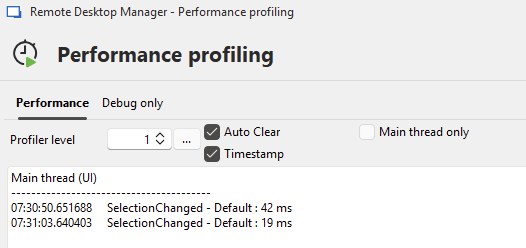
Additionally, if it's something you're able to do, sending us a video of the issue might be useful. You can send it to our sharefile here: https://devolutions.sharefile.com/share/filedrop
Please mention my name in the file so it reaches me quicker.
If even with the video it's not something we're able to reproduce, we might need your CFG file so we can have the same local configurations as you do as some setting might be interfering.
Regards,
Hubert Mireault
772e52ac-9cb2-4324-bd8e-3f50755b9114.png
Hello John,
I received your video. I don't see anything obvious at a glance but I'll forward it to our QA team to see if they are able to reproduce. If we're still not able to reproduce, I'll let you know for the next steps. I understand this is an annoying issue for you so I'd like to get this fixed.
Regards,
Hubert Mireault
You should see that the first entry opens and does focus, but not with the preceding entries
, they require tab clicks to focus manually? Quite some time ago RDM would focus on every new opened entry automatically yet I've obviously changed a setting that's preventing auto focusing now?
Thanks, fyi its a livable issue that I can cope with, its just something that's bugged me for ages now and I've finally got to the point i have to fix it. Ideally without factory resetting RDM settings....
JK
Devolutions Force Member (and Long time Devolutions Fan)
Hello John,
Good news, I believe we found what the "issue" is!
At the bottom right of your RDM window, in the status bar, there's an 'anchor' icon: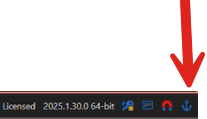
In your video we noticed it's checked. If you hover your mouse over it, you'll see the description of the setting: "Keep current focused content while opening a new tab".
You must have misclicked it at some point, but unchecking it should resolve this focus behavior.
Let me know if that worked!
Regards,
Hubert Mireault
7c46e6e3-a061-44bf-829c-1ba37ac8b8ae.png
Hello John,
Good news, I believe we found what the "issue" is!
At the bottom right of your RDM window, in the status bar, there's an 'anchor' icon:
In your video we noticed it's checked. If you hover your mouse over it, you'll see the description of the setting: "Keep current focused content while opening a new tab".
You must have misclicked it at some point, but unchecking it should resolve this focus behavior.
Let me know if that worked!
Regards,
Doh, yep that was it!
You're an absolute star! Many thanks, I knew you guys would see what I'd missed lol
Thanks
JK
Devolutions Force Member (and Long time Devolutions Fan)
No problem, glad we could help! Let us know if you have any other issue.
Regards,
Hubert Mireault
got another error today lol after updating to 2025.1.31.0 64bit, I can create new web entries but editing I get this notification but can't find it in activity logs?? I tested by creating a new entry which worked but editing and saving the edit I got the same notification on windows and the entry didn't save / update.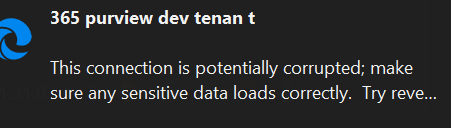
Ideas?
JK
Devolutions Force Member (and Long time Devolutions Fan)
898a18d7-200d-443f-bcfe-c22541850c84.png
Hi @john.kenny,
I'm Maxime, Team Lead on Hub at Devolutions.
I have a few questions for you to assist you better.
- Are we discussing Hub Business or Hub Personal?
- Is this issue specific to one entry, or do all your other entries get corrupted once updated?
- Does this occur also with newly created entries, and then updating them causes corruption?
- Are you able to restore 1 of your corrupted entry with RDM 2025.1.31.0 to a working version in RDM (View - Entry History)?
- If yes, can you test out if you are able to update that entry using the Hub's web interface.
After your responses, we will try to reproduce the issue on our end, and if we cannot reproduce, we will ask you to open a support ticket with us.
Maxime Forest
Hi @john.kenny,
I'm Maxime, Team Lead on Hub at Devolutions.
I have a few questions for you to assist you better.
- Are we discussing Hub Business or Hub Personal?
- Is this issue specific to one entry, or do all your other entries get corrupted once updated?
- Does this occur also with newly created entries, and then updating them causes corruption?
- Are you able to restore 1 of your corrupted entry with RDM 2025.1.31.0 to a working version in RDM (View - Entry History)?
- If yes, can you test out if you are able to update that entry using the Hub's web interface.
After your responses, we will try to reproduce the issue on our end, and if we cannot reproduce, we will ask you to open a support ticket with us.
Ok, looks like it's just one entry, which I've just realised so i've recreated it and now it's fine. Wonder how that happened?
Thanks anyway.
JK
Devolutions Force Member (and Long time Devolutions Fan)