The tab bar is in one line like the browser (shortening the length of the tab name, rather than scrolling to the right)
The tab bar is in one line like the browser (shortening the length of the tab name, rather than scrolling to the right)

Is it possible to add such a mode for the tab bar so that it works in one line, like a browser (so that when it overflows, the tab width decreases). Now that the "online tab bar" option is selected, the tab bar continues to increase to the right (scroll arrows appear), add a mode in which you can reduce the tab length, as in any browser when there are many tabs (scroll arrows are slightly longer). useless solution, at least in our tasks) PS: The tab group panel mode is not suitable for us, since the purpose of the tab is precisely in its name, and in our tasks they cannot be grouped, it is better to shorten the length of the tab. I think many people would support our idea if you created a 3rd tab bar mode similar to yours.
PS: Tab group bar mode is not suitable for us, since the purpose of the tab is precisely in its name, and in our tasks they cannot be grouped, it is better to shorten the length of the tab. I think many people would support our idea if you created a 3rd tab bar mode like the browser.
All Comments (14)
Hello,
This is something really interesting. I did a quick search, and the third party that we use does not support that. I will try to submit a feature request to them.
Regards
David Hervieux
I've seen exactly the same feature request here:
https://supportcenter.devexpress.com/ticket/details/t102339/documentmanager-tabbedview-implement-the-capability-to-auto-resize-tab-page-headers
David Hervieux
Hello,
This is something really interesting. I did a quick search, and the third party that we use does not support that. I will try to submit a feature request to them.
Regards
We will be looking forward to this very useful feature, David (as we can see, other users also have an interest and request for its appearance). As I understand it, by a third party you mean the developer of the visual components that are used in RDM, it would be great if they implemented in the tab bar such a property to reduce their length as in browsers (I think it's not so difficult) and will bring new very useful functionality in other products too
Ps: if it's not difficult, David, please tell us in the future how they reacted to this idea, and is it worth waiting for such a useful panel feature?
I've seen exactly the same feature request here:
https://supportcenter.devexpress.com/ticket/details/t102339/documentmanager-tabbedview-implement-the-capability-to-auto-resize-tab-page-headers
Good afternoon, David. Can you tell me how things are going with the third-party component? Will your partners be able to develop functionality for shortening tabs in length (as in browsers auto resize tab page) ? Should we expect such a great feature in the upcoming RDM releases?
Hello,
Nothing new. It's more of a long-term goal, but we are in the process of modernizing RDM, and we should have more control over the UI components:
https://blog.devolutions.net/2025/01/modernizing-the-codebase-of-rdm-a-journey-from-2008-to-2024/
In 2 or 3 years, I hope that we will no longer have excuses for using third-party UI components. :)
David Hervieux
Good day, dear David. Could you tell me how the function of reducing the width of tabs works, similar to browsers?
Hello,
Nothing new. It's more of a long-term goal, but we are in the process of modernizing RDM, and we should have more control over the UI components:
https://blog.devolutions.net/2025/01/modernizing-the-codebase-of-rdm-a-journey-from-2008-to-2024/
In 2 or 3 years, I hope that we will no longer have excuses for using third-party UI components. :)
@David Hervieux
Have a good and great year, David. Tell me, will there be tab scrolling like in browsers in 2026 ?
Hello,
I've just retried with AI to try to find another workaround, but I'm still unable to make this work with DevExpress. We are progressing with the Avalonia conversion. Unfortunately, the tab control needs to be done at the end. We are making great progress: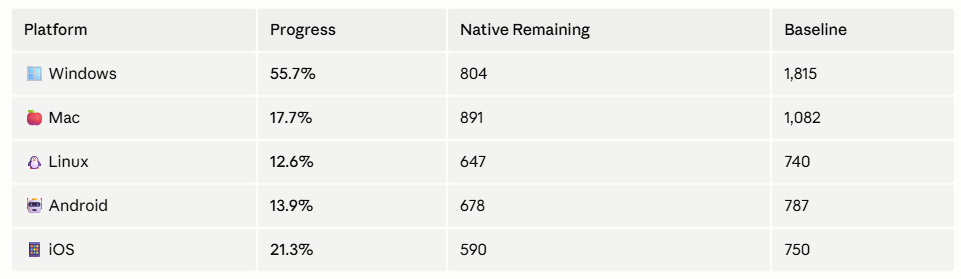
David Hervieux
30d47032-e025-48de-a52d-3c32e1d1685a.png
Hello,
We have completed the migration. The next version should be able to support more UI tweaking. The beta should be out soon, let us know what you think but don't forget that we might have changed some default, let me know if anything goes wrong. This was a huge project for us.
Regards
David Hervieux
Great news, David. What link can I use to download this beta version? And where can I read the instructions on how to enable the new tab layout functionality, similar to the browser?
Hello,
Here is the link for the beta information:
https://forum.devolutions.net/topics/55940/remote-desktop-manager-20263-beta
Just right click to change the tab sizing mode: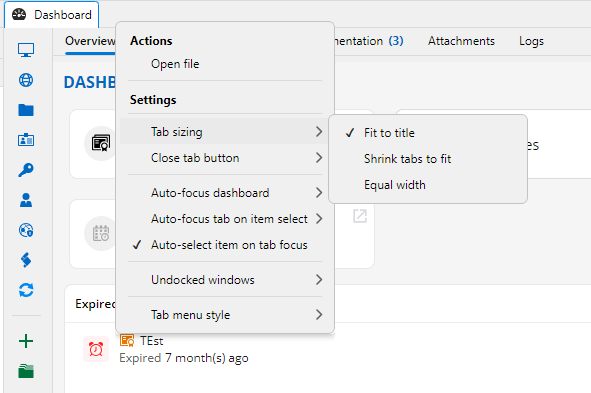
Regards
David Hervieux
13ae2ffd-006f-4add-ab1f-1c6c5ecac911.png
Hello David. We tested the "Shrink tabs to fit" feature in RDM version 2026.3.13.0, and it works great !!
But the "Fit to title" function turned out to be broken.
Let me explain: previously in RDM version 2025 and early 2026 builds if a LONG entry name was used (for an RDP session, website, or any item, really), the tab would display the FULL name upon launch (I’ve attached a screenshot). Even in multi-line tab mode, the tabs were wide enough to show the full names. This is how most users name their entries (especially those who want clear, immediate classification, where the name includes various parameters and details); it makes things visually convenient.
Now, however, the "Fit to title" mode starts TRUNCATING long names in the middle and inserting an ellipsis (...) on the tab, which is VERY INCONVENIENT.
This is what the full name of the entry in the navigation tree looks like.
This is how the name gets cut off in the tab (even though "Fit to title" mode is selected), and it’s very inconvenient.
This is how it used to be in this mode for instance, when you wanted to use a few tabs or relied on multi-line wrapping.
Could this mode be fixed to display the full entry name?
Or perhaps a checkbox could be added to the tab settings labeled "Fit to title without cropping name"? (Ideally, this mode should work whether tabs wrap to multiple lines or are arranged in a single line that extends into a horizontal scrollbar <>).
PS: We also noticed an error in the tooltip that appears when hovering over a tab: the record name gets truncated there as well, but differently (the "..." ellipsis isn't inserted). The name is cut off from the end, and the truncation varies depending on the length of the name on different tabs.
The record name was cut off in the tooltip.
RemoteDesktopManager_BeAs5fIgGg.png
RemoteDesktopManager_T75NKOsy71.png
RemoteDesktopManager_ucVN9B3Vvn.png
RemoteDesktopManager_PQeeF19P4u.png
Hello,
We have completed the migration. The next version should be able to support more UI tweaking. The beta should be out soon, let us know what you think but don't forget that we might have changed some default, let me know if anything goes wrong. This was a huge project for us.
Regards
@David Hervieux
Will David be able to fix the "Fit to title" function in the next release, or add an option (checkbox) -> "Fit to title without cropping name" to the "Tabs" section of the RDM settings ?
Hello,
Could you check the next minor update for the fix? I have managed to include it, but it might not be listed in the release notes.
Regards
David Hervieux