reconnect bypass lock screen
2 votes

It used to be that if the Remote Desktop machine that I'm connecting to were to lock due to user inactivity, and I right-clicked the tab and selected reconnect, it would reconnect and unlock the screen. That no longer happens. Nothing appears to happen. I think it would be great to get that functionality back.
And actually, it does sort of exist. Let's say I have two connections open to two servers in Tab1 and Tab2. If the machine at Tab1 locks and I want to get back in, it will work if I select Tab2, then right-click on Tab1 in the lefthand tree pane and select reconnect. I'll see Tab1 flash in the background and when I go back to that tab, I'll be in an unlocked screen to my server. Of course, the other way is to close Tab1 and then select "open session" in the lefthand pane. So, it seems like you guys didn't mean to remove that functionality. It just got lost in some update.
All Comments (3)
Hello,
If you configure your "reconnect mode" to "Full", it should perform the complete login process again when doing the reconnect action. You can configure this either in your entry directly, or in File > Settings > Entry types > Sessions > Remote Desktop (RDP):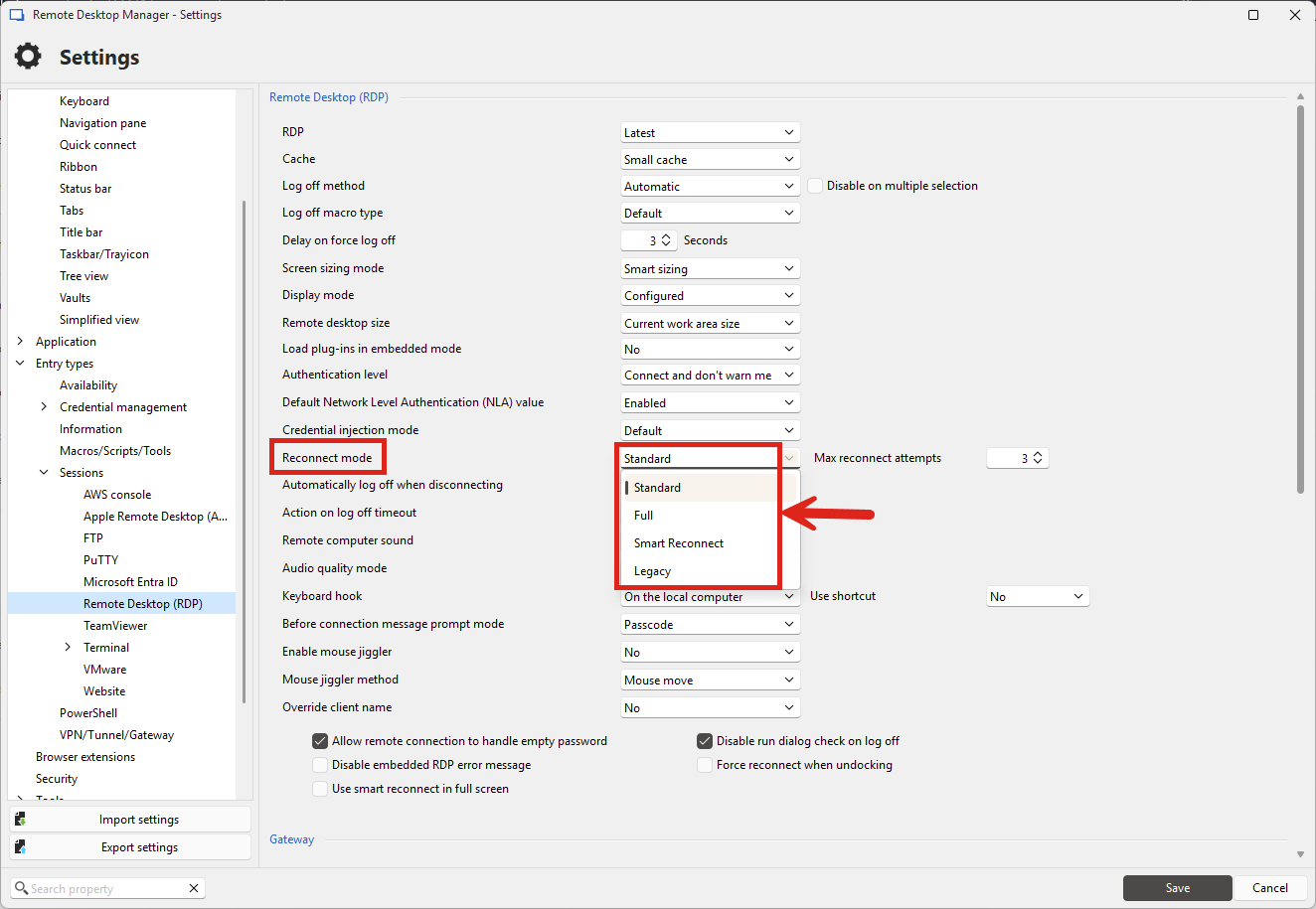
Can you see if this helps in your scenario? Make sure that your RDP entries are closed before changing this setting to make sure it correctly applies.
Regards,
Hubert Mireault
2c49473c-25e9-439d-9383-f14602818a1b.png
Hello,
If you configure your "reconnect mode" to "Full", it should perform the complete login process again when doing the reconnect action. You can configure this either in your entry directly, or in File > Settings > Entry types > Sessions > Remote Desktop (RDP):
Can you see if this helps in your scenario? Make sure that your RDP entries are closed before changing this setting to make sure it correctly applies.
Regards,
Thank you. That did work!
Perfect, I'm glad this works for you. For now, this is the expected way to achieve this. I'll mark this thread as resolved, but let us know if you have any additional feedback.
Regards,
Hubert Mireault