RDM Does Not Run..

Hi,
I can't seem to run any latest version of RDM that requires .NET 9.0, on my Windows 10.
I trIed version 2025.1.29.0 and 2025.1.26.0, both portable (.zip), and installed .exe as well, both do nothing.
.NET 9 installs succssfully without any errors.
Tried in a completely blank new VM as well, there is no error appearing, it just doesn't run, tried running Remote Desktop Manager.exe and Remote Desktop Manager_x64.exe.
Anything else I can check.
Recommended Answer
Hello
I wonder if you're not hitting this issue. Essentially there have been cases where the CET feature of .NET 9 is not compatible with some older versions of Windows. Your version is 19045.2965 but according to Windows 10 release information the latest build is 19045.5679. Someone else on that thread mentioned they had success on a system with the same build number as you, but regardless, I'd recommend trying this on a fully patched system.
(CET support is a security feature of .NET 9)
If that doesn't help, the error code is STATUS_FAIL_FAST_EXCEPTION; meaning it's possible we hit an unhandled exception early in the launch process. I'd need to give you instructions for providing a crash dump that we can analyze further because, to my knowledge, we haven't seen this issue before.
One more question - are you running any third party antivirus or security software (e.g. SentinelOne)?
Thanks and kind regards,
Richard Markievicz
All Comments (8)
I tested this in a Windows 11 VM, works fine in it..
Hi
Do you have anything relevant in the Event Viewer for the failure to launch? Look for "System" or "Application" errors or warnings occurring at the same time as trying to launch the app.
I'm sorry for the inconvenience
Thanks and kind regards,
Richard Markievicz
No Worries Richard..
I cleared the logs, then ran the application, all the below appeared in Event Viewer > Application.******************************* marks end of the entry.
Faulting application name: RemoteDesktopManager_x64.exe, version: 2025.1.29.0, time stamp: 0x67ab0000
Faulting module name: KERNELBASE.dll, version: 10.0.19041.2913, time stamp: 0xa1c3e870
Exception code: 0xc0000602
Fault offset: 0x000000000012d862
Faulting process id: 0x16f4
Faulting application start time: 0x01dba4dc741223d8
Faulting application path: C:\Users\Win1022H2\Desktop\Devolutions.RemoteDesktopManager.Bin.2025.1.29.0\RemoteDesktopManager_x64.exe
Faulting module path: C:\Windows\System32\KERNELBASE.dll
Report Id: 9aa9cdd5-8379-41e4-8b46-92691667cebb
Faulting package full name:
Faulting package-relative application ID:

*******************************

Successful auto update of third-party root certificate:: Subject: <CN=GlobalSign Code Signing Root R45, O=GlobalSign nv-sa, C=BE> Sha1 thumbprint: <4EFC31460C619ECAE59C1BCE2C008036D94C84B8>.

*******************************

Fault bucket , type 0
Event Name: APPCRASH
Response: Not available
Cab Id: 0

Problem signature:
P1: RemoteDesktopManager_x64.exe
P2: 2025.1.29.0
P3: 67ab0000
P4: KERNELBASE.dll
P5: 10.0.19041.2913
P6: a1c3e870
P7: c0000602
P8: 000000000012d862
P9:
P10:

Attached files:

These files may be available here:
\\?\C:\ProgramData\Microsoft\Windows\WER\ReportQueue\AppCrash_RemoteDesktopMan_3c2d10caf8a62ffbc14bedac798b682b70ec412_ce14e5dd_45bdf0cc-54bb-4820-b75f-01babd6df51d

Analysis symbol:
Rechecking for solution: 0
Report Id: 9aa9cdd5-8379-41e4-8b46-92691667cebb
Report Status: 100
Hashed bucket:
Cab Guid: 0

*******************************

Fault bucket , type 0
Event Name: CbsPackageServicingFailure2
Response: Not available
Cab Id: 0

Problem signature:
P1: 10.0.19041.2905
P2: Microsoft-Windows-LanguageFeatures-Basic-en-gb-Package
P3: 10.0.19041.1
P4: amd64
P5: unknown
P6: 8024402c
P7: CBS Other
P8: Absent
P9: Absent
P10: FodHelper(LanguageFeaturesOnDemand)

Attached files:
\\?\C:\ProgramData\Microsoft\Windows\WER\Temp\WER11CF.tmp.WERInternalMetadata.xml

These files may be available here:
\\?\C:\ProgramData\Microsoft\Windows\WER\ReportQueue\Critical_10.0.19041.2905_e0d87b286936fc224e3c8e8386494290d76dfdae_00000000_82ff6b13-bca0-4a65-aa12-d66c08b3c32c

Analysis symbol:
Rechecking for solution: 0
Report Id: 82ff6b13-bca0-4a65-aa12-d66c08b3c32c
Report Status: 100
Hashed bucket:
Cab Guid: 0

*******************************

Fault bucket , type 0
Event Name: MoAppCrash
Response: Not available
Cab Id: 0

Problem signature:
P1: Microsoft.Windows.StartMenuExperienceHost_10.0.19041.1023_neutral_neutral_cw5n1h2txyewy
P2: praid:App
P3: 0.0.0.0
P4: e40668d4
P5: combase.dll
P6: 10.0.19041.2788
P7: 03e7e147
P8: 8007139f
P9: 000000000001ccfa
P10:

Attached files:
\\?\C:\ProgramData\Microsoft\Windows\WER\Temp\WER5490.tmp.WERInternalMetadata.xml

These files may be available here:
\\?\C:\ProgramData\Microsoft\Windows\WER\ReportQueue\AppCrash_Microsoft.Window_b17d092a1279cdab3f8f47fdc6ddd8bebf29e_b55b5c1a_7cf968eb-727c-4e3f-86fc-15fc55a10830

Analysis symbol:
Rechecking for solution: 0
Report Id: 4ea018e2-e365-430c-806a-6c0a077391ce
Report Status: 100
Hashed bucket:
Cab Guid: 0

*******************************

Fault bucket , type 0
Event Name: CbsPackageServicingFailure2
Response: Not available
Cab Id: 0

Problem signature:
P1: 10.0.19041.2905
P2: Microsoft-Windows-LanguageFeatures-Basic-en-gb-Package
P3: 10.0.19041.1
P4: amd64
P5: unknown
P6: 8024402c
P7: CBS Other
P8: Absent
P9: Absent
P10: FodHelper(LanguageFeaturesOnDemand)

Attached files:
\\?\C:\ProgramData\Microsoft\Windows\WER\Temp\WER72E5.tmp.WERInternalMetadata.xml

These files may be available here:
\\?\C:\ProgramData\Microsoft\Windows\WER\ReportQueue\Critical_10.0.19041.2905_e0d87b286936fc224e3c8e8386494290d76dfdae_00000000_d6a5efb0-bfbc-4f70-9056-ce2ad00b1ffa

Analysis symbol:
Rechecking for solution: 0
Report Id: d6a5efb0-bfbc-4f70-9056-ce2ad00b1ffa
Report Status: 100
Hashed bucket:
Cab Guid: 0

*******************************

Fault bucket , type 0
Event Name: APPCRASH
Response: Not available
Cab Id: 0

Problem signature:
P1: RemoteDesktopManager_x64.exe
P2: 2025.1.29.0
P3: 67ab0000
P4: KERNELBASE.dll
P5: 10.0.19041.2913
P6: a1c3e870
P7: c0000602
P8: 000000000012d862
P9:
P10:

Attached files:
\\?\C:\ProgramData\Microsoft\Windows\WER\Temp\WER44F6.tmp.WERInternalMetadata.xml

These files may be available here:
\\?\C:\ProgramData\Microsoft\Windows\WER\ReportQueue\AppCrash_RemoteDesktopMan_3c2d10caf8a62ffbc14bedac798b682b70ec412_ce14e5dd_45bdf0cc-54bb-4820-b75f-01babd6df51d

Analysis symbol:
Rechecking for solution: 0
Report Id: 9aa9cdd5-8379-41e4-8b46-92691667cebb
Report Status: 100
Hashed bucket:
Cab Guid: 0
Hi
Thanks for that. What's the exact version and build of your Windows 10? You can Start > Run > "winver" to get that information easily.
Kind regards,
Richard Markievicz
Its..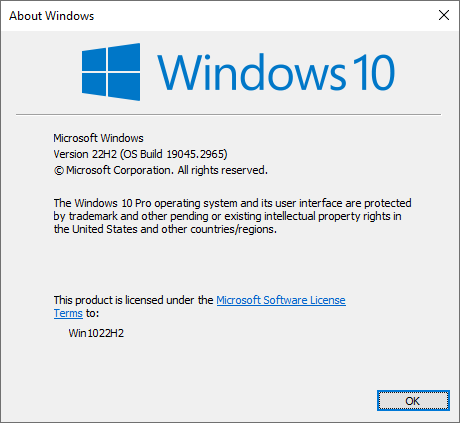
db46b742-bd77-4a88-9c56-472ac7925aff.png
Hello
I wonder if you're not hitting this issue. Essentially there have been cases where the CET feature of .NET 9 is not compatible with some older versions of Windows. Your version is 19045.2965 but according to Windows 10 release information the latest build is 19045.5679. Someone else on that thread mentioned they had success on a system with the same build number as you, but regardless, I'd recommend trying this on a fully patched system.
(CET support is a security feature of .NET 9)
If that doesn't help, the error code is STATUS_FAIL_FAST_EXCEPTION; meaning it's possible we hit an unhandled exception early in the launch process. I'd need to give you instructions for providing a crash dump that we can analyze further because, to my knowledge, we haven't seen this issue before.
One more question - are you running any third party antivirus or security software (e.g. SentinelOne)?
Thanks and kind regards,
Richard Markievicz
Thanks for pointing this out, I can confirm update as the issue, after updating the application now runs..
Thanks Richard..
Hello
Excellent! I'm glad the problem is resolved.
Best regards,
Richard Markievicz