Opening RDP connection always prompts for credentials

Hi there,
whenever I use one of the new 2025 versions I encounter the problem that every RDP connection ignores any credential settings and prompts for credentials.
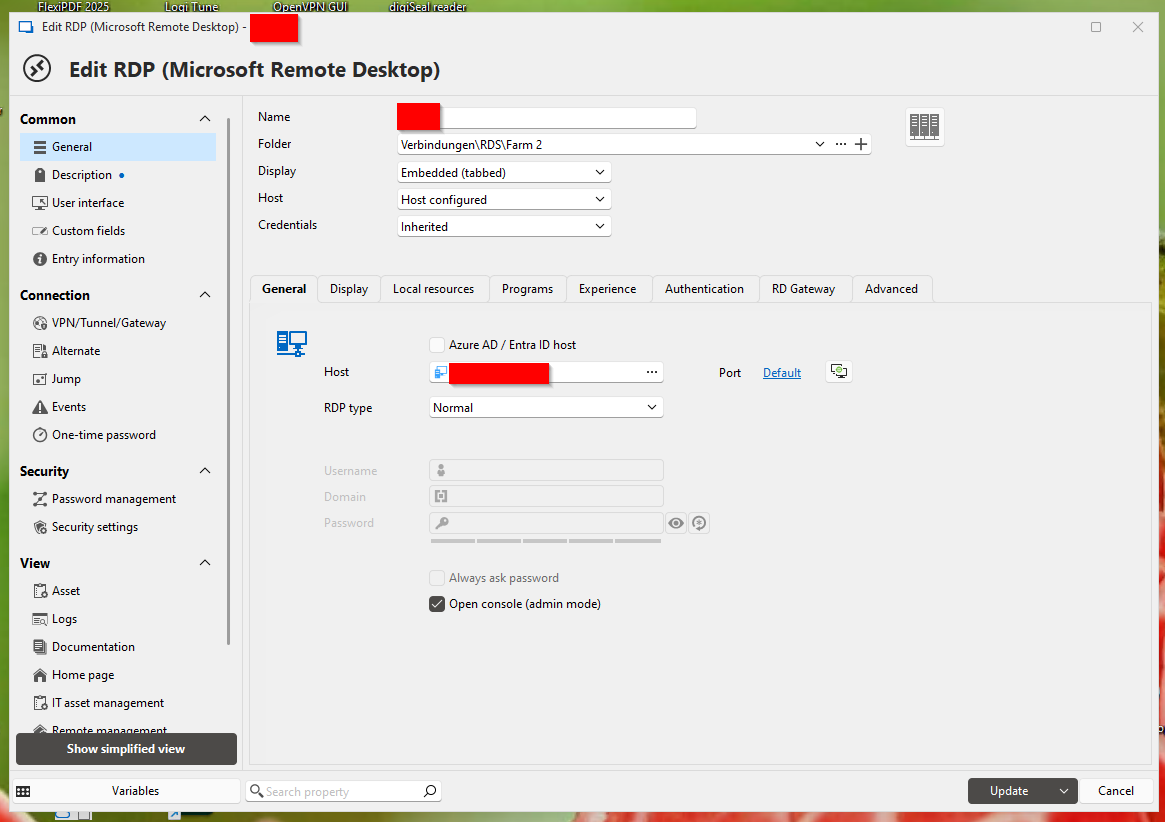
On every RDP connection I use "Inherited" which uses the credentials I entered on a folder on the top. The credentials here are one of my admin credentials on the remote systems from my credentials vault. When starting the RDP connection I get a credentials prompt telling me that the connection was started with my current user credentials from my local workstation which of course has no permissions to connect to the remote systems.
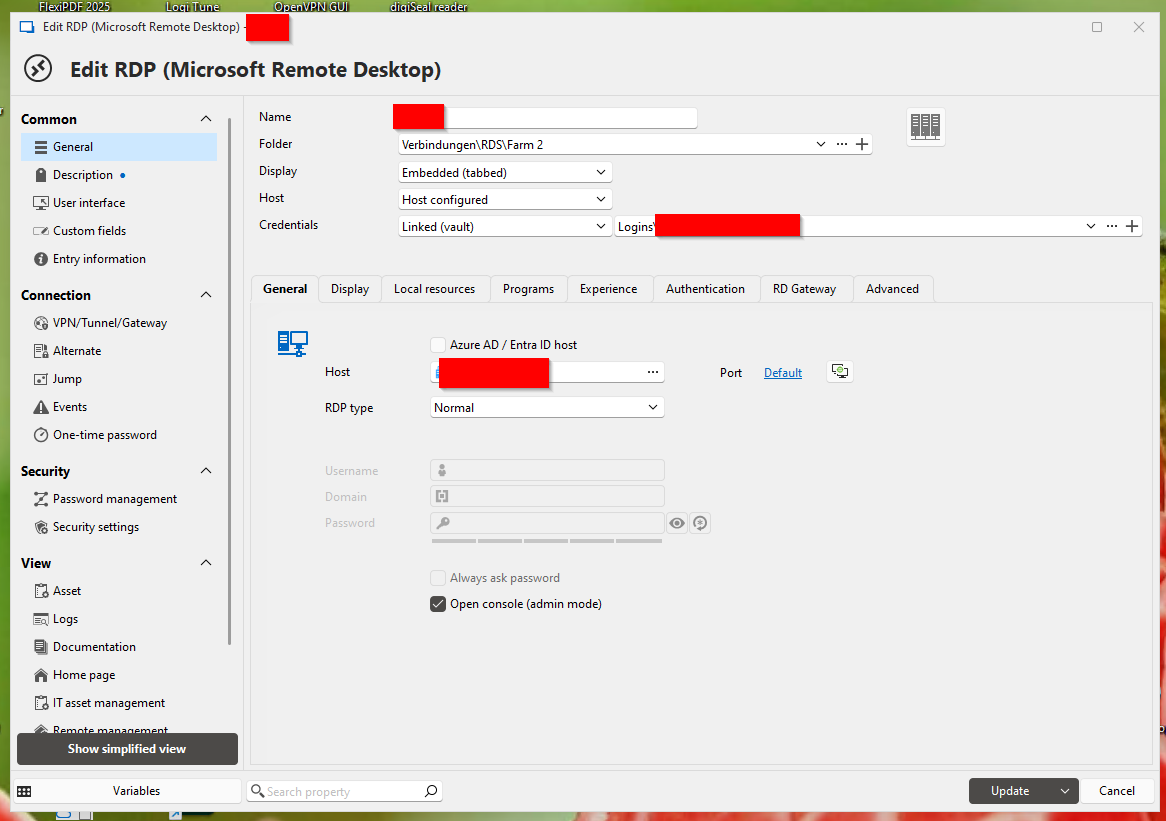
When changing the credential settings from "Inherited" to "Linked (Vault)" and selection my admin credentials the RDP connection still tries to connect with my current user credentials.
It seems to be completey irrelevant which credential settings I choose as none of my vault credentials are used and every setting is being ignored.
All of this only happens when I use the navigation pane in any other setting than Tree view. If I use the Tree view in the navigation pane the selected credential settings are honored.
When I switch back to a 2024 version (e.g. 2024.3.29.0) everything works as expected.
I'm wondering if there is a setting I overlooked as I can't find any mentioning of this behaviour in the 3 release notes since version 2025. Could someone assist here please?
Thanks in advance,
Joerg 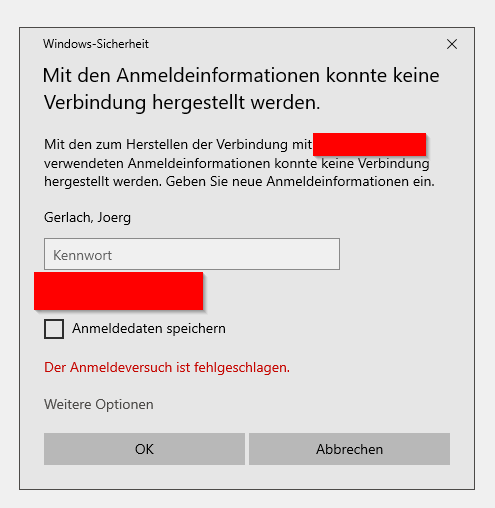
03.png
02.png
01.png
All Comments (21)
Hello Joerg,
Thank you for bringing this to our attention.
I was able to reproduce the behavior on my end and will go ahead and create a development task to address it.
I'll make sure to update you here as soon as a fix is available!
Thank you very much, much appreciated.
Hi,
On my side, when I'm using the navigation pane to initiate RDP connexion it works perfectly fine as long as I'm using an embedded or an undocked display. I believe I'm using the tree view in the navigation pane, but being new to RDM I can't find any other navigation pane view so I'm not sure ...
Nevertheless, when I'm trying to initiate the same RDP connexion with an external display, I'm perpetually asked for my password. Is linked to this issue or is it just a limitation with RDM? (the possibility to save our credential in the RDP windows app is disable).
Many thanks.
Hi Miquel,
Thanks for your post!
I’ve tried to reproduce the issue you described, but so far I haven’t been able to. It might be related to the View settings—could you please check your configuration by going to:
File > Settings > User Interface > Navigation Pane > View
If Tree View is selected, would you mind sharing a bit more information about your entry settings? This will help us determine if there’s another factor at play.
Looking forward to your reply so we can get to the bottom of this!
Hi Stephan,
Thank you very much for your reply.
Tree View is indeed selected as the view of the Navigation Pane.
My entry is RDP normal type using the latest version, Embedded (tabbed) display overwritten with user specific settings as External display, and credentials are found by name in my user vault. I can't think about any other specific settings but please don't hesitate to ask.
When I open it, I can see that the correct login is used but it seems that the password is not taken into account. If I copy/paste the password from my entry into the prompt it works perfectly fine.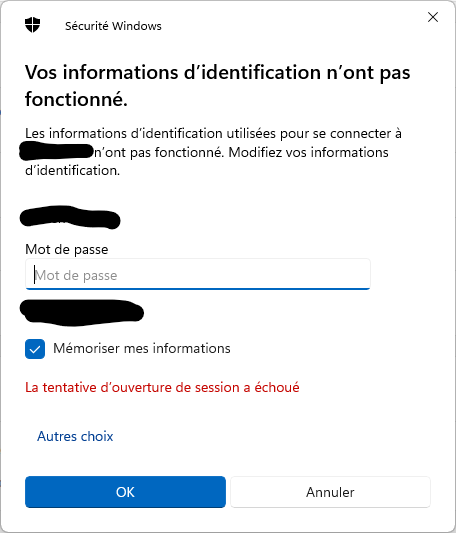
Cheers.
Capture d'écran 2025-04-08 093750.png
Same issue here
Hello,
I apologize for the delay.
Could you please directly set the Display mode of the entry to external and check if the login works? This will help us determine if the issue lies with the user-specific settings or the entry itself.
Thanks!
Hi Stephan,
makes no difference, it still prompts for credentials if the naviagation pane is set to anything different than Tree View.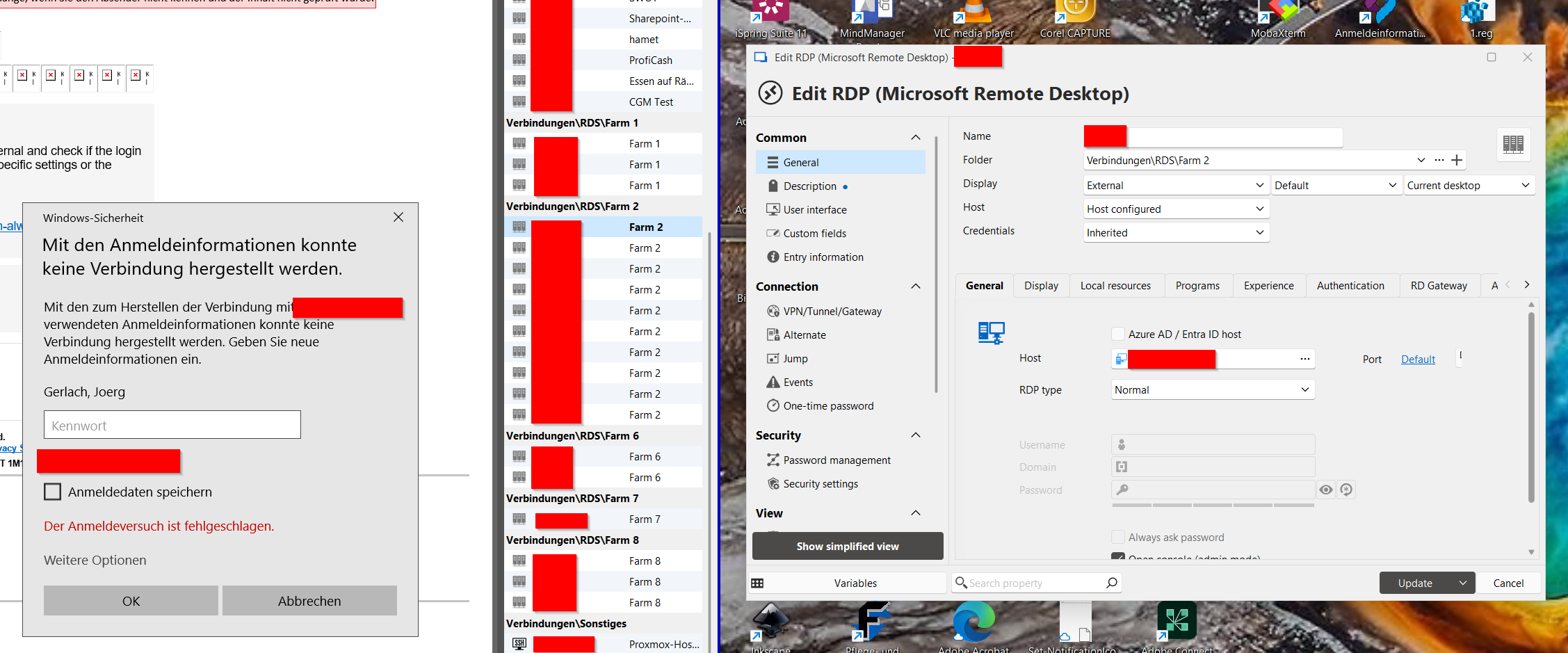
Best regards,
Joerg
2025-04-24 07_24_55-.png
Hi,
Makes no difference for me as well.
Also, putting my original settings back, something I find a bit strange: is it normal to not be able to override local or user settings on the vault itself? I mean, I have the option to have a local specific setting about the jump configuration for instance, but this setting won't be inherited by the entries available in the vault. On the other side, if I have this local specific setting on a folder instead of the vault, then this setting will be inherited by the entries available in the folder.
Is it an expected behaviour and, if so, why can't we set a local or user specific display mode on a folder?
Many thanks.
Hello everyone,
Thank you for your testing and feedback.
You're absolutely right—the issue is related to the different views available in the Navigation pane, other than Tree view. We’ll be sharing an official announcement about this feature shortly.
@miquel
Regarding your question:
If I understood correctly, you’d like a setting defined at the Vault level to be inherited by an entry located within a folder. This is indeed possible. The inheritance logic works by checking the next higher-level container, so it’s important to ensure that every folder in the hierarchy—from the entry all the way up to the Vault—has the specific setting configured to "inherited." Otherwise, the entry or folder will only consider its immediate parent for that setting.
Please don’t hesitate to reach out if anything remains unclear!
Hi Stephan,
On the vault we can set local and user specific settings: Nevertheless, no matter the settings I'm using on the vault, those will never apply to the entries contained in the vault (in my screenshot, the user specific display mode will never be taken into consideration for instance).
On folders, we can also set local and user specific settings: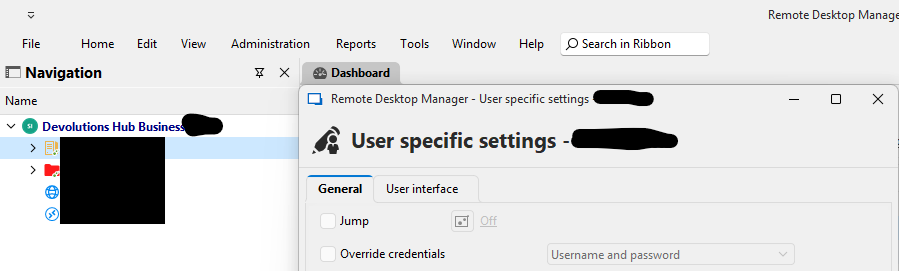 In this case, if I use specific jump or credentials settings on the folder, then those settings will be applied to the entries contained in the folder.
Am I missing something or are the vault local and user specific settings just irrelevant?
Many thanks.
Capture d'écran 2025-04-28 091258b.png
Capture d'écran 2025-04-28 091021.png
Hello Miquel,
Thank you for your reply,
Could you confirm which version of RDM you are currently using? I want to verify since this thread has been ongoing for some time.
That being said, you would be correct. User-specific settings are useful if you wish to make changes to entries without affecting your colleagues. In the case of the "Display mode," it is not really that useful unless you configure the desired connection directly, since it cannot be inherited.
From testing on my end, I can confirm that credentials configured on the Root folder can indeed be inherited on a child entry, If the entry is contained in another folder it will also work if the parent folder is set to inherited.
Let me know if this helps or if you have further questions,
Best regards,
Samuel Dery
Hi Samuel,
I'm using the 2025.1.33.0 64-bit version.
What do you mean by "Root folder"? Are you talking about the "vault folder" ("Devolutions Hub Business" on my screenshot)? Because on my side, any user or local specific settings I'd set on the vault will never be inherited by any child entry. At least, I've tried it for the "Jump" setting and it doesn't work. Of course, if I set the local or user "Jump" specific setting on a folder, then it works perfectly fine for the child entries.
Do you have the same behavior on your side or is it just me? If you have the same behavior, is it normal to have such local and user specific settings offered on the vault level if we can't actually use them?
Many thanks.
Hello,
Thank you for your detailed message!
I tested the exact scenario on my end, and the inheritance seems to work as expected. I configured a Jump host as a user-specific setting directly on the vault (in this case, the "Devolutions Hub Business" vault), and then ensured that the "Jump" setting on each subfolder and entry was explicitly set to "Inherited" in the user-specific settings.
This step is crucial—if the setting isn’t marked as "Inherited" at every level between the vault and the final entry, the configuration won’t propagate as intended. That might be the reason it didn’t appear to work in your case.
Could you please confirm if the intermediate folders and entries are all set to inherit the setting (as user-specific settings)? If you've already done that and the issue persists, I'd be happy to investigate further with you.
Thanks again, and I look forward to your reply!
Best regards,
Stephan
Hi,
just out of curiosity: is there an ETA for a fix regarding the disregard for any credential settings in any other viw than tree view? I can't find any hint about the problem in the past release notes and now after the 4th point release (currently using 2025.1.37.0) without any news I'm beginning to get desperated. When will this official announcement be released that was promised 13 days ago?
Best regards,
Joerg
Hello,
Thank you for your detailed message!
I tested the exact scenario on my end, and the inheritance seems to work as expected. I configured a Jump host as a user-specific setting directly on the vault (in this case, the "Devolutions Hub Business" vault), and then ensured that the "Jump" setting on each subfolder and entry was explicitly set to "Inherited" in the user-specific settings.
This step is crucial—if the setting isn’t marked as "Inherited" at every level between the vault and the final entry, the configuration won’t propagate as intended. That might be the reason it didn’t appear to work in your case.
Could you please confirm if the intermediate folders and entries are all set to inherit the setting (as user-specific settings)? If you've already done that and the issue persists, I'd be happy to investigate further with you.
Thanks again, and I look forward to your reply!
Best regards,
Stephan
Hi,
Thanks for your reply, you are absolutely right, sorry about that!
Cheers
Hello @jgerlach,
The fix will be available starting with 2025.1.38.0, which we are hoping to release this week, depending on how QA testing goes.
As a note, in 2025.2 (beta version planned to release this week), we are deprecating the view modes that aren't "tree view" to focus our efforts on that one. In 2025.3 (planned around October this year), we will be removing support for these other view modes. I would highly suggest using the tree view mode in the near future for that reason.
Regards,
Hubert Mireault
Thank you Hubert and d*mn, I loved the Detail view showing the comment right beside the servers name. It's so much easier to distinguish the correct server when working with more then 1 or 2 servers...
@jgerlach Could you take a screenshot of what you mean about the comment? If we could show it in the Detail view, I believe there's no reason we can't add it as an optional column in the tree view.
You can currently choose the columns you see by right clicking in the header of the navigation pane and selecting the column chooser: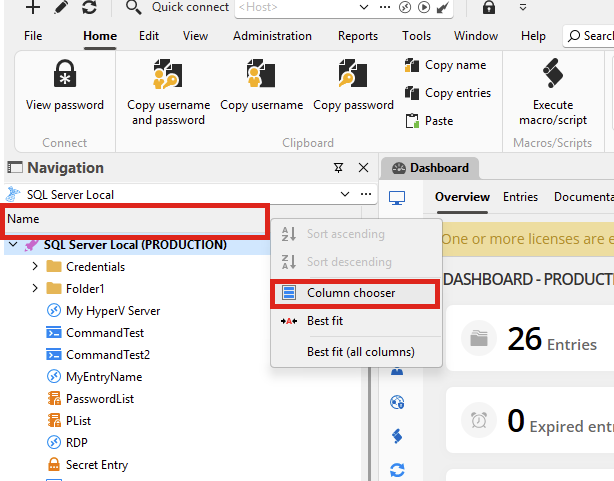
Regards,
Hubert Mireault
83fb6364-2082-4bb4-8775-391bfd56dd71.png
Why thank you very much. The only reason for the Details view was the automatic activation of the column Description. I was not aware that there was an option to show the Description column in Tree View. Now I know and I activated this column and I can see everything in one place. Thank you very much, this helped a great deal.
Best regards,
Joerg
I'm glad I could help make the transition to this view mode smoother! We don't like removing features from our products but sometimes we have to make choices regarding what we choose to maintain so we can be more efficient with our development. With how versatile RDM is, there usually is another way to achieve the same thing, as you can see with the custom columns.
If you have any other issue please let us know.
Regards,
Hubert Mireault