Screen Recording No Longer works

In 2024 version, the ffmpeg location had a binary I placed there, and it worked reliably.
Since upgrading to 2025.1 versions (both versions listed on previous versions, today's release and the previous one), it silently fails and there's no more ffmpeg location to define.
On a new install on a new host, It seemed like it was working but created a .webm file that was corrupt when viewed in VLC (looked like a brown screen with fixed scanlines going across the window at a diagonal.)
Uninstalling and going back to 2024 and it works fine.
I've only tested screen recording via actions menu, this doesn't apply to session recording as I do not use that.
All Comments (10)
Hello,
Thank you for reaching out to Devolutions Support.
Could you please let us know which data source you are using, and whether you are also using a recording server?
Best regards,
Carl Marien
Hi,
I first noticed with an RDP datasource, but also saw the same issue with a putty session, as well as Desktop capture instead of application.
I'm not using a recording server, it's host local.
Thanks
Chris
Hello,
Thank you for your patience. I was able to reproduce the issue and have submitted a bug report. I’ll keep you updated on any progress from our side.
Best regards,
Carl Marien
I have the same issue, also I could not find the configuration setting in the board files.
Hello,
As mentioned in my previous message, I was able to reproduce your issue and a case as been open on our end.
since then I have identified two different workarounds if you wish to use version 2025.1:
1. Avoid selecting 'Full size' as the resolution. In my testing, setting it to 'Default' or 'Full HD (1080p)' resolved the issue.
2. select 'GDI' as the capture method instead of ffmepg. With this setting, I did not encounter the problem either.
Best regards,
Carl Marien
Hello,
As mentioned in my previous message, I was able to reproduce your issue and a case as been open on our end.
since then I have identified two different workarounds if you wish to use version 2025.1:
1. Avoid selecting 'Full size' as the resolution. In my testing, setting it to 'Default' or 'Full HD (1080p)' resolved the issue.
2. select 'GDI' as the capture method instead of ffmepg. With this setting, I did not encounter the problem either.
Best regards,
Hello, thank you for your interest. How can I choose ffmpeg instead of 'GDI'? I couldn't find its location.
Hello,
You can change the capture method when starting a new recording.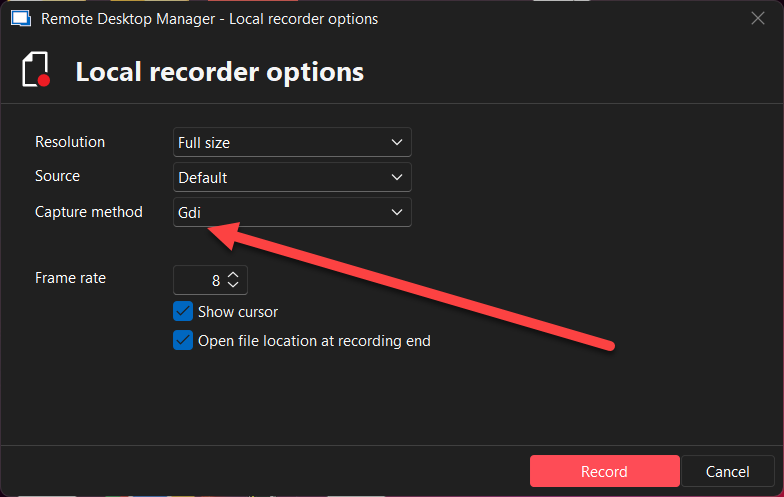
Best regards,
Carl Marien
screenshot.png
Hello,
You can change the capture method when starting a new recording.
Best regards,
https://prnt.sc/aVJubPdixCYZ, no :(
I moved to a new machine and installed .net9 and the most recent version again because GDI didn't appear as an option on my original computer.
GDI became an option and I was able to record using Full size with application and not desktop selected, however it saves only as webm, which plays back in VLC alright.
Is FFmpeg for mp4 or mkv possible again in a future release?
Thank you for the workaround.
Hello,
It’s unusual that some users don’t have the option to change the capture method. However, a fresh RDM installation on a new computer resolved the issue for ChrisQuirk.
This suggests that others experiencing the same issue may be able to restore the option by resetting RDM to its default settings, as outlined in the following documentation:
https://docs.devolutions.net/rdm/kb/how-to-articles/reset-rdm-to-default-settings/
Regarding your question about FFmpeg support for MP4 or MKV formats in a future release: a bug report has been submitted, and I’ll keep you updated as soon as we have any progress.
Best regards,
Carl Marien