Issue with referenced credentials

I just stumbled upon an issue and can't find a way to resolve it easily: It seems in the past we deleted some credentials records which we figured were duplicates but missed to notice one was being referenced by other entries (like website entries), so we ended up deleting the wrong duplicate.
Now we face the issue that several such website entries have missing references, which we only started noticing whenever we tried to use one. In addition a message is also shown when we go to edit such an entry with missing reference.
I've found the "credential entry references" report, but this one seems to list where an existing credential entry is being referenced. What I'd need is to get a list of all the other entries which have a missing reference.
It would then also help to know which is the former location of the now missing reference or at least the name, so I could then go into the "deleted entries" under administration to hopefully restore it.
Did I fail to find such features or do they just not exist?
All Comments (5)
Hi Patrick,
Very interesting use case.
First, how can we recover from this? I’ll need to confirm with one of our PS experts, but I think we could use PS to identify all such entries and output the name and ID of the missing linked entries. We might even be able to recover them from the deleted entries via PS—though I’m not sure if that functionality exists.
The second point is how can we prevent or recover from this in the future?
- A warning on delete would be ideal.
- Provide the option to delete and lose the reference, or remap the reference to a different entry.
- Modify the report (or create a new report) to identify entries with missing linked entries.
- Possibly add the ability to recover the entry directly from the report.
This is just a quick brainstorm of ideas. I’ll discuss with the team and get back to you.
Best regards,
Stéfane Lavergne
Hello Patrick,
Depending on the credential ID and the expected behaviour, you can run this script here:
$sessions = Get-RDMSession

foreach ($session in $sessions) {
    $creds = Get-RDMSession | Where-Object { $_.Name -eq $session.CredentialConnectionSavedPath }
    $credsid = $session.CredentialConnectionID
    $savedPath = $session.CredentialConnectionSavedPath

    if (-not $creds -and $credsid -eq "e034a49c-4eb2-4992-881e-993326e2175b") {
        Write-Host "This entry has an empty credential path and matches target ID: $($session.Name)"
    }
    elseif (-not $creds -and $credsid) {
        Write-Host "Missing credential [$($savedPath)] but has credential ID: $credsid - Entry: $($session.Name)"
    }

    }
Just make sure to change the ID.
This can also be run on all your vault an don any credential ID.
Let us know if this works.
Best regards,
Patrick Ouimet
What is this credential ID "e034a49c-4eb2-4992-881e-993326e2175b" and with what value should I replace it? If it's some specific value to my environment, how to find it?
Hello Patrick,
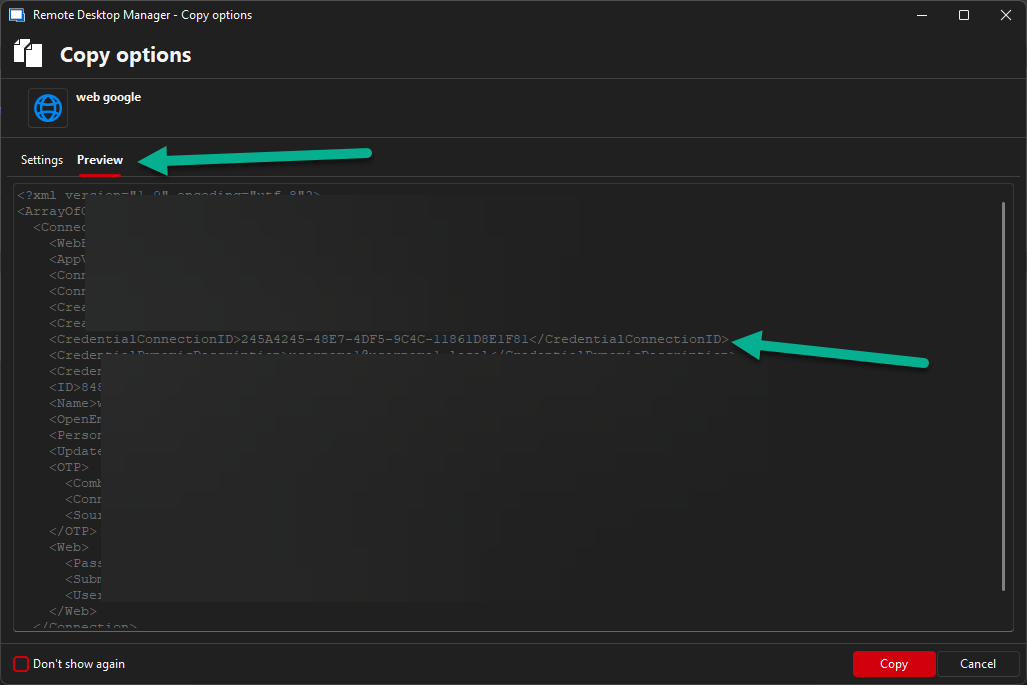
To find which credential ID is related to a specific entry, I recommend looking at the XML of this entry.
This one could be viewed under Right-click -> Clipboard -> Copy Entry -> Preview.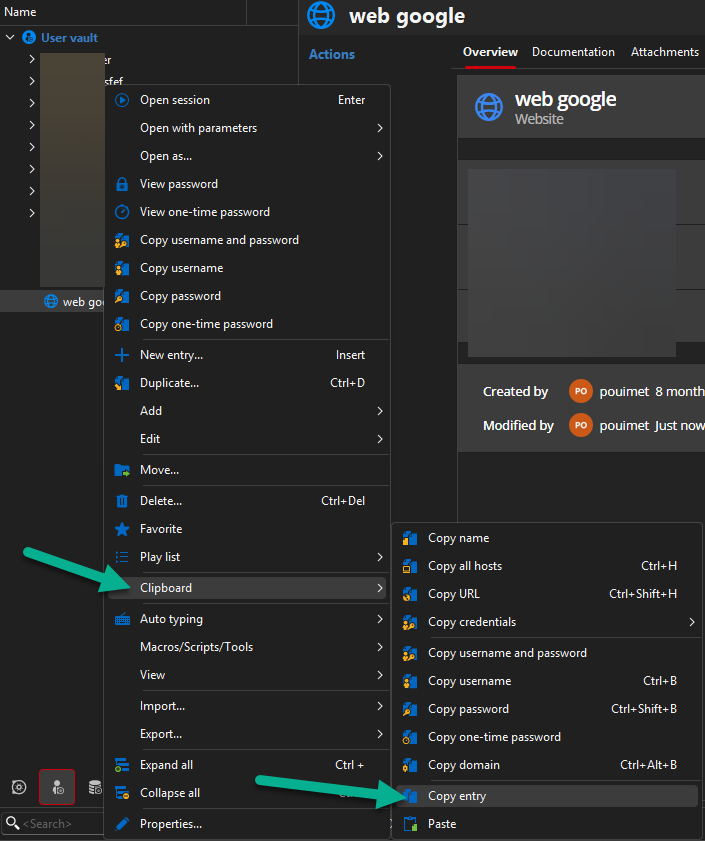
Best regards,
Patrick Ouimet
2.png
1.png
You could also output all you entries with this and check them a text editor to find the missing ones.
Get-RDMSession | Format-Table Name, Group, ID, CredentialConnectionID, CredentialConnectionSavedPath -AutoSize
Output will look something like this:
Name            Group ID                                   CredentialConnectionID               CredentialConnectionSavedPath
----            ----- --                                   ----------------------               -----------------------------
A               A     ea4c68fe-778b-4ebe-bf5e-58bb8f8ec273
cred A - 01     A     e3f076bf-5f50-445e-8133-a7dbf54db887
cred A - 02     A     5907d632-8a4f-427a-8965-32510bb098a0
cred A - 01           217f2652-13dd-4fd1-95d7-3692d1ab854a
cred A - 02           88ff1324-1d58-4e43-818b-e209d699e340
Cred Card             28abd06c-60c9-4c86-b09d-56f4a434e6ee
Cred Card - 000       3bd386ea-d637-4a10-be9e-ab6a2a1bc268
RDP                   e80cd60d-19db-420e-ba91-e65ff2f44dfa 5907d632-8a4f-427a-8965-32510bb098a0 A\cred A - 02
RDP - 000             b2fed352-5f73-419a-9c85-7b35180b3a7d 9F3C3BCF-068A-4927-B996-CA52154CAE3B
RDP - 001             e979bd7b-bb2c-4fbf-97b5-919b46ed2b89 d75d2114-2390-4d2a-920e-531f606eec86 A\cred A - 03
RDP - 002             3b044072-4af3-4477-9fc9-7390ad56226f 88E4BE76-4C5B-4694-AA9C-D53B7E0FE0DC
RDP - External        23d96178-1e66-4a1b-90ce-eb6c7011a2d2 d4f7e345-4146-4572-9fcf-ba0ba0881eb4 Add in V1
What you want to check if any value in CredentialConnectionID is missing in ID.
In this example d75d2114-2390-4d2a-920e-531f606eec86 is missing.
Note some values will not be found in ID and that is normal as some are hard coded. For example:88E4BE76-4C5B-4694-AA9C-D53B7E0FE0DC => Find by name (user vault)9F3C3BCF-068A-4927-B996-CA52154CAE3B => My personal credentials
Stéfane Lavergne