SmartCard randomly stops working...

RDM Version
2025.1.26.0 64-bit
NOTE: this issue also occurred under Version 2024.3.x.x
OS Information
Windows Server 2022 21H2 (OS Build 20348.3328)
Scenario
Open RDM. Open (embedded/tabbed) RDP (Microsoft Remote Desktop) session. Receive Windows Security "Enter your credentials" dialog box. The dialog box presents Smartcard credential options (certificates). Select a Smartcard credential (certificate). Enter PIN and press Enter. Successful authentication and login occurs. This works repeatedly for all of our (embedded/tabbed) RDP (Microsoft Remote Desktop) sessions as expected. At some random point in time, could be 30 mins, could be overnight, opening any (embedded/tabbed) RDP (Microsoft Remote Desktop) session results in a Windows Security "Enter your credentials" dialog box that never shows any Smartcard credential (certificate) options. We have noticed the following at this point, all embedded/tabbed and undocked RDP (Microsoft Remote Desktop) sessions do not display Smartcard credential (certificate) options in the Windows Security "Enter your credentials" dialog box. However, when launching the RDP (Microsoft Remote Desktop) session as "external" the Windows Security "Enter your credentials" dialog box does display Smartcard credential (certificate) options correctly. Also, when manually launching RDP outside RDM it also works correctly. Only embedded/tabbed and undocked session inside RDM are broken. We have not found any way to resolve the issue other than restart RDM which causes all open sessions to disconnect.
All Comments (12)
Hello,
Thank you for reaching out to Devolutions Support.
Would it be possible for you to try recreating the problematic entry to see if the issue reoccurs?
If the issue does persist, could you try opening the entry using MSTSC to determine if the same problem occurs?
If you have any additional questions, concerns, or need further assistance, please don’t hesitate to let me know—I'll be happy to help.
Best regards,
Carl Marien
Hello Carl,
Thank you for the quick reply.
It is not a single problematic entry. I open RDM and all RDP session entries work just fine as expected. After a random amount of time EVERY one of my "RDP (Microsoft Remote Desktop)" session entries exhibits the behavior described above when opened via embedded/tabbed and undocked. If I close RDM and reopen they all are working in again in embedded/tabbed and undocked mode.
As I stated above (but not explicitly), I tried it via MSTCS and they all work even when broken in RDM using embedded/tabbed and undocked.
Also, when manually launching RDP outside RDM it also works correctly.
Yes, I do need your help, having to fully close RDM to regain Smartcard credentials in the Windows Security "Enter your credentials" dialog box when using embedded/tabbed and undocked is not a viable solution. Thank you for looking at this and your help appreciated.
Carl,
It's all working correctly at present, when I open a "RDP (Microsoft Remote Desktop)" session entry you can see the Windows Security "Enter your credentials" dialog box is presenting all the available certificates on the Smartcard. When it stops working, I'll post again with what the Windows Security "Enter your credentials" dialog box looks like.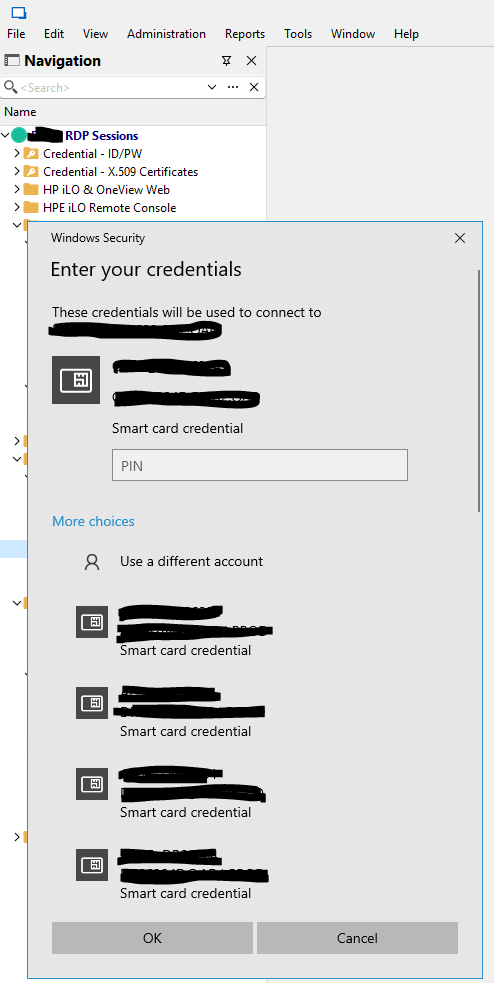
050f327c-777f-4da7-97e4-a60e127afcf5.png
Hello,
Thank you for the screenshot. When you mention that "it's all working correctly at present," did you try any of the suggestions I proposed, or did the issue resolve itself?
I appreciate your response.
Best regards,
Carl Marien
Carl,
I appreciate your help, but we are not on the same page, I blame myself. I'll try to explain the issue again...
- I open the RDM application.
- I have over 100+ "RDP (Microsoft Remote Desktop)" session entries.
- I can click "Open Session", "Open (embedded/tabbed)" this is the default, "Open (undocked)" or "Open (external)" on any and all entries and...
- I get the Windows Security "Enter your credentials" dialog box as shown above with all Smartcard certificates present in the dialog.
- I select a certificate, enter the PIN, and click "OK".
- I get authenticate and logged into the "RDP (Microsoft Remote Desktop)" session.
- Things are working as expected.
As some random amount of time passes, could be 30 mins, could be overnight, the Windows Security "Enter your credentials" dialog box stops showing the certificates when I attempt to open any of my "RDP (Microsoft Remote Desktop)" session entries.
- I can click "Open Session" (embedded/tabbed mode the default configured).
- I get the Windows Security "Enter your credentials" dialog box with NO certificates shown. This is true for any and all of my "RDP (Microsoft Remote Desktop)" session entries when using either the "embedded/tabbed" or "undocked" mode.
- If I use "external" mode, the Windows Security "Enter your credentials" dialog box shows the certificates.
- If I use MSTSC, the Windows Security "Enter your credentials" dialog box shows the certificates.
- The above is true for any and all of my "RDP (Microsoft Remote Desktop)" session entries configured in RDM.
At this point the only way I can get "embedded/tabbed" and "undocked" mode to display certificates again in the Windows Security "Enter your credentials" dialog box is to fully shutdown RDM. When I reopen RDM am back to the first bullet in this "reply", i.e., the "I open the RDM application." bullet and all is working as expected until sometime passes and it happens again...the certificates are no longer shown in the Windows Security "Enter your credentials" dialog box.
Hope this help better explain my issue.
Hello
I know a little bit about smart card authentication with RDP, so I'll chime in here with some thoughts on top of what my colleague already wrote.
In the worst case, you might simply be bumping into a bug in the Microsoft RDP ActiveX control (that's what we use in most cases for embedded RDP in RDM). The authentication dialog you see is part of Windows, that's outside of our control and not a part of RDM.
Are you using RDM's X.509 credential type to reference the smart card certificate? It sounds like you have the credentials left empty for the RDP session, and then you're relying on the authentication prompt to give you the smart card option.
There are a few other things that might narrow down the cause of the problem
- It could be a misbehaving credential provider. Although I'd expect it to manifest in mstsc.exe as well if that was the case, maybe not; because of the difference in how the RDP is hosted (with mstsc.exe you get a fresh executable every time). If you list the credential providers on your system, do have anything third party? The following PowerShell will list the credential providers. You could post the list here or send by PM if you can't interpret it.
Get-ChildItem "HKLM:\SOFTWARE\Microsoft\Windows\CurrentVersion\Authentication\Credential Providers"
- Maybe some credential is getting badly cached in the Windows credential store. Do you have any saved credentials for the remote system(s)?
cmdkey /list | ? { $_ -Match "TERMSRV/" } | % { $_ -Replace ".*: " }
- Try experimenting with an older version of the RDP ActiveX. Since you say all connections are affected; Settings > Sessions > Entry Types > Remote Desktop (RDP), under "RDP" change from "Latest" to "RDP (8.1)"
Please let me know if something isn't clear
Kind regards,
Richard Markievicz
Richard,
Thank you for jumping in.
So, for any RDP session entry that is within my login AD DS forest yes, I am using an RDM's X.509 credential type to reference the smart card certificate. For RDP session entries outside my login AD DS forest and that have no trusts between them you are correct, the credentials are left empty for the RDP session. For AD DS forests outside my login forest with no trusts we have not found a way to get RDM's X.509 credential type to reference the smart card certificate in that scenario.
I ran...
Get-ChildItem "HKLM:\SOFTWARE\Microsoft\Windows\CurrentVersion\Authentication\Credential Providers" | ft -AutoSize
...and set the output to you in PM.
I ran...
cmdkey /list | ? { $_ -Match "TERMSRV/" } | % { $_ -Replace ".*: " }...it did not return any data so to be sure I ran...
cmdkey /list
...and did not see anything TERMSRV related...
I will try your suggestion of experimenting with an older version of the RDP ActiveX.
Lastly, and this is a little embarrassing, but I want to be fully transparent. I asked a teammate to look at this with me and he noticed I am out-of-date (older version) on my HID smartcard driver. I updated that and am hopeful it may have been the culprit. My teammate is setup similar to me but doesn't have this issue. I should have checked this sooner.
Hello
Thanks for the information. The credential provider list is pretty normal, is it safe to say you're using ActivClient? That's the only thing that looks 3rd party.
For entries that are using the X.509 credential, is the behaviour the same? Do you have the PIN entered on the credential. because in that case I wouldn't expect the CredUI dialog to show at all. We've seen some weirdness here in the past that we haven't been able to explain (although we're using an official documented, although little used, Microsoft API).
Please try updating your smart card driver and do that independently of messing with the RDP version. It will make it more clear if one or the other is responsible for this. I have my fingers crossed that the driver is the problem here and this issue will go away.
Let us know the outcome.
Kind regards,
Richard Markievicz
Richard,
Yes, we use the Smartcard driver from the ActivClient MSI package.
Yes, the PIN is entered on the RDM X.509 credentials.
When the certificates stop showing up in the Windows Security "Enter your credentials" dialog box it seems that the RDP entries setup with a RDM's X.509 credential type reference are also broken. However more detailed analysis would be needed to get a definitive answer. The focus has been on the RDP entries that actually prompt for smartcard credentials. If I have another episode of certificates not showing up in the dialog box (I have already updated the driver) I'll probe this a little deeper.
As stated above I have already updated the driver and do not plan on making any other changes while I evaluate the results of the driver update. Only if the issue comes back post driver update will I then start testing additional changes, i.e., your RDP version changes recommendation.
Thank you for feedback and guidance, it is much appreciated.
I'll update this thread when I have results to share. I too have my finger crossed.
Hello
Excellent, thank you!
Kind regards,
Richard Markievicz
Richard,
I am happy to report that the HID Smartcard driver update appears to have resolved the issue. I have not had a single instance of the Windows Security "Enter your credentials" dialog box fail to show the Smartcard certificates since the update.
Thank you to you and Carl for your assistance.
Hello
Excellent! Thanks for the follow up. I'll mark this "resolved" but don't hesitate with further questions or comments.
Best regards,
Richard Markievicz