(Re)connect smartfolder
2 votes

We are grouping database and application servers by application in a Smart Folder. Our previous Remote Desktop Connection Manager has a nice feature where it was possible to (re)connect all entries directly from the Smart (Group) Folder itself. It is a very convenient feature we often use, so it would be nice to have this feature in Devolutions RDM. Also all open connections could immediately be reconnected with one click.
All Comments (5)
Hello,
From what I can see this is already possible. In your Smart Folder's dashboard, you can see the list of entries: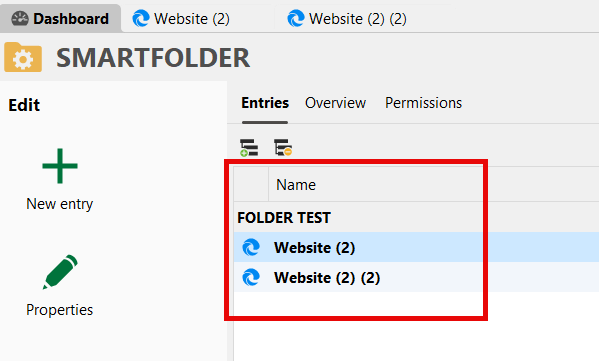
If you click in there and press Ctrl-A to select all the entries, you should be able to see a "reconnect" button, and it will apply to the selection: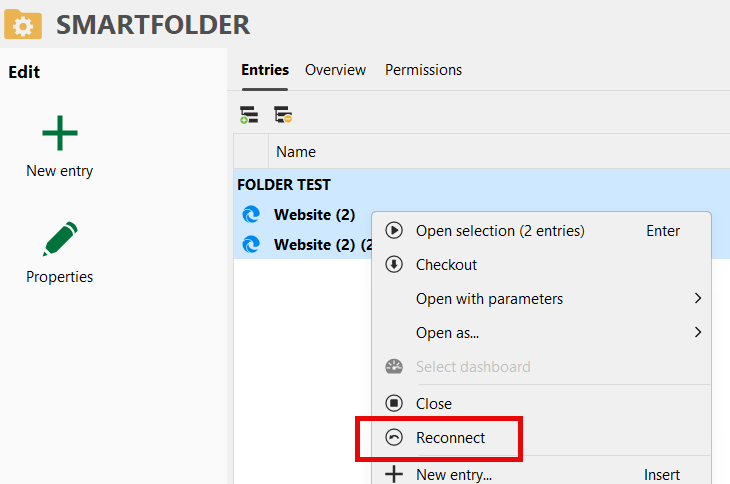
Does this work for you?
Regards,
Hubert Mireault
051c384c-0a9b-4ba1-8b57-d3d7f78f2f80.png
5f9a233d-4d2d-4a5a-acc5-2bc1aafd9614.png
First thanks for responding Hubert. BTW Posting with another account here. But what I meant above is also have the possibility to direct connect and reconnect on its toplevel, so from the folder itself and not from the entries underneath. The Smartfolder has all the entries already in it. So in our experience with the another RDCM it is a nice feature. It is quicker and is often used.
We could see about adding an option in the context menu of the smart folder directly, I understand it would be quicker to use this way. I will open an internal ticket for this and we'll keep this thread updated. I can't give you an ETA at the moment but I don't think it should be complicated for us to add it.
Regards,
Hubert Mireault
Superb thank you
Hello,
We've added a Open all connections and Close all button to the toolbar of the smart folder dashboard. You can expect these changes with the upcoming 2025.3 version this fall.
Regards,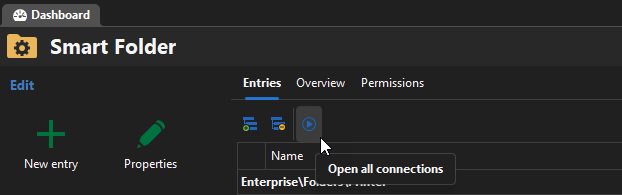
Jafran Majeau
5f59a52f-dfeb-4f36-ac67-7868a50906a3.png