Auto open and minimize
1 vote

It would be helpful if the following features were integrated into a future update.
- Run and minimize to the system tray when Windows starts.
- When clicking on "X" button
- Minimize to system tray
- Terminate program
Thanks for taking this into consideration.
Thanks
Rudy
All Comments (1)
Hello Rudy,
I believe both of these should already be available in RDM.
Run and minimize to the system tray when Windows starts.
To have RDM start automatically when you log into your Windows account, you can configure RDM to open on startup in your Windows settings. You can find out more information here: https://support.microsoft.com/en-us/windows/configure-startup-applications-in-windows-115a420a-0bff-4a6f-90e0-1934c844e473
To ensure that when RDM starts it opens in Minimized mode, you can change the "Startup window state" which is available in File > Settings > Application > Application startup.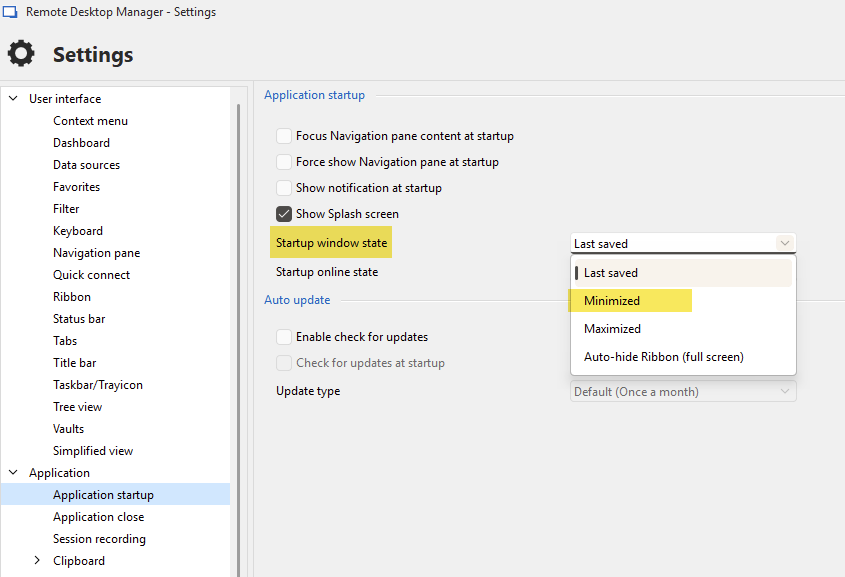
When clicking on "X" button
Minimize to system tray
Terminate program
You can find the setting for this in File > Settings > User interface > Taskbar/trayicon, called "reduce to trayicon/taskbar on close".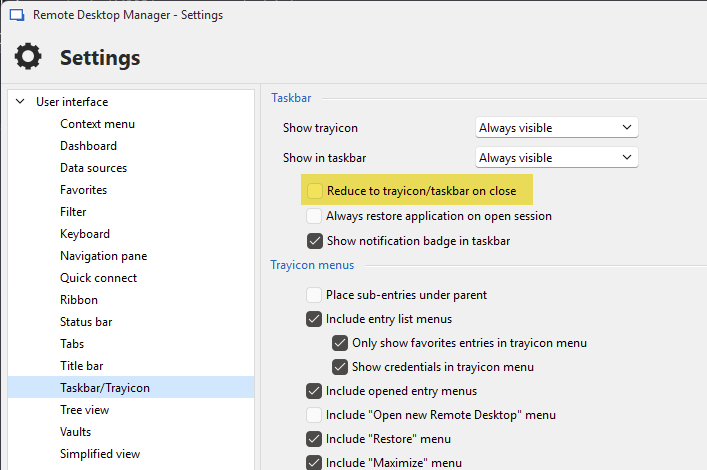
Enabling this configuration will make it so pressing the "X" that normally closes the application will instead minimize it. If you want to close the application while having this setting enabled, you can right click the tray icon of the application and press "exit".
I believe this should answer both your needs. Let me know if this doesn't work as you'd expect.
Regards,
Hubert Mireault
6aa07129-033d-44e5-915e-ab5456b44509.png
01828fd9-aaf9-4903-ba8e-fd2361e42951.png