Feature Request-Shortcut and Highlight with audio trigger
Feature Request-Shortcut and Highlight with audio trigger
1 vote

My system has about 200 Sessions (these 200 computers are in 60 folders, each folder is a node in a different site).
I currently want to customize it in the form: the user enters the folder identifier in a script or tool, for example, entering the number 1 in the tool or script, the Remote Desktop Manager software will automatically go to the sessions in that "folder 1". The same goes for other folders and sessions.
The second problem, in case I open 10 tabs (10 Remote Desktop sessions), when 3 or 4 sessions have an alarm, is there a way to flash that tab so that the user can correctly identify the session with the alarm sound?
All Comments (3)
Hello,
I'll go over your two points separately
I currently want to customize it in the form: the user enters the folder identifier in a script or tool, for example, entering the number 1 in the tool or script, the Remote Desktop Manager software will automatically go to the sessions in that "folder 1". The same goes for other folders and sessions.
Did you try customizing the filter to filter on specific fields? For example, if you store the identifier you're looking for in the Tags of your entry and enable to filter by tags, then you could more easily find your entries that way.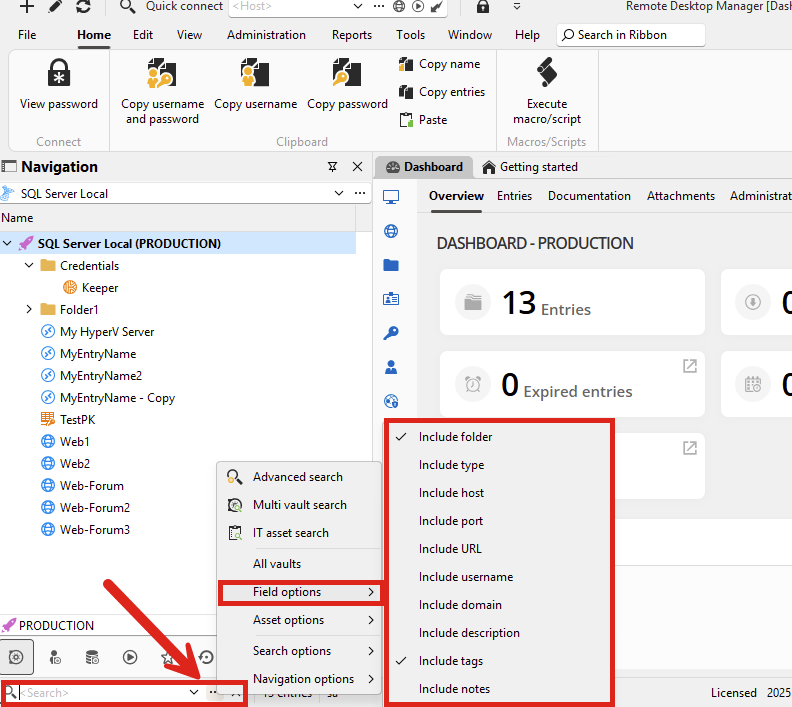
By default, pressing Ctrl-F will focus this filter box, so it might be a convenient way to access this quickly.
Additionally there is also the quick search feature which can be accessed with the shortcut Ctrl-Space or the ribbon's View tab, in the search button: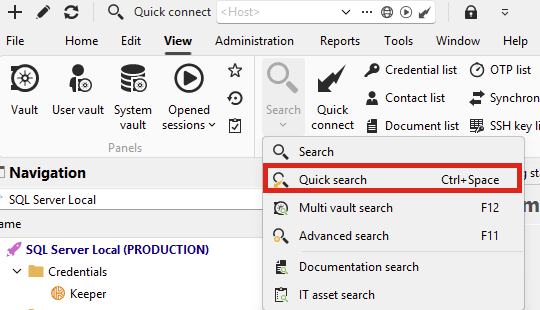
For your second point:
The second problem, in case I open 10 tabs (10 Remote Desktop sessions), when 3 or 4 sessions have an alarm, is there a way to flash that tab so that the user can correctly identify the session with the alarm sound?
In your case what do you mean by an alarm being triggered? If you mean from within the RDP session itself, at the moment I don't think we have a way to receive an event that triggers for that kind of thing (unlike, let's say, SSH). It might be possible but I want to be sure I understand what you mean in this case.
If you instead mean an RDM prompt then we might have more control over that. Maybe a screenshot of what you mean could help if it's the kind of thing you can capture like that.
Regards,
Hubert Mireault
75f2ea64-240c-44d0-8e86-e93d470aab9b.png
eef2242a-b257-4171-82be-499854091876.png
Hello,
Regarding issue 1: You have suggested how to attach and search via Tag, I would like to ask more, besides grouping and searching by tag, is there any way to run an external Script or type command 123 and press enter, they will automatically access the sessions attached to command 123? That is what I really want.
Hi,
Regarding issue 2: Alarm trigger is an alarm sound in any Remote session
For your first point, I think I don't quite understand how you would see this integrated in RDM. Do you mean if you have, let's say, an RDP entry that has a link to a macro entry in its "before events" section, you would like to be able to search for it by typing the name of that macro?
The field I'm speaking of as an example: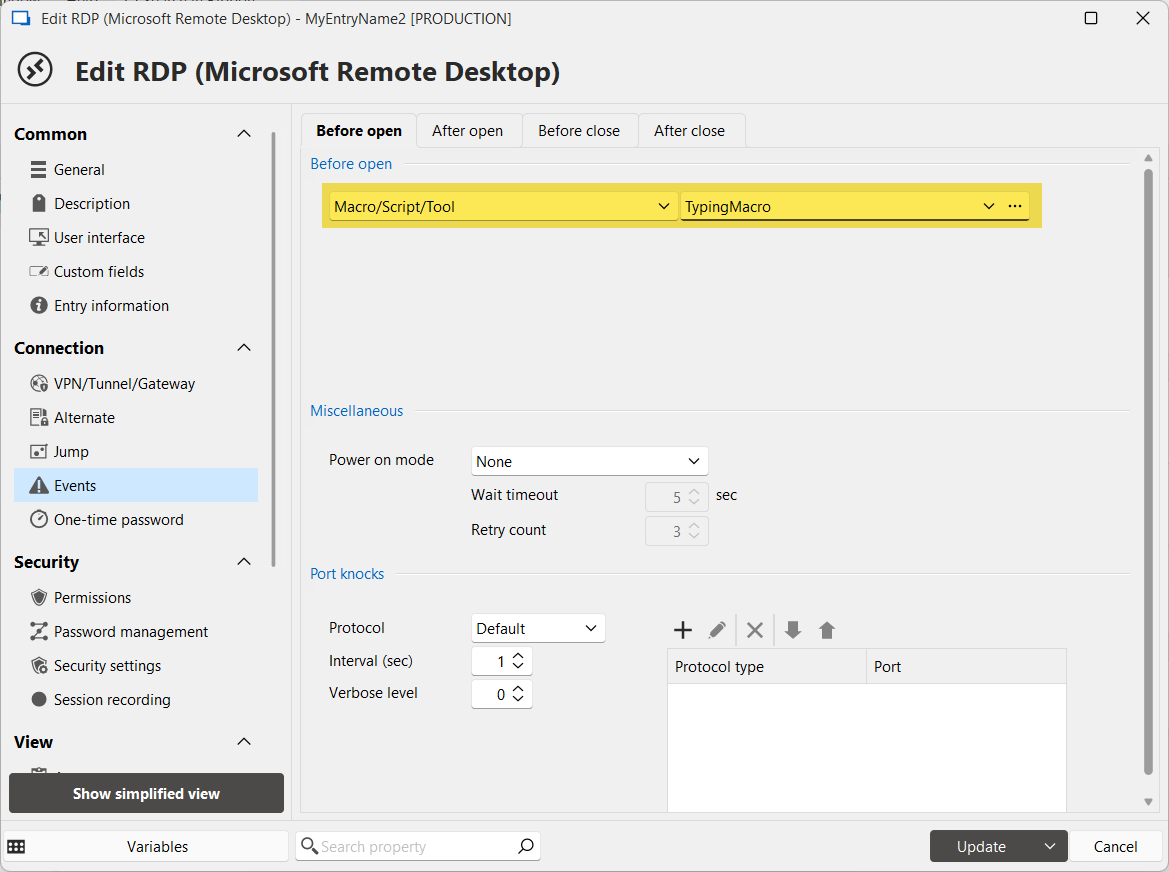
For VPNs, we have a tab in their dashboard called "referenced by" that lists all the entries referencing that VPN entry. Maybe we could have something similar for macros/scripts/tools. Do you think that would work for you?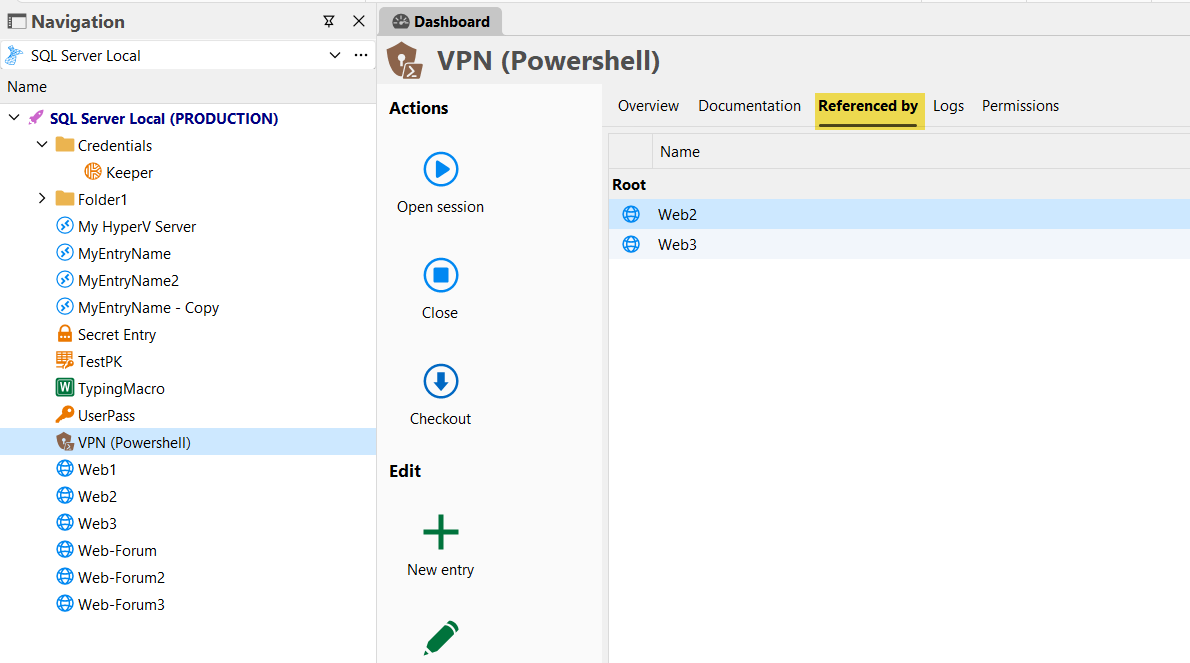
For your second point, I asked our RDP expert and this is not something that's available in the RDP ActiveX control which is what we use in RDM. So at the moment, this is not something we're able to add in RDM.
Regards,
Hubert Mireault
6b96019b-0b9e-4afc-bac6-a433c2d602ba.png
b446bd98-2a56-45ce-97fc-337eab3d15a5.png