Browser entry login scripts no longer working

Am I the only one who can't get login scripts in browser entries to work anymore in 2025.1.25.0+?
It does not even seem to try to run the script.
All Comments (4)
Hi,
When you refer to “login scripts,” do you mean the "autofill login" or custom scripts under Login -> Script -> Script Types in the website edit dialog or Before/After Connect Macros or are you referring to something else?
Does this issue affect all website entries? Do you enforce private mode on your entries?
Could you go to File -> Settings -> Entry Types -> Website -> Autofill Mode and select V1 in the dropdown? Do you still experience the same issue after doing so?
Best regards,
Olivier Désalliers
Hi Olivier,
I mean the custom scripts here "Login -> Script -> Script Types".
It affects all entries.
Changing the version does not seem to do anything.
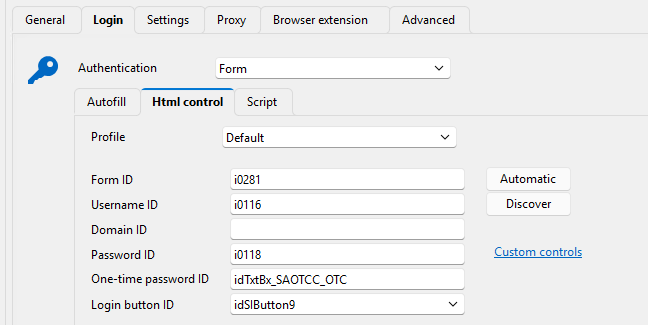
However I have found out that if i configure the entry likes this and having my custom script selected it runs the script. If autofill login and the values in Html control is not filled out it does not run the script at all. I tested this with a simple popup in the website window, and it only executes if i do the following config. This must be a mistake because my script does not need the values in Html control and it handles all the pressing buttons etc so the autofill also does not matter: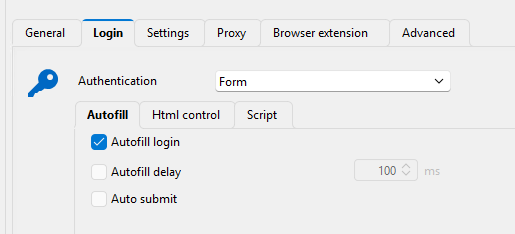
24056ca4-802b-4f0e-aa13-af452287b446.png
93bbda0c-f663-4490-ae41-f31e96ceddd0.png
Hi,
Thank you for the clarification.
We are currently investigating the execution of custom scripts, independently of field detection and the autofill login option.
Best regards,
Olivier Désalliers
Hi,
Remote Desktop Manager 2025.1.31 is now available and includes a potential fix for the issue you encountered.
Could you test your entries with this version and let us know if it works as you expect?
Best regards,
Olivier Désalliers