Add a feature to let RDM start automatically minimized and a setting to chose that when hitting the "X" it minimizes the app instead of closing it
Add a feature to let RDM start automatically minimized and a setting to chose that when hitting the "X" it minimizes the app instead of closing it
0 vote

Nigh all,
I love the product and am starting to use it for almost all my connections, from RDP, Mikrokit, and iDrak. My biggest issue is with the startup. If I start RDM after boot, it could take up to a minute. Is there a service I can autostart that would make the startup process faster?
Also, if I use it for a while, at times, I have to restart the computer since it freezes or works slowly.
Thanks
Rudy
All Comments (4)
Hello Rudy,
Did you try the steps from this KB?
Regards,
Min
Thanks, I followed the KB, and it improved a bit.
It would be great if the program had a setting to out-start minimized once you log in to Windows and minimized even if you pressed the "x" to close it.
Other tools I use have that function, and it's helpful.
Thanks
Rudy
Hello,
Thank you for the follow-up.
This will mostly be a feature request. I'll move the topic to the feature request section.
You will then be able to vote for the feature!
Our feature request forum allows our community to submit/share ideas with our development, service desk, and management teams. It’s also an opportunity for our community to demonstrate an interest in your idea. We use this interest to prioritize the features we implement.
Best regards,
Jacob Lafrenière
Hello,
I believe we already have what we need. If you go in File > Settings > Application > Application startup, you can set RDM to start minimized: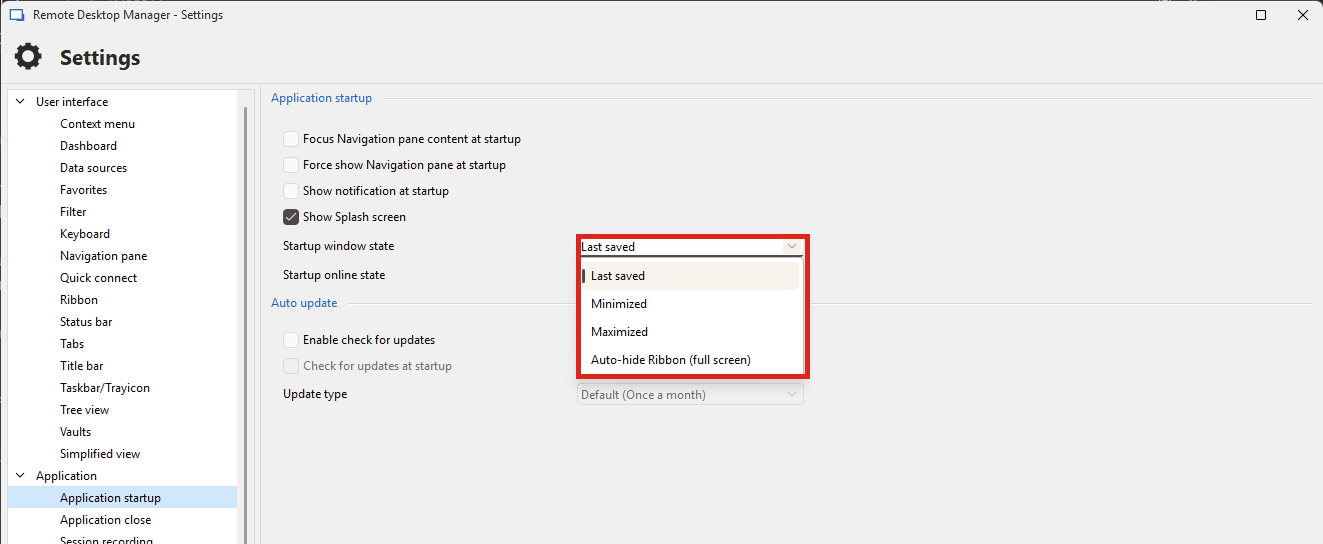
You can also configure RDM to reduce to the taskbar/tray on close, available in File > Settings > User interface > taskbar/trayicon: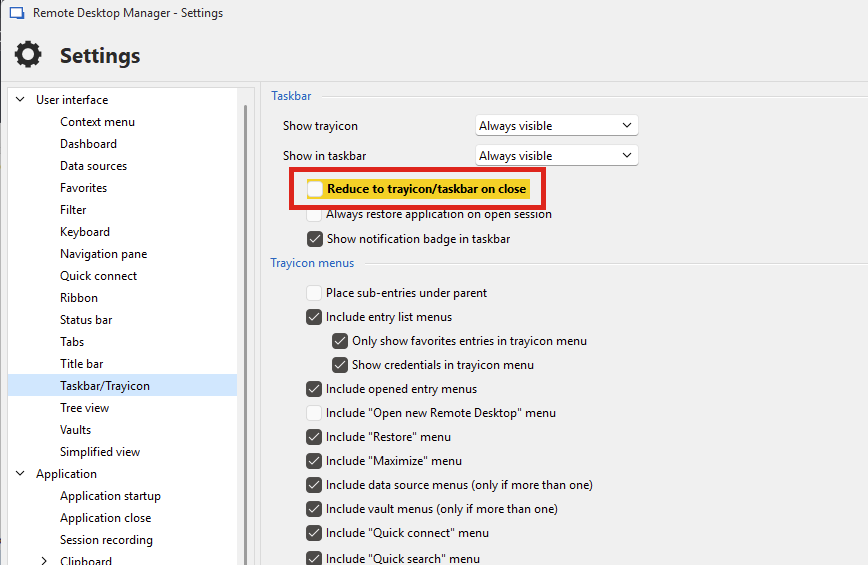
Let me know if this works for you.
Regards,
Hubert Mireault
7900318d-6fdb-46b6-b87c-f51fad47a80c.png
a52d1e33-7bab-4581-9b46-e7acfa4f4769.png