[FEATURE REQUEST] RDM Gateway management - deploy self contained instances within docker containers??
[FEATURE REQUEST] RDM Gateway management - deploy self contained instances within docker containers??
1 vote

I know I've touched on similar topics with some of you tech guys and we now have the docker containers to use, but is there any way of integrating the RDM Gateway management to be able to deploy isolated Gateway instances within docker containers themselves similar to how RDM can deploy gateways now just using containers as a mini gateway farm???
All the components to achieve this outcome should be in place now right so with some of your developer magic maybe put some of these blocks together to use in the recent RDM gateway manager???
I'm wondering if I should mirror this port in the Gateway forum too maybe??
JK
Devolutions Force Member (and Long time Devolutions Fan)
All Comments (2)
Hello John,
Do I understand correctly that you would like the ability to install Devolutions Gateway on the same machine that is running RDM?
Is the intention to use RDM in place of, e.g.: DVLS Console?
DVLS Console is the tool dedicated to installing DVLS and various other services to use along DVLS like the Devolutions Gateway.
That being said, I don’t think DVLS Console supports managing Gateway containers either. For this feature request, you really want something that deploys a Gateway container?
May I ask you clarifications about the "mini gateway farms" you would achieve using containers? I understand you would run many containers on the same machine? What is the use case you have for that? Is it to isolate your networks into several virtual networks, with one virtual network per container?
Benoit Cortier
Hello John,
Do I understand correctly that you would like the ability to install Devolutions Gateway on the same machine that is running RDM?
Is the intention to use RDM in place of, e.g.: DVLS Console?
Being docker it could be local or remote via context's etc
DVLS Console is the tool dedicated to installing DVLS and various other services to use along DVLS like the Devolutions Gateway.
The recent RDM addition to deploy Gateway instances & Farms,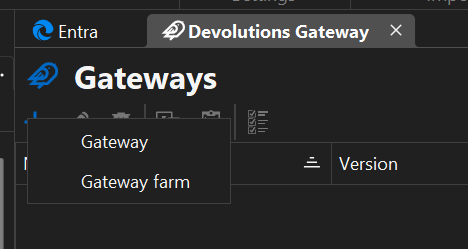 I just thought that here there could be the option to be able to add additional opions to deploy gateway just in a docker container (as previously mentioned the components are available i.e. I know Gateway can now be deployed via ps1 or docker compose as per the github repo ScriptLibrary) I had hoped that somehow in RDM in that new feature somehow the docker gateway deployment could be implemented, after all it all comes from PowerShell right?? (Also TBH I haven't actually had much time to dig through this RDM Gateway management yet)
That being said, I don’t think DVLS Console supports managing Gateway containers either. For this feature request, you really want something that deploys a Gateway container?
You are correct the console is still doesn't yet have this functionality, its all pure Powershell at present,
May I ask you clarifications about the "mini gateway farms" you would achieve using containers? I understand you would run many containers on the same machine? What is the use case you have for that? Is it to isolate your networks into several virtual networks, with one virtual network per container?
As to my mentioning of farms its just a reiteration of what's now in RDM for gateway management
PS This is why I also cloned this topic in the Gateway thread as I have already worked with the team there in relation to furthering using Gateway in Docker and there was going to be a progression to also add services for DVLS in docker too so that the 2 services could be in one compose file....
Apologise for being picky lol its just i always end up containerising services where possible, it just makes processes such as lift and shift very simple which would include cloud hosting in the same manner
JK
Devolutions Force Member (and Long time Devolutions Fan)
12ed33cb-588b-458c-9d43-efa80d1d8c8e.png