Executing macro in personal fault - SAVING table row with [FeatureImprovement]
Executing macro in personal fault - SAVING table row with [FeatureImprovement]
1 vote

Hi!
I got a little idea for a great improvement of the RDM tool.
The requested feature: an option to set the column to "Best Fit" by default - in the Execute macro/script window of Vault/User Vault
The problem being resolved with this feature:
- I open a ssh session to one of our customers
- I switch in the left bottom menu bar to the user vault
- I klick Execute macro/script in the upper menu bar (Home)
- In the following window “Remote Desktop Manager – Execute macro/script” ... the “Name” collum is always the same witness and this is too less for the length of the macro names we are using
every time we must right klick on the Name collum and choose “Best fit (all columns) so that we are able to see the whole name of a macro (this is also the same behavior when “Vault” is chosen)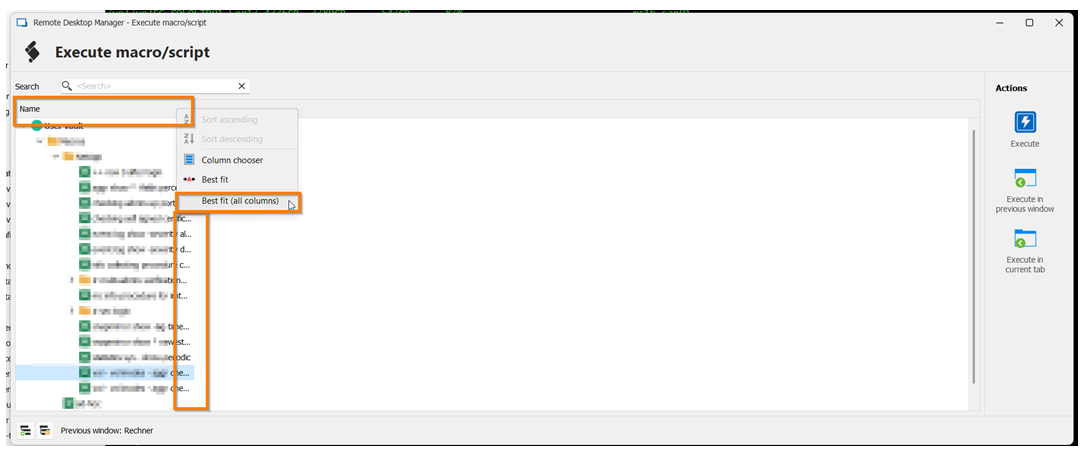
Would be great if you could add this feature.
Greetings!
RS
2025-03-12 16_22_18_GS.png
All Comments (3)
Hello,
Thank you for the request. This should be a simple thing to improve, I've opened a ticket.
Regards,
Hubert Mireault
Hello,
We've implemented a change for the entry selection window (such as the one presented in this post). They should now always trigger the Best fit (all columns) when displayed.
You can expect these changes with the upcoming 2025.1.26 version.
Regards,
Jafran Majeau
Hello!
Thank you a lot for the fast response in this case.
Glad to hear that my request is useful and will be go to production in near future.
Thank you and have a nice day!
Reinhold