weird typing issue in username fields in web pages

Hi all - running 2024.3.29.0 64-bit on Windows 10, I've had an odd issue ever since upgrading to this version a week or so ago.
When using keyboard macros or the built-in autotyping to type into username fields on webpages used as docked tabs (and only username fields, not password or OTP fields), something's fighting the autotyper. It seems like some sort of autosuggest thing maybe? I sometimes see a flash of "Tab" in a box with an arrow as it deletes what the autotyper is putting in and when it's all done, if the string it was trying to put in was say admin, there might be just an a in the field. It doesn't happen in any field that's not a username field. I've tried specifying either Chrome or Edge in the database entry properties and it happens either way. It does not happen if I open the URL externally in my default browser (Chrome) or Edge.
Noted - it happens logging into Synology DSM 7.2, but not into SRM 1.3 which is based on an older version of DSM. It happens on a SonicWALL running Sonic OS 7.1.something, and on a pfSense firewall running 2.7.2. It happens logging into a Unifi network 9.0 console, and HomeBridge UI.
If I type manually and very slowly, I can get it to work, but I do see that weird flash and "Tab" in a box with an arrow sometimes, but not always.
Is anyone else experiencing this?
Remote Desktop Manager [HOMEBRIDGE] 2025-03-11 23-45-14.mp4
All Comments (7)
Hello,
Thank you for reaching out to Devolutions Support.
Could you provide the string you are using in the typing macro? A screenshot would also be helpful so I can review the configuration.
This might be an unusual idea, but I’m curious—if the username is "admin," could you try using the following string instead? a{TAB}
Since it seems to autofill to "admin," adding {TAB} might allow it to proceed correctly.
Please test it and follow up with the results.
Best regards,
Jacob Lafrenière
I tried a[TAB}, it didn't help. Even when I type manually, hitting tab doesn't actually autofill, it just flashes that for a second.
I note the following:
It's Edge. It's all Edge. Even the sites I say to use Chrome, it's actually Edge pretending to be Chrome. And this makes sense to me, since the tab thing looks like an Edge Autofill thing.
When I go to whatismybrowser.com in one of the embedded browser windows where I have set the preference to Chrome, it says it's Edge pretending to be Chrome.
So the weirdness is definitely coming from Edge autofill, which have turned off in Edge settings since I use a password manager, but maybe the embedded web view process is ignoring that.
Again, I will say that it is ONLY Username / UserID fields, and not all of them, just the more modern ones. And it doesn't do it in an RDP window - just web browser ones. Also, it's throwing up autosuggestions for other usernames too! if I type m, it briefly shows the username associated with a different web-based entry in my datastore!
Something really strange is happening here. Maybe time to set up a call and a screenshare.
Hello,
Thank you for following up.
I understand the issue correctly. I will check with the development team and follow up with you soon.
Best regards,
Jacob Lafrenière
thanks - happy to do a screen share with someone if you like... let me know if there's anything I can do to help debug...
Hello,
Thank you for the follow-up.
Can you test our new update? (2025.1.25.0) You can update your RDM instance or install a portable version as a test!
You can find documentation here for the portable version.
https://docs.devolutions.net/rdm/kb/how-to-articles/portable-rdm-installation/
Please let me know if this helps!
Best regards,
Jacob Lafrenière
It's fixed in 2025.1.25.0! Thanks! All the autotyping seems to be working correctly now, the internal RDM one, and my external keyboard macros and AutoHotKey replacements.
One question is still, where is the Edge autofill saved info coming from? I have a couple of profiles in Edge - one for my MS 365 business account and one for my personal MS account. Neither of them is showing this saved information when I look in the settings for those profiles? Fill and save is turned off in both profiles (since I use a password manager) and if I open the same site in Edge directly it doesn't show up. Is this some local profile that's coming up in the msedgewebview2.exe process somehow?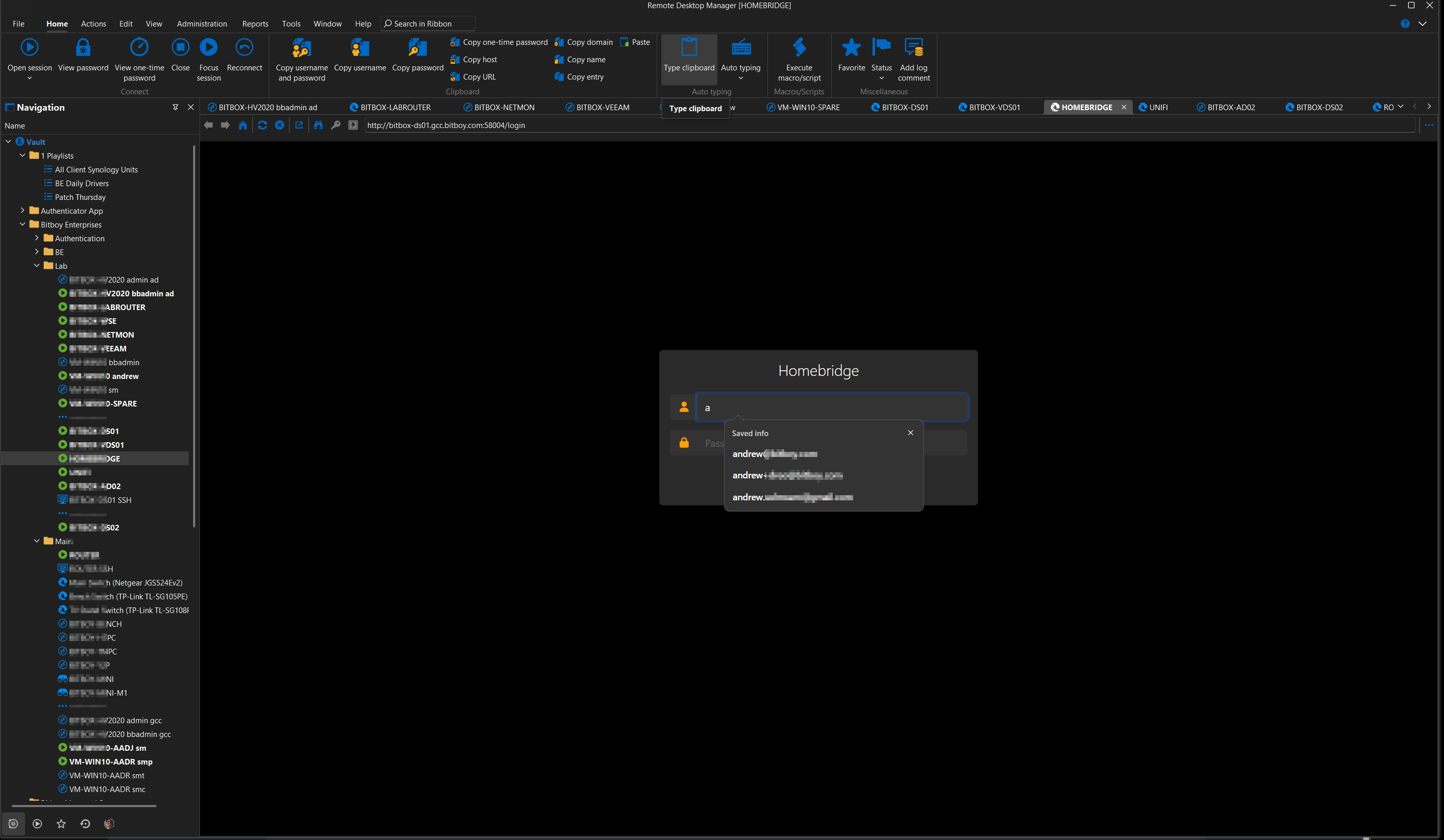
RDM Edge Autofill.png
Hello,
Thank you for your patience.
I’ve received some information from our development team regarding your inquiry.
Here is their general response:
- Edge and WebView2 do not share cache paths, and attempting to do so is unlikely to work.
- Remote Desktop Manager (RDM) stores the WebView2 cache at: %LocalAppData%\Devolutions\RemoteDesktopManager\WebView2.Cache.
- Users can override this path via: File > Settings > Entry Types > Sessions > Website > Edge > Override cache path.
- Within this directory, RDM includes logic to control cache sharing between sessions. For example, setting a specific Edge Profile Name on a session helps manage cache usage.
- Cache separation is also influenced by browser arguments. For instance, using the same profile name across two entries but applying different language settings will result in two distinct caches, as WebView2 does not permit cache sharing in such cases.
- There is also an "Enable Single Sign-On with Windows accounts" setting that allows WebView2 to support SSO using the Windows account.
Please let me know if you need further details or clarification.
Best regards,
Jacob Lafrenière