Username string, problems with domain autofill feature

Hello everyone,
I need to connect via RDP to some servers using a PAM tool, where the standard format for the username field should be as follows:
user_pam[domain\user_of_server@device]
However, when I attempt to connect, Remote Desktop Manager recognizes the domain before the backslash (\) and tries to establish a connection with the domain. This is causing a connection error.
What I would like is to send the syntax user_pam[domain\user_of_server@device] to RDP without the RDP client interpreting the domain before the backslash and adding any formatting or line breaks.
Could anyone assist me in sending this information in the username field exactly as text, without any characters within it being interpreted?
All Comments (3)
Hello
I'm not an expert on this - and if I'm wrong, I'm sure one of my colleagues can jump in with a better answer - but can you look at the setting "Enable MSTSC credential parsing" in the "Advanced" tab of the RDP session?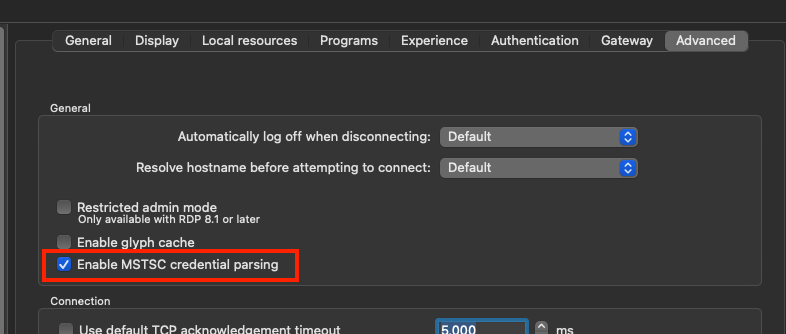
If this is checked, try unchecking it and see if it makes a difference. This will cause the username to be split on the backslash character at the point it enters the RDP session.
Thanks and kind regards,
Richard Markievicz
Screenshot 2025-03-10 at 13.10.38.png
Hello Richard,
Thank you so much for your help!
I unchecked the feature, and it worked perfectly!
Hello
Excellent! Thank you for the follow up.
Kind regards,
Richard Markievicz