Session "Resets" After Host Hibernation

Hello all,
Remote Desktop Manager is amazing. Excellent work on this product. I have not had any problems with it since installing it earlier this week except one that I will explain below.
To start, please note that I have six monitors across two video cards. Guests are configured to use all monitors and it works great during normal operating hours. Additionally, I have "Display" set to External -> Monitor #6 -> Current desktop.
So onto the problem: when locking the host machine and going into hibernation mode, and then returning some time later, I am noticing that if guests were full screen in all six monitors they get "reset" into the configured External monitor as a window. When I "full screen" this guest, it no longer uses all monitors but only full screens in the monitor alone.
I have to close the session and reopen it to get all monitors in use again.
I have tried different settings but they all do not seem to impact this behavior. To add to the chaos, this morning I returned from hibernation and the guest did not reset at all and I was able to return to full screen exactly as expected. 🤔 I am not seeing any settings that are different from the others here, so I wanted to reach out and see if anyone with more experience can help provide some guidance on how to address this issue.
Thank you for any assistance you can provide.
All Comments (13)
Hello,
Thank you for reaching out regarding this matter.
Could you confirm the version of RDM you are using, along with the data source type and version?
I recommend enabling Dynamic Resolution in the display settings under the entry property.
Please test this setting and share the results with us.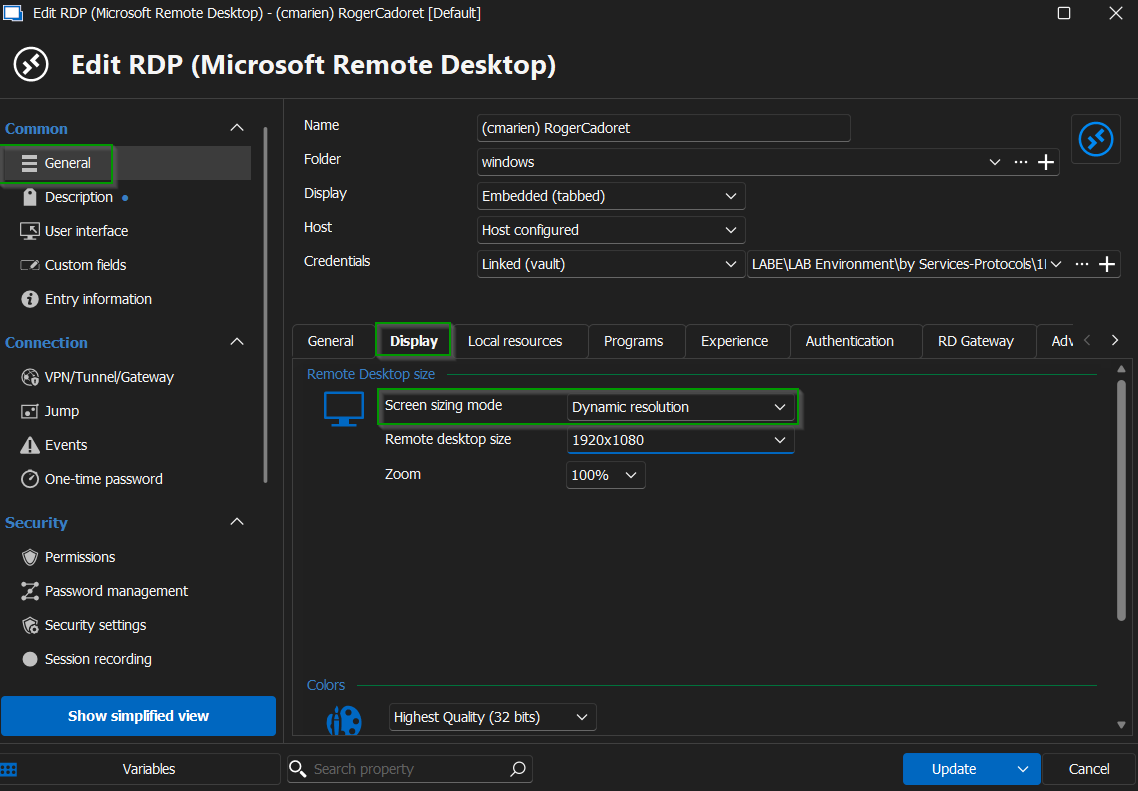
Looking forward to your response.
Best regards,
Jacob Lafrenière
78da4f20-2cc7-419d-b5f8-6dafc9cd9f29.png
Hi Jacob thank you for your assistance. I found the setting and we'll see how it does. Unfortunately a quick lock and hibernate doesn't seem to trigger the incident. It appears the machine must be idle for some time so I will monitor and let you know.
As for the version, it is 2024.3.29.0. As for the datasource type + version I am unclear on where to find this. If you give me a pointer I can find out for you.
Thank you again!
Hm, nope, this appears to be bigger than a setting. I still encountered the problem after applying that setting and logging out of the guest.
I will also say that this issue is hit and miss. Sometimes (rarely, I have only seen it happen twice) I will emerge out of hibernation with the RDC session intact. Mostly, though, it gets kicked out to the designated window in the new configuration.
I have also noticed that windows get "switched" in the guest when this occurs. Applications that were in monitor 3 are now in monitor 4 and so on.
Finally, I have noticed that five of my monitors will wake up and one takes a little longer to do so, and wonder if this might be causing this issue. 🤔 A lot of variables here.
Thanks! I’ll try that and see if it resolves the issue.
Hello,
Thank you for your patience.
I also recommend using the Smart Reconnect option for testing. Please ensure that the dynamic resolution setting remains selected in the display menu.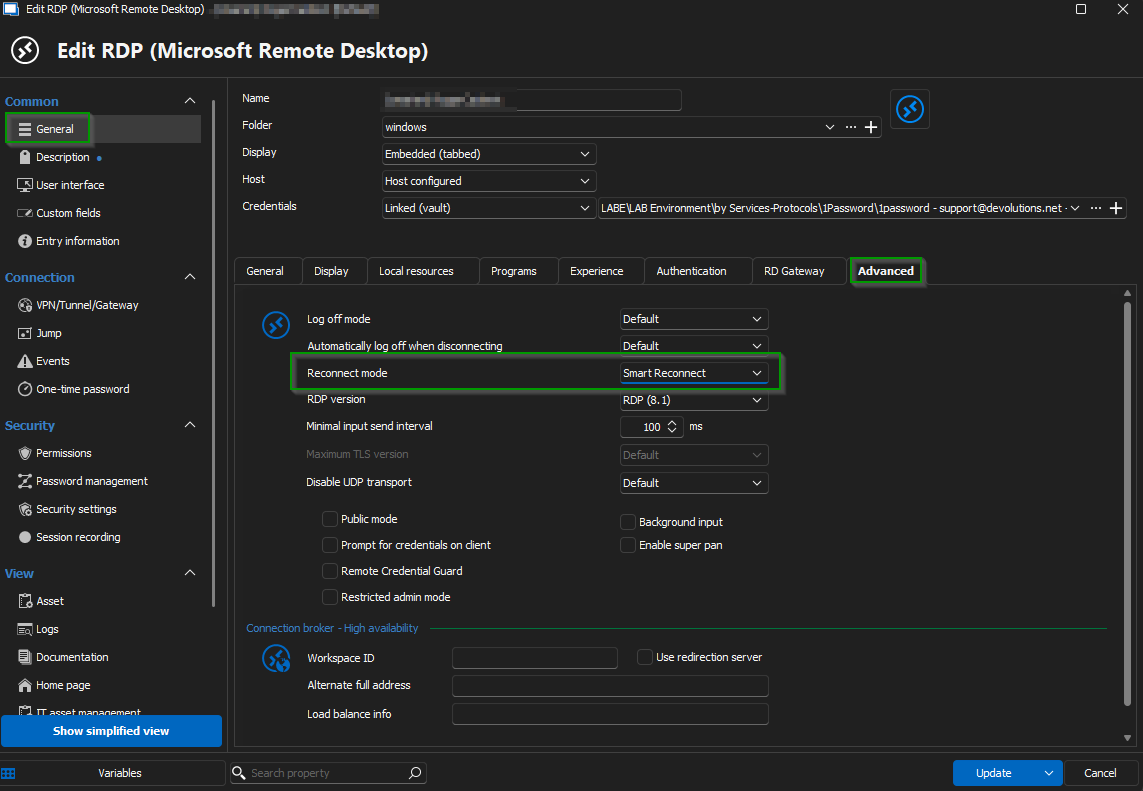
Looking forward to your feedback.
Best regards,
Jacob Lafrenière
8b0c133b-47af-4d4e-932a-20036cd6ee31.png
Hey Jacob thank you for suggestion! I have tried twice now waking up the PC with the trouble monitor "flickering" before the rest do (the tell-tale sign I have been using to denote when this issue occurs), and the connection has stood pat as expected. So this might be the winner here. I will give it a few more days before giving it my official stamp of approval, however. 😁👍
The other setting that I am also using is setting `Remote Desktop Size` to "Fullscreen". It seems the combination of all three are doing the trick here. I again will update when I feel fully comfortable with it. Thank you again for your great support!
Hello,
Thank you for the follow-up.
Glad to hear things are looking good so far!
Please keep me updated once you have fully tested the solution.
Best regards,
Jacob Lafrenière
Hey there Jacob, an update here. Looks like for the most part things work as expected. If I go away for a few hours and restore my login the RDC pops right back in full screen, perfectly. However, for long hibernations there is something that is occurring that is producing the original report. The session goes to the designated monitor and the restore/full screen only full-screens into that monitor.
I will also say that even with that, there have been times that I have returned from the long hibernation and it has worked as expected too. 🤔 So, a bit of a mystery here. I am open to suggestions and can provide logging/telemetry if needed to help track this down. Thank you again for all your impressive efforts out there.
Hello,
Thank you for the follow-up.
Can you test our new update? (2025.1.25.0) You can update your RDM instance or install a portable version as a test!
You can find documentation here for the portable version.
https://docs.devolutions.net/rdm/kb/how-to-articles/portable-rdm-installation/
Please let me know if this helps!
Best regards,
Jacob Lafrenière
Thank you Jacob I will try this and see. I am also pretty sure that this may be a Windows 11 issue or maybe with the drivers. It seems to work as expected about 80% of the time. I am wondering if it has to do with the monitor connections of my two cards as well. Maybe switching them around so that the trouble monitors are on one card. I will try v2025 and if that doesn't work I will see if adjusting monitor connections does anything. 👍
Woohoo... I switched my monitors from 3x on each card to 4 on 1 and 2 on the other, and this morning it full-screened as expected after finding it minimized after hibernation. I am not convinced however. 😁 I will continue to monitor and hope for the best here.
OK so the problem I was encountering was with my monitor setup! After switching from a 3x3 configuration to a 4x2 configuration, I have not seen this problem and everything is so much nicer.
Thank you again for your diligence in supporting your excellently designed product! I wish I would have encountered it sooner. 🙏
Hello,
Thank you for your follow-up and for the feedback.
I'm glad to hear you were able to resolve it!
Warm regards,
Jacob Lafrenière