Private vault not loading after AD migration

I have one case here where we are conducting a AD migration between (in this case) child and parent domain.
The use in question claims that while he can load the database connected general vault in RDM, His personal vault will not populate.
Now I have seen one post in the forum from 10 years ago claiming that the personal vaults are in UserInfo.PersonalConnections, however, that table does not exist in the database instance in question.
Does anyone have a hint where I could look to find a clue as to where the assignment of the private vault does need adaption?
All Comments (5)
Hello,
Thank you for contacting us on that matter!
Could you please provide us with the following information?
- Your current RDM Version.
- Does a new account has been created for this user? Perhaps another account was created for that same user, which could have caused the issue.
Also, The personal vault entries are stored in the Connections table, where the UserID is used as the RepositoryID.
Please let us know if that is the case. If you have any other questions, feel free to let us know.
Best regards,
Maxim Robert
Hi and thank you for taking the time to reply
The RDM version used is 2021.1.36.0
About the account:
Since Active Directory cannot move accounts between domains, an AD migration for a user account is always a deletion in the original domain and re-creation in the new domain.
In our process, one of the steps is that the user profile is adjusted to belong to the new user account so all settings etc that are stored locally will still be available to the user.
The samaccountname (Logon name) and Userprincipalname ("[First].[Last]@[Domain]") of the user stay the same, but the domain prefix in the "[Domain]\[Username]" notation changes and also the SID (Security identifier) changes in this process.
Hello,
Thank you for your response!
Under Administration > User in RDM, please verify if the user has a new account with the new Domain. If yes, you will need to delete the new account and use an SQL query, which can be used to update the username or group name. I will send it to you in a private message.
Then, go to Administration > User in RDM, refresh the user list, and now you should see their new account. Once they log in, their entries should appear in their Personal Vault. 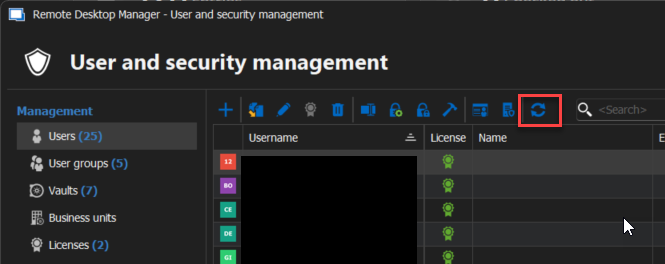
Please let us know the result. If you have any other questions, feel free to let us know.
Best regards,
Maxim Robert
2025-03-04_13-52-18.png
Hi - sorry I was sure to have replied back already - I can confirm that the user has regained all access to his data.
Thanks again very much for your help
Hello Matthias,
Thank you for letting us know!
Feel free to let us know if the problem resurfaces or if any other problem occurs.
Best regards,
Maxim Robert