IT Glue

Hi,
I want to test RDM with IT Glue
I can not find any documentation on the RDM side.
When I add a entry and select IT Glue I have to choose an Organization but cant find where to add it.
Recommended Answer
Hello,
There is currently no way to automatically create one entry per IT Glue password. You either have to create the needed entries by hand one by one or use "Always prompt with list" so you can choose from the list of all passwords every time you use the credential.
Best Regards,
Michaël Beaudin
All Comments (9)
Hi,
When setting up your IT Glue entry in RDM, you’ll need to select an organization first.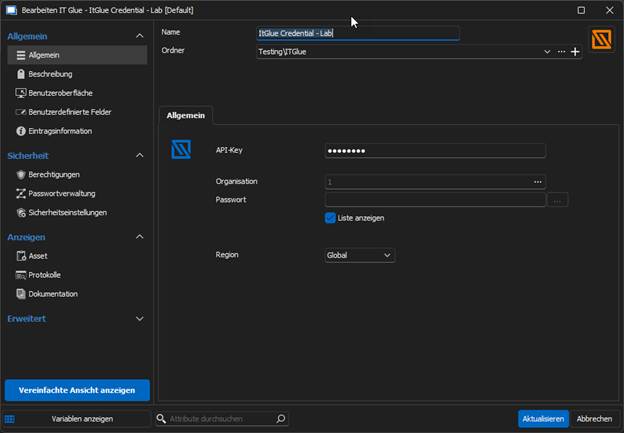
Once the entry is created, you can use it as a linked credential for other entries. This will allow you to access any passwords stored for that organization.
If this isn’t what you were referring to, could you share a screenshot of where you’re being asked to provide an organization? We’d be happy to assist further!
Best regards,
Stephan
870218f1-7aa2-482a-aa34-9b57c6d3dc8a.png
Hi,
When setting up your IT Glue entry in RDM, you’ll need to select an organization first.
Once the entry is created, you can use it as a linked credential for other entries. This will allow you to access any passwords stored for that organization.
If this isn’t what you were referring to, could you share a screenshot of where you’re being asked to provide an organization? We’d be happy to assist further!
Best regards,
Stephan
Hi yes you need to select a organization as in your screenshot.
But where do I add this organisation?
I can only select one and the list is empty.
Hi,
You can add and edit your organizations in your IT Glue Web Interface:
The organizations you create here should be selectable in your IT Glue entry within your RDM entry.
18b78531-51a8-4dbc-88d0-6f656f1e9e78.png
In IT-glue we have organisations.
But we first need to link RDM with IT-glue
I entered the API-key en when I click the dots by organization I get the error no records found.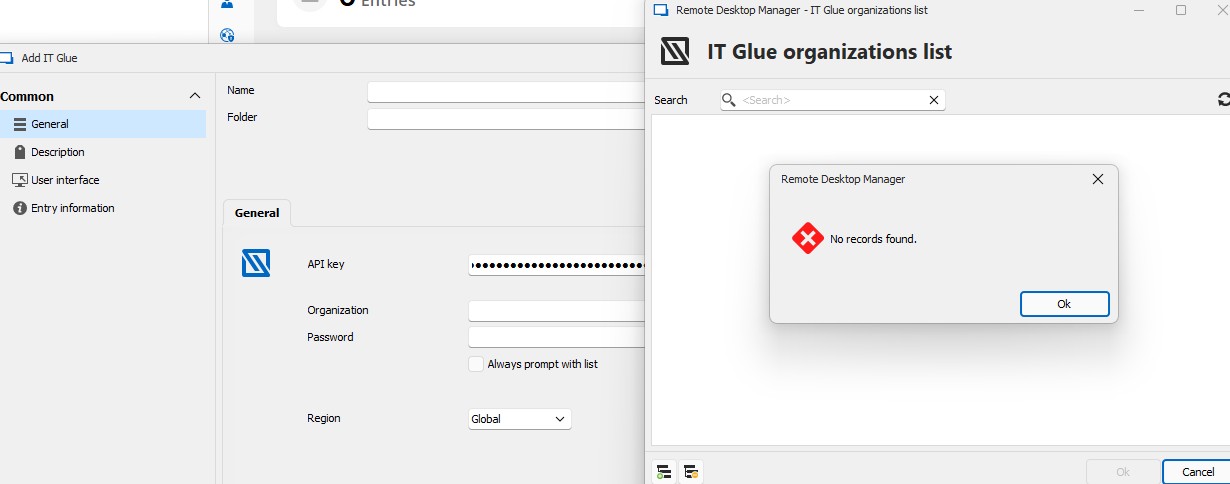
Schermafbeelding 2025-02-27 152053.jpg
Hello,
I would have 3 questions for you.
- Which type of ITGlue license are you using? IT Glue has a limitation where only their enterprise licenses can use their API. This means you need it for the RDM integration.
- Do you see any related errors if you go in Help -> Profiler -> Debug Only and set the debug level to 1 and then try to fetch your organizations?
- Are you using the proper "Region" in your properties? You might need to change it from global to European or Australian depending on your IT Glue setup.
Best Regards,
Michaël Beaudin
I found it
needed to change to europe.
Now I can add objects
Do you know if you can bulk add all passwords?
Hello,
There is currently no way to automatically create one entry per IT Glue password. You either have to create the needed entries by hand one by one or use "Always prompt with list" so you can choose from the list of all passwords every time you use the credential.
Best Regards,
Michaël Beaudin
On another note, I suggest reading https://docs.devolutions.net/rdm/kb/knowledge-base/it-glue-information/ before choosing how to do your setup in RDM.
Michaël Beaudin
Thank you for the support.
This is not going to work for us.