Inquiry About Local Backup Option in Devolutions Cloud

Hello,
I am currently testing Devolutions Personal Hub and have a question regarding the backup functionality. I would like to set up a local backup option as a precaution. However, I haven't found a way to automatically and regularly perform backups.
Is there an option for this? If so, where can I configure it?
Thank you in advance for your support!
Best regards
All Comments (8)
Hello,
Thank you for reaching out to us regarding the backup functionality in Devolutions Hub Personal. At this moment, the option for setting up an automated local backup is not available. However, you can perform manual backups via the Web interface or using Remote Desktop Manager (RDM).
If you need guidance on how to carry out these manual backups, please let us know, and we'll be happy to assist you further.
Have a good day!
Maxime Morin
Hi,
I will appreciate some docs about that too.
Can you point us thru some documentation about that please ?
Thanks
You can export and import the content of a vault from the Help & tools menu. See https://docs.devolutions.net/hub/web-interface/tools/import-export/#json-export-type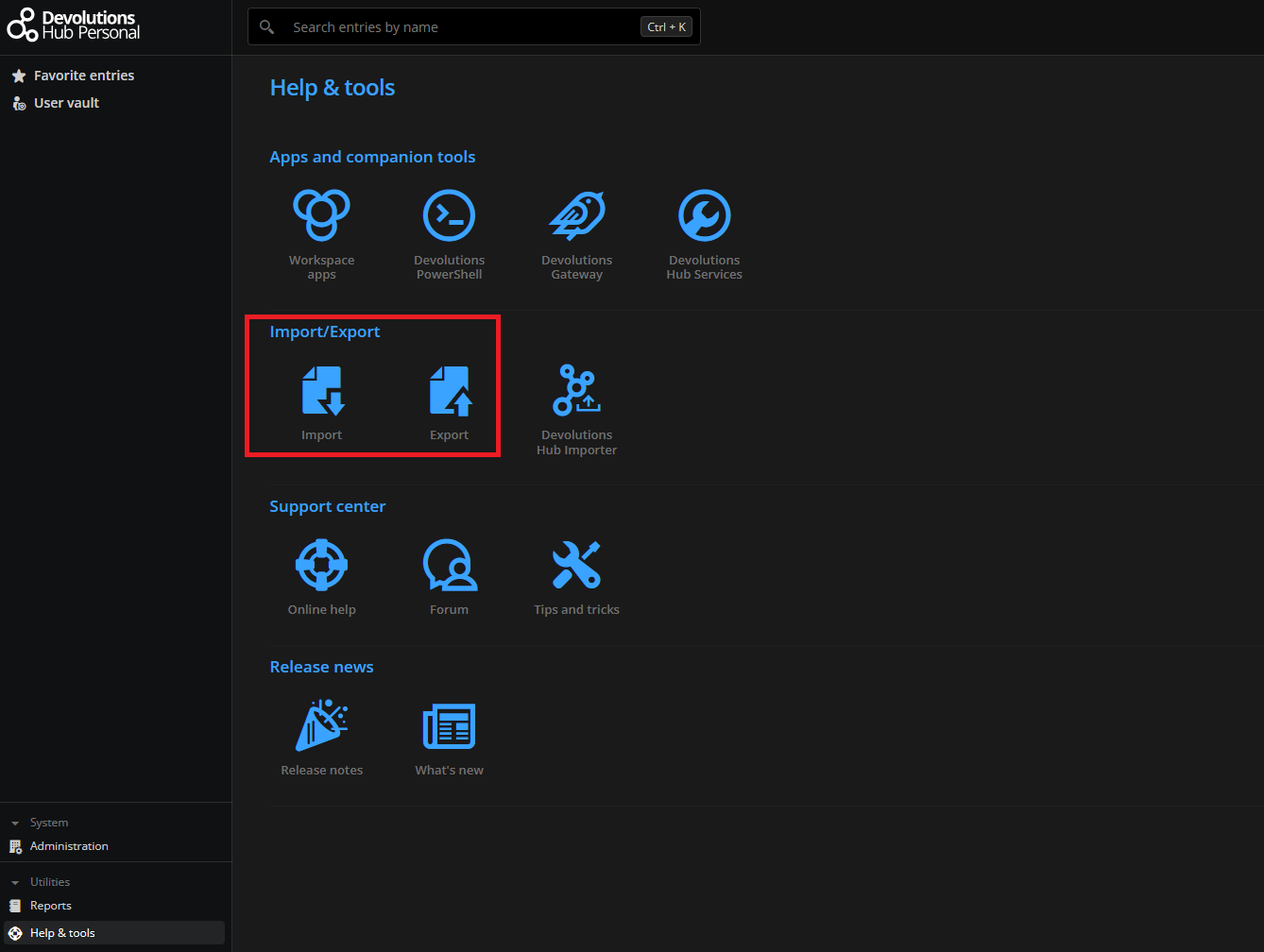
f752e757-9bde-4f21-b162-5e6c5dccd2b3.png
Thank you very much for your response! I’m really enthusiastic about Devolution Hub Personal overall, but I do find it a bit disappointing that there’s no automatic backup function. While the manual option is nice, it’s not the greatest in terms of convenience. It would be fantastic if this feature could be introduced in the future.
Hello,
For the sake of the discussion, how would you like these automated backups to be configured and exported? For example, would you like to receive an email with a link to download an export file? I'm asking because with Hub Business, we provide a way for users to create application identities and export via a PowerShell cmdlet. Admins can then save the backups how they want. This seems a bit overboard for a personal experience, but it could also be done.
Let me know, have a good day!
Maxime Morin
Thank you for the information regarding the backup option available in Hub Business—it sounds good. For Hub Personal, it would be great to have an export function maybe that allows users to back up their data directly to OneDrive, an external drive, or a similar service. Additionally, having the option to schedule these backups automatically, either daily or weekly, would be very convenient.
Hello,
I don't think that having straight backups like that would be very useful. Hub Personal is a zero-knowledge on sensitive data service. In other words, your sensitive data is encrypted and not accessible by us. Meaning that we could in theory backup this data, but it would be encrypted. In my opinion, that wouldn't be much more useful to you. That's why with Hub Business we use Powershell. The Powershell scripts is a client that decrypts the data and saves it where the admin wants. (Same principle with RDM, Workspace or the web client.)
Internally, we had a quick discussion about this. We could add support via Powershell just like Hub Business or maybe have an email reminder that would prompt you to click on a link to generate and download your backup. These two options would probably be the easiest solutions while keeping the backups useful to end users.
We will add a task in our backlog and see when and how exactly we want to implement this idea.
Have a good day!
Maxime Morin
"or maybe have an email reminder that would prompt you to click on a link to generate and download your backup. " this option would be nice, thanks for help!