ctrl+alt-del missing in context menu
0 vote

Yes, I found it, it is available in the context menu when you right-click the tab.
But if you, like me, mostly use the context menu from the navigation pane, it is annoying that it is not there. I suggest to make those identical. I don't see a reason to make them different unless they are very different.
All Comments (3)
Hello,
I'm not sure about the exact context where the menu is missing. Could you post a screenshot of the context menu you are referring to?
Regards
David Hervieux
Yes of course. Especially since this forum software allows pasting images. Kudos.
Present when you right click in the Tab: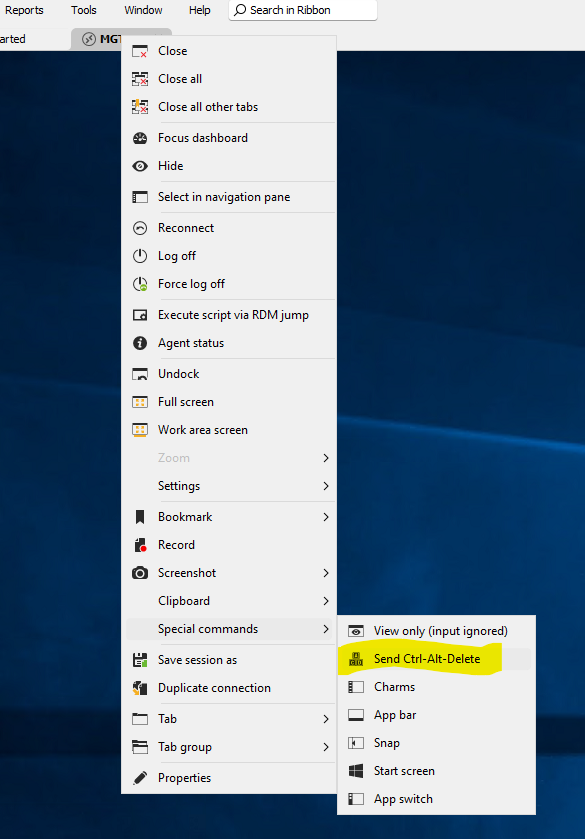
Not present when right clicking in the navigation pane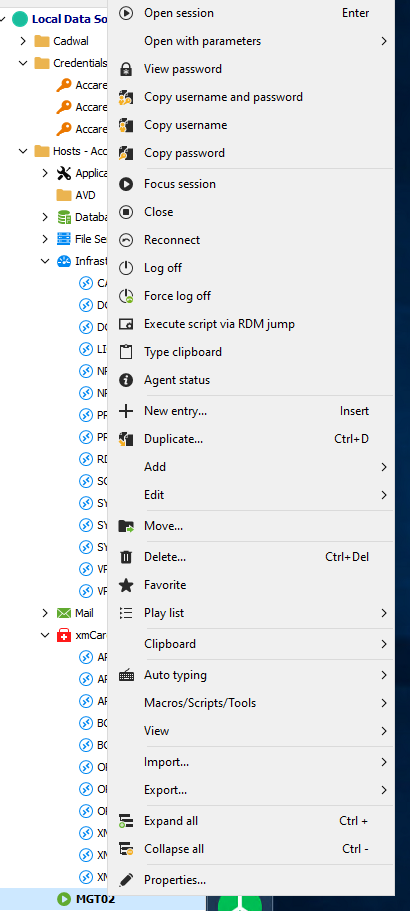
d109ee41-2aed-4c44-9bd0-8d516b519fd5.png
44d90d7a-8e62-48d3-a8e5-57ecb3116345.png
Hello,
Got it. I will create a ticket for that.
Regards
David Hervieux