SSH Port forward via Azure Bastion to a Linux VM

Hey guys,
i am a little bit stuck and can not find any information anywhere how to configure SSH port forward when connecting via ssh to a linux vm via an azure bastion.
For the normal SSH Shell i have already found this instruction and it worked pretty straight forward:
https://docs.devolutions.net/rdm/kb/how-to-articles/configure-azure-bastion-entry/
Now it gets weird, whenever I create a new SSH port forward entry and add the existing azure bastion in the VPN section and link it to either the bastion ssh session or the linux ssh session it tells me that this entry is not supported and can not figure it out how to configure it correctly.
in the general SSH settings of this entry i just added the destination linux vm i want to port forward. Nothing of what i tried is working for me.
Any suggestions on this?
Thanks a lot!
Greetings Michal
All Comments (9)
Hello
The first iterations of the Azure Bastion integration tightly restricted what session types you could use Azure Bastion for.
Since an Azure Bastion TCP tunnel allows forwarding arbitrary ports, there's not much reason for this restriction any more. I know we had spoken about removing it but it didn't happen; I have to dig into the "why" of that as maybe there was a technical reason.
In this specific case, there's no reason you shouldn't be able to use an Azure Bastion with an SSH Port Forward - you're not doing anything wrong, we just need to unblock that on our side. It should be an easy change. I'll create a ticket for that, link it here and post back once this is fixed but you can likely expect that in an upcoming release.
In the meantime, thanks for your patience and don't hesitate if you have further questions
Kind regards,
Richard Markievicz
Hello
Ok - I checked up on this and a while ago we changed things to allow using an Azure Bastion VPN on arbitrary connection types.
Can you check that in your Azure Bastion VPN entry you have "TCP Tunnel" selected for the "Connection Mode", and not RD Gateway?
If that's the case and it's still not working; can you let me know exactly when the error appears? Is it when you are launching the session? Can you let me know the exact error message that you see (a screenshot would be more than sufficient)?
Thanks for your patience, and please let me know if something isn't clear
Kind regards,
Richard Markievicz
Hey,
updated today to the newest version: 2024.3.29.0 64-bit and now my ssh shell via the bastion like described in the link in the first post is not working anymore. I receive a "FAIL_CONNECTION_RESET (-22) Connection Reset" error.
Machine have not changed and the config has not changed.
edit: my fault, was missing the ipv4 only protocol setting
Regarding you question:
Afaik SSH will only work with "TCP Tunnel" in the Azure Bastion entry. Chaning to RD Gateway gives me an error "this entry is not allowed".
Regarding port forwarding i dont know how to set this up. Should i make a new entry for SSH port forward and also set the existing Azure bastion entry in the tunnel settings? and then also connect while i am connected via the other ssh shell?
Thanks
Hello
I will look into why you might have started getting a connection reset error on your existing session and get back to you.
For the port forwarding - yes, it's expected that this only works with the TCP Tunnel mode so it sounds like you already have that selected. I'll try to reproduce your setup here although I'm not super familiar with port forwarding in RDM. It would be really helpful if you can provide a screenshot of the "not supported" error message you mentioned in your original post, because it's not clear to me where you are hitting this.
Please, let me know if something isn't clear or you have further questions
Kind regards,
Richard Markievicz
Hello again
For your existing SSH Shell that stopped working, can you first check the setting Advanced > Internet Protocol (in the SSH Shell entry)? Please try setting it to "IPv4" if it's not already, and let me know if that helps.
Thanks and kind regards,
Richard Markievicz
Hello again
For your existing SSH Shell that stopped working, can you first check the setting Advanced > Internet Protocol (in the SSH Shell entry)? Please try setting it to "IPv4" if it's not already, and let me know if that helps.
Thanks and kind regards,
Yeah this was the issue, changed to ipv4 and it works again, thanks for that!
Hello
Excellent! This is due to our SSH implementation not being able to resolve the IPv6 localhost address of the local tunnel listener. Until that gets worked out, this is a good workaround. It's likely that something changed in your local network configuration (or perhaps you are just using a new network location) but there's no harm in leaving that setting enabled generally.
Back to your original issue; if you can send me a screenshot of the "not supported" error you got, it would be very helpful.
Thanks and kind regards,
Richard Markievicz
Alright I found a solution and also maybe a bug.
so i created the ssh port forwarding by entry. I linked the existing Azure Bastion Tunnel under VPN/Tunnel/Gateway which works perfectly with SSH Shell. 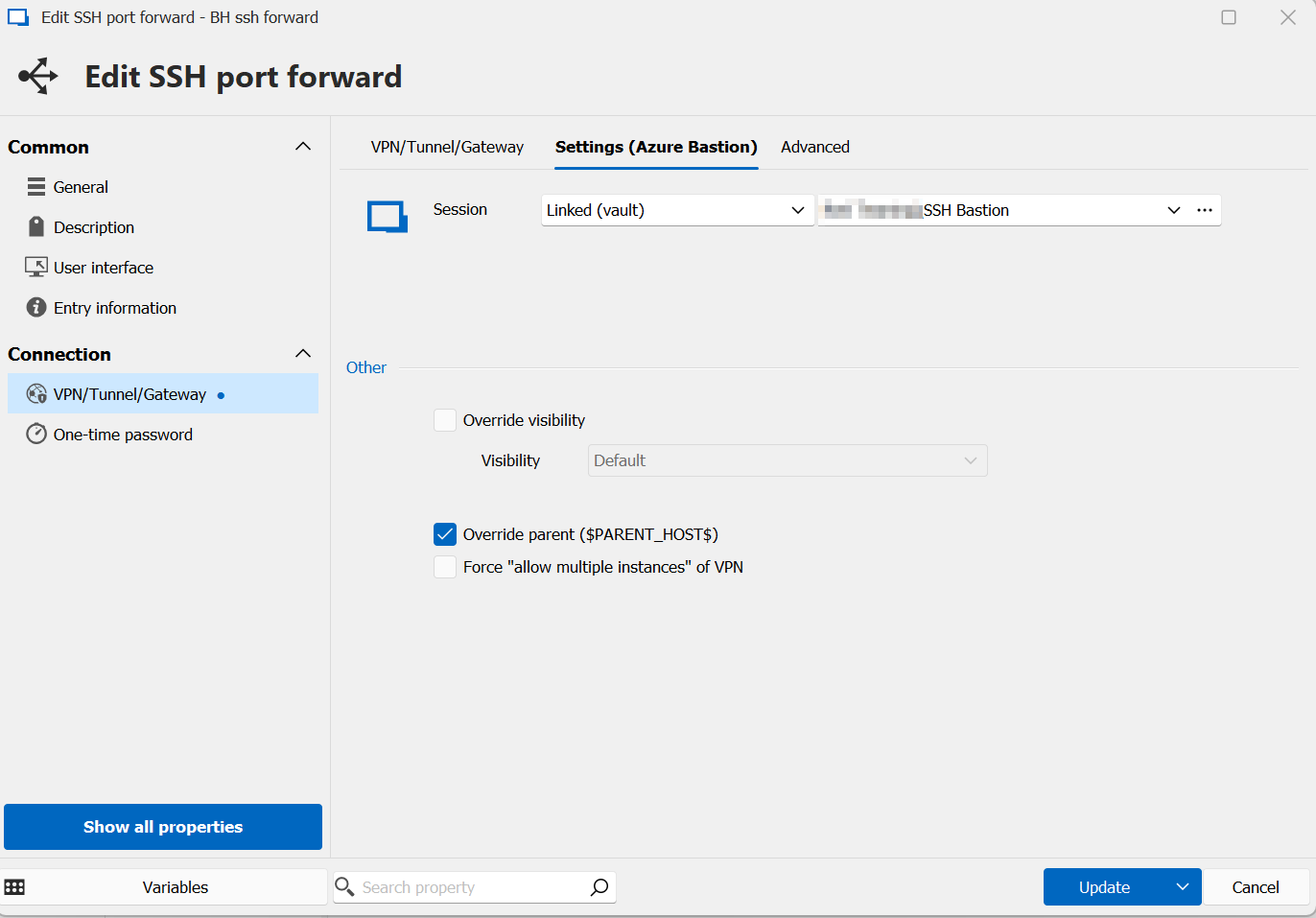
And opening this connection i ran always into this and was stuck: 
In the SSH settings of this entry the SSH port was set to default, so i assume its 22. But now i changed this manually to 22 will make the port forward work. Changing it back zu "default" will break it again, so I assume this is maybe a bug.
Since the newer version of today, the "not supported" error is gone although its the identical configuration. But working now, by setting the default ssh port to 22.
12.png
5.png
Hello
Excellent! Thanks for the investigation and the feedback.
This sounds pretty identical to this prior issue.
Essentially, when you choose "Default" port in RDM, internally we store a 0 (or perhaps -1, I don't remember); and at connection time we need to check for that and lookup the default port for the connection you're making. That's obviously not happening in some code path here.
I should be able to reproduce this pretty easily with the information you've given, I'll create a ticket linked to this post and notify you once the issue is corrected. In the meantime, the workaround is to use an explicit port assignment.
I'm guessing you updated from a pretty old version (I should've asked at the beginning what version you had). Previously sessions had to be whitelisted to work with the Azure Bastion VPN; but since sometime last year we allow arbitrary sessions. I guess that was the "not supported" error message you got.
Once again, thanks for the issue report and valuable feedback.
Kind regards,
Richard Markievicz
