complex query in custom variable

I'm creating Data Reports for SQL Server, with large queries, and parameters.
Everything running ok.
Now, I want to protect queries from business user.
Creating a variable, and using it in "Query" property of Data Report, does the work. But only for simple (one line) queries.
I wonder if there is any other way to store the query, and execute it as 'EXEC ($variable_storing_largeQuery$)', or similar.
All Comments (4)
Hello,
Thank you for contacting us on that matter!
Could you please provide us with the following information?
- Have you set permissions on the entries where you added the Custom Variable with the queries?
- Have you tried adding the full queries on one line to see if it worked? We tried it on our end to have the full queries in one line, and it worked.
Are you looking for a way to prevent users from accessing the Custom Variable, which includes the queries?
Thank you for letting us know. If you have any other questions, feel free to let us know.
Best regards,
Maxim Robert
Hello,
starting from the end: yes, I'm looking for a way to have the queries unaccesible to users.
About your suggestions:
Have you set permissions on the entries where you added the Custom Variable with the queries?
not sure how to do it. Pending dive a little bit more inside the docs.
Have you tried adding the full queries on one line to see if it worked? We tried it on our end to have the full queries in one line, and it worked.
Yes, I tried a "short" query of 1064 characters, and it worked.
Here I see two challenges:
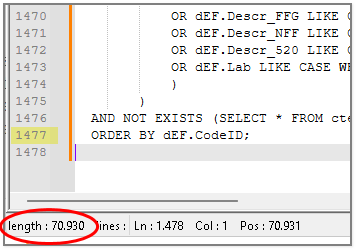
- some other queries have about 70,000 characters (see image). Will they keep inside a custom variable?
- if the answer to previous question is "yes":
- a dynamic query has to be built, to take profit of parameters:
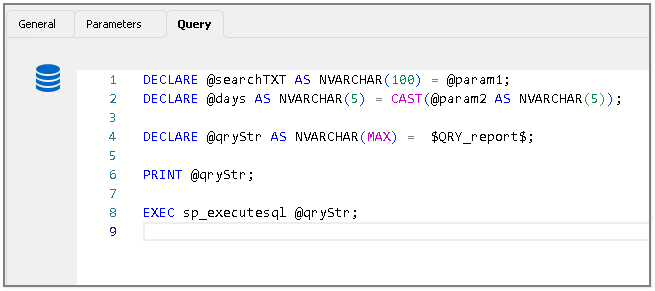
- a dynamic query is hard to maintain.
So, I'm thinking in another strategy:
- can a Powershell script be protected from end user?
- if yes, how can the PS script results be passed to a Data Report?
Thank you for the support.
Best regards.
db69ec1e-90c0-471e-bfbd-7c73018d1e63.png
9733a7c4-7ade-45b4-b6af-5217170240d0.png
Hello,
Thank you for your response, and sorry for the delay,
Unfortunately, the Custom Variable Value field has a maximum length of 32,773 characters, which means your query exceeds this limit and cannot be fully entered into the Value field of the Custom Variable. However, under Data Report > Query, there is no restriction on the number of characters you can input. This allows you to execute longer queries without encountering any character limitations but you would need to change the permissions of the entry if you don't want the end user to access the information.
Regarding your second idea, adjusting the permissions can indeed help protect the PowerShell script entries from being accessed or modified by the end user. However, it is important to note that while this method secures the script itself, the results generated by the PowerShell script cannot be displayed directly within a Data Report.
If you have any other questions, feel free to let us know.
Best regards,
Maxim Robert
Thank you for your help.
I'll try other options.
Best regards.