Online Hub first priority with offline local fallback?
Online Hub first priority with offline local fallback?
1 vote

Hello,
I have been enjoying using the Devolutions Hub to manage my credentials. This allows me to bounce between VMs quickly that are running different VPNs for each client while still centrally managing all my endpoint configuration.
However, recently I went on to a site that did not have internet access and I couldn't access ANY of my stored endpoints. I did some cursory research and it seems like there currently is not a quick way to configure "Online Hub first priority with offline local fallback" so that I could have some set of local endpoints if I am unable to connect to the internet. My current workaround is to store a SQLite db file in my OneDrive. I haven't been back to an area w/ no internet but I think this will work?
Is there a way to solve my issue more cleanly? I know that this could cause version mismatches if you had multiple offline copies edited over a period of time, but I think warning messages and merge diff reports could solve that.
Looking forward to hearing from the team!
- Ben Merryman
All Comments (6)
Hello,
Have you tried configuring the offline mode in Hub and RDM?
https://docs.devolutions.net/hub/web-interface/administration/management/users/offline-mode/
https://docs.devolutions.net/rdm/concepts/intermediate-concepts/offline/
Could this configuration work for your scenario?
Best regards,
Érica Poirier
I think that may be for business Hub users only? My current tier is the free "Devolutions Hub Personal" while I test this out for my company.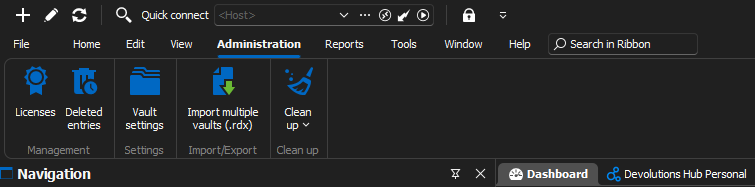
Vault settings had nothing similar to what the manual was describing around offline access.
Thanks for the fast response!
1b2c46fc-08ca-4167-8e8e-83eb7b6c39e6.png
Hello,
Thank you for your feedback.
You are right, it's not available on the Hub Personal data source.
You could request a 30-day trial of the Hub Business data source and see if that fulfills your needs.
Best regards,
Érica Poirier
Hello,
I provided you with the wrong information about the offline mode with Hub Personal.
You can configure it by following these steps.
https://docs.devolutions.net/rdm/data-sources/offline-mode/hub-personal-offline-mode/
Let us know if that helps.
Best regards,
Érica Poirier
Érica: this is going to sound silly, but I'm struggling with step 1: In Devolutions Hub Personal, go to your account, then click on Preferences.
When I go to my navigation bar in Remote Desktop Manager and r-click on the hub data source, there is no preferences option. If I go to Properties... the options are very different.
If I go to File > Settings there is no option I see for configuring the hub.
If I go to File > Devolutions Account it only takes me to a web page when I click Edit Devolution Account.
If I go to File > Data sources then r-click and select Edit data source on "Devolutions Hub Personal" connection it only has 2 tabs for General and VPN.
I finally did find it by going to the https://hub.devolutions.com/ and finding the preferences for offline mode there. Kind of strange since I thought the setting would be in the RDM app.
I'll leave this post since it took me about 15 minutes to figure out where this setting was, so the manual could use an improvement or potentially a link could be added in RDM to directly go to the settings page at the hub web site.
Thanks!
- Ben
Hello,
Thank you for your comment.
We will update our documentation that the offline mode setting is available on the Hub Personal web page.
Best regards,
Érica Poirier
