A/D Background syncs still not working with Linked Credentials

Good morning.
I thought I remember reading on one of my past posts somewhere, that the Background A/D Syncs utilizing KeePass linked credentials would be fixed by this version release. However, they still return a result code 49.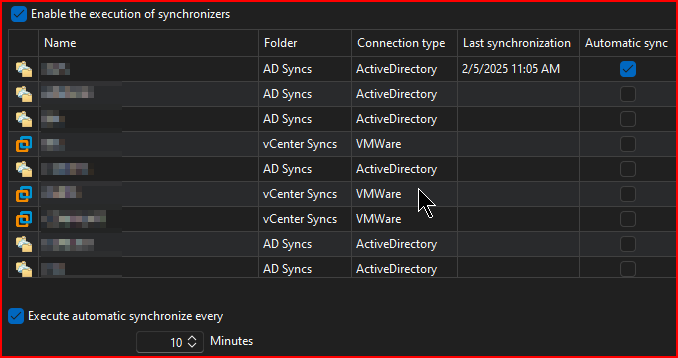

Will this ever be something that is fixed?
--- Chuck
Overgaard, AZ (-7 MST / Zulu Year-Round)
RDM Version: 2026.3.2.0 64-Bit - Free
20357095-73a8-468f-bdd3-b0c86eb43b6a.png
08039428-b68e-408b-a924-728332db7d17.png
All Comments (18)
Hello Chuck,
Thank you for reaching out to us regarding this,
I have to assume the fix for this was possibly not included in this version. Do you by chance, remember where you reported this initially?
This would allow me to see any linked development cases
Best regards,
Samuel Dery
Hello Chuck,
Thank you for reaching out to us regarding this,
I have to assume the fix for this was possibly not included in this version. Do you by chance, remember where you reported this initially?
This would allow me to see any linked development cases
Best regards,
I will have to look through my post history, but It was around early v2022. Give me a bit to find.
--- Chuck
Overgaard, AZ (-7 MST / Zulu Year-Round)
RDM Version: 2026.3.2.0 64-Bit - Free
I believe it was before this, but I could be wrong...
https://forum.devolutions.net/topics/41592/ad-synchronizers-stopped-working-after-2024120
Does this help?
--- Chuck
Overgaard, AZ (-7 MST / Zulu Year-Round)
RDM Version: 2026.3.2.0 64-Bit - Free
Hello Chuck,
Thank you for your reply,
Perhaps I do not fully understand the issue in this case. Would you be available for a remote session so that I can have a look?
If so, I will open a case for this with the email used for your account,
Let me know,
Best regards,
Samuel Dery
Hello Chuck,
Thank you for your reply,
Perhaps I do not fully understand the issue in this case. Would you be available for a remote session so that I can have a look?
If so, I will open a case for this with the email used for your account,
Let me know,
Best regards,
Sam,
This will be the 4th or 5th session regarding this issue, but sure - set one up if you need.
Since there is a bit of confusion, here is some info...
I have 14 entries that are Active Directory Syncs.
If I run any of them manually with their KeePass linked credentials, I get the following:
From there, it works as it should and adjusts as expected: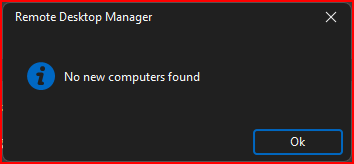
Under File > Background services, if I click enable any of the Synchronizers and click "Synchronize", it runs as expected there as well: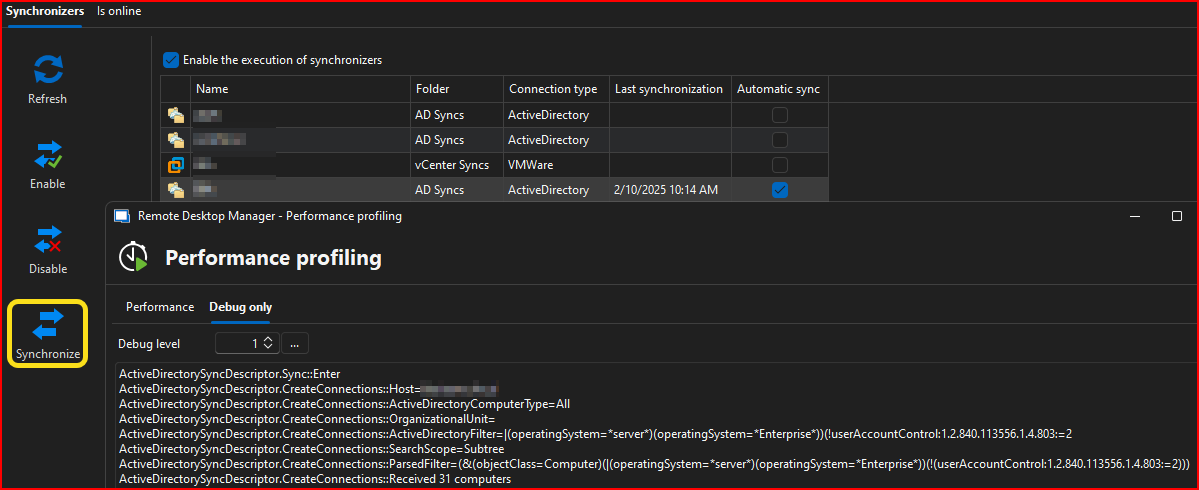
If I just let RDM run the Synchronizer(s) on their next scheduled 10 minute run, when credentials are linked RDM returns an error code 49:
HOWEVER, if the entry itself is set for "username and password", the auto sync's work as they should:
The problem is, our entries in the database are saved utilizing Linked Credentials via "Edit > User Specific Setting > Override Credentials > Linked (user vault)", which your colleagues have directed to use as the correct way to set linked credentials.
These are the results I have shared with your colleagues during the previous screen share sessions.
If you still need a new session to gather any different information other than testing different ways of utilizing the entry credentials, please set one up.
--- Chuck
Overgaard, AZ (-7 MST / Zulu Year-Round)
RDM Version: 2026.3.2.0 64-Bit - Free
ae2d1bc1-a0c7-4494-bf99-199b4328cd50.png
11c6c41e-e394-46c3-a5d8-673913a8bf55.png
78605762-fd65-4a15-ac59-0ff9c82d2a38.png
3ae4375f-2438-4fee-9aad-4f52b825c5b9.png
Hello Chuck,
I'm sorry it's taken so long to get to the root of the issue, but with your description in your previous post, I think I understand what is happening.
The short of it is: this is the "expected" behavior to avoid potential issues, but I think we could add a configuration to support your scenario, as long as your users are aware of the possible impacts.
Let me describe what's going on. The important thing here is that the synchronization is:
- Being done automatically through RDM
- Pointing to an "external credential source" (Keepass, but it could be 1Password, LastPass, etc)
Under these specific circumstances, RDM doesn't try to resolve the linked credentials. There's two major reasons for that:
- The first reason is that there's a lot out of our control when it comes to resolving these credentials, most notably MFA or similar prompts and performance issues since calling these services can take a while for some users. When done in an "automatic" context running in the background, this can confusing for a user since they may get a small freeze or a prompt "out of nowhere".
- Additionally, some synchronizer entries are also supported on DVLS, and it's not possible for DVLS to resolve these 'external credentials', so we also wished to avoid this kind of issue.
This is why we opted not to resolve these credentials through the automatic sync.
What we could do is add a local configuration so if a user wants their automatic synchronization to resolve external credentials, they could enable it, knowing the possible pitfalls this has. Do you think this would be an appropriate solution for you?
Regards,
Hubert Mireault
Hello Chuck,
I'm sorry it's taken so long to get to the root of the issue, but with your description in your previous post, I think I understand what is happening.
The short of it is: this is the "expected" behavior to avoid potential issues, but I think we could add a configuration to support your scenario, as long as your users are aware of the possible impacts.
Let me describe what's going on. The important thing here is that the synchronization is:
- Being done automatically through RDM
- Pointing to an "external credential source" (Keepass, but it could be 1Password, LastPass, etc)
Under these specific circumstances, RDM doesn't try to resolve the linked credentials. There's two major reasons for that:
- The first reason is that there's a lot out of our control when it comes to resolving these credentials, most notably MFA or similar prompts and performance issues since calling these services can take a while for some users. When done in an "automatic" context running in the background, this can confusing for a user since they may get a small freeze or a prompt "out of nowhere".
- Additionally, some synchronizer entries are also supported on DVLS, and it's not possible for DVLS to resolve these 'external credentials', so we also wished to avoid this kind of issue.
This is why we opted not to resolve these credentials through the automatic sync.
What we could do is add a local configuration so if a user wants their automatic synchronization to resolve external credentials, they could enable it, knowing the possible pitfalls this has. Do you think this would be an appropriate solution for you?
Regards,
Thank you Hubert for the explanation.
Only thing I don't understand is this:The first reason is that there's a lot out of our control when it comes to resolving these credentials, most notably MFA or similar prompts and performance issues since calling these services can take a while for some users. When done in an "automatic" context running in the background, this can confusing for a user since they may get a small freeze or a prompt "out of nowhere".
I don't feel that's an appropriate thought / reason to not do it, as if a user has Linked Credentials for the rest of their RDM assets, this wouldn't be a valid reason to not include it. The user would already have to have KeePass or 1Password, LastPass, etc. open in order for RDM to work correctly.What we could do is add a local configuration so if a user wants their automatic synchronization to resolve external credentials, they could enable it, knowing the possible pitfalls this has. Do you think this would be an appropriate solution for you?
Yes, this would be valid not just for us, but also others who need to utilize A/D Sync's with linked credentials. There's already a check for KeePass under Settings > Sessions: 
Couldn't you just move that from Settings > Session, to their respective Add-On configuration screen: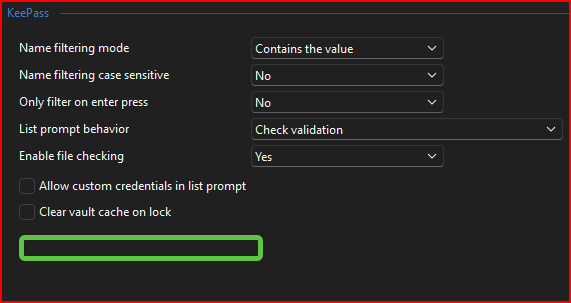
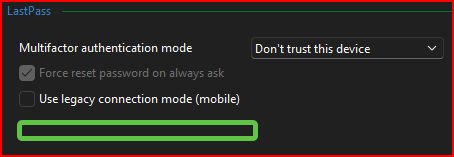
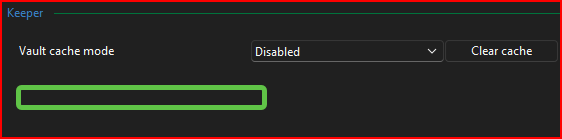
If it's in those screens above, then the user would see it when adding and configuring their add-on.
For your original question of an appropriate solution, are you thinking something like this?
--- Chuck
Overgaard, AZ (-7 MST / Zulu Year-Round)
RDM Version: 2026.3.2.0 64-Bit - Free
8696b8e9-5185-47fe-849f-eca6cfdc6161.png
8790471f-938b-4c2b-b400-350c49da821c.png
4f2ffd41-9693-4b4c-a0ac-426b57be28c5.png
3a3389ee-5644-47b5-b326-cfa5399adb45.png
2d74bd72-5328-452c-a62c-fa0d3b9c79fc.png
Hello Chuck,
To start with the simple answer:
For your original question of an appropriate solution, are you thinking something like this?

Yes, this is exactly what I had in mind and where to configure it, although the name would be different as it's not related to linked credentials, but to linked external credentials specifically. If this would be a good solution for you then I will open a ticket, it's not a difficult change on our end as far as I know. You will just have to make sure your users enable this setting on their machines, as this would be stored in the CFG file.
For your other points:
I don't feel that's an appropriate thought / reason to not do it, as if a user has Linked Credentials for the rest of their RDM assets, this wouldn't be a valid reason to not include it. The user would already have to have KeePass or 1Password, LastPass, etc. open in order for RDM to work correctly.
The difference in this case is that this is an automatic sync, and not an action consciously triggered by the user. This means the user could be working in an RDP entry and suddenly be prompted for, let's say, their 1Password MFA, which would be intrusive as well as difficult for them to understand why the prompt is happening.
For your other point regarding the settings like "Ensure that Keepass is running", this is something that is only available for Keepass because it's one of the few credential integrations that works with a local application. Most other integrations like LastPass, 1Password or Keeper all work using API calls to their servers. This means the server is the one handling whether we need to prompt for MFA or not, for example, and we don't know whether we need to do that until we're already resolving the credential. So it's not possible for us to have such a setting for other credential integrations.
Additionally, this setting for Keepass doesn't guarantee that there's no prompt that would happen, just that the Keepass application is running. You could get a password prompt for your Keepass file even with this setting checked, if you configured your entry that way.
The combination of these reasons is why this new configuration would not be enabled by default, and instead need to be enabled by the user. I hope this helps explain our perspective on this.
Regards,
Hubert Mireault
1b9103fd-4757-4682-abf7-c7667dfccab2.png
Hello Chuck,
To start with the simple answer:
For your original question of an appropriate solution, are you thinking something like this?
Yes, this is exactly what I had in mind and where to configure it, although the name would be different as it's not related to linked credentials, but to linked external credentials specifically. If this would be a good solution for you then I will open a ticket, it's not a difficult change on our end as far as I know. You will just have to make sure your users enable this setting on their machines, as this would be stored in the CFG file.
For your other points:
I don't feel that's an appropriate thought / reason to not do it, as if a user has Linked Credentials for the rest of their RDM assets, this wouldn't be a valid reason to not include it. The user would already have to have KeePass or 1Password, LastPass, etc. open in order for RDM to work correctly.
The difference in this case is that this is an automatic sync, and not an action consciously triggered by the user. This means the user could be working in an RDP entry and suddenly be prompted for, let's say, their 1Password MFA, which would be intrusive as well as difficult for them to understand why the prompt is happening.
For your other point regarding the settings like "Ensure that Keepass is running", this is something that is only available for Keepass because it's one of the few credential integrations that works with a local application. Most other integrations like LastPass, 1Password or Keeper all work using API calls to their servers. This means the server is the one handling whether we need to prompt for MFA or not, for example, and we don't know whether we need to do that until we're already resolving the credential. So it's not possible for us to have such a setting for other credential integrations.
Additionally, this setting for Keepass doesn't guarantee that there's no prompt that would happen, just that the Keepass application is running. You could get a password prompt for your Keepass file even with this setting checked, if you configured your entry that way.
The combination of these reasons is why this new configuration would not be enabled by default, and instead need to be enabled by the user. I hope this helps explain our perspective on this.
Regards,
I love it, Hubert!
I'm glad you and I were thinking of the same spot, and yes - that would work perfectly right there!You will just have to make sure your users enable this setting on their machines, as this would be stored in the CFG file.
That's the easy part. There's only one or two other folks on my team who would have this enabled, so we can keep everything up to date when one of us is not in.The difference in this case is that this is an automatic sync, and not an action consciously triggered by the user.
Completely understood!...... it's one of the few credential integrations that works with a local application. Most other integrations like LastPass, 1Password or Keeper all work using API calls to their servers.
This makes perfect sense with the local vs API. Undersood!The combination of these reasons is why this new configuration would not be enabled by default, and instead need to be enabled by the user.
With the way you explained the reasoning, I wouldn't expect this to be enabled by default. I would think this would be for more "advanced" configurations.
Thank you again for the assistance, and let's see what we can do together to get the A/D Sync's working automatically once and for all! :-)
--- Chuck
Overgaard, AZ (-7 MST / Zulu Year-Round)
RDM Version: 2026.3.2.0 64-Bit - Free
I'm glad we're on the same page with this. I've opened a ticket and I'll post back here once development is completed.
Regards,
Hubert Mireault
Just letting you know that this should be available starting with RDM 2025.1.16.0. It worked well on my end from my testing using Keeper where it prompted me to select my credential.
At the moment I don't have a solid date to give you as to when this version will be available, we're stabilizing our architectural changes to make sure our 2025.1 release goes smoothly and we don't want to release a new version that's full of issues.
Regards,
Hubert Mireault
Just letting you know that this should be available starting with RDM 2025.1.16.0. It worked well on my end from my testing using Keeper where it prompted me to select my credential.
At the moment I don't have a solid date to give you as to when this version will be available, we're stabilizing our architectural changes to make sure our 2025.1 release goes smoothly and we don't want to release a new version that's full of issues.
Regards,
Understood.
That is why I try and install the Beta's and work them through finding bugs and report back to give y'all enough time to incorporate in to a near future release.
Thanks again for the quick response on this. If you want to mark this implemented since positive testing was achieved, please do so.
Have a great day!
--- Chuck
Overgaard, AZ (-7 MST / Zulu Year-Round)
RDM Version: 2026.3.2.0 64-Bit - Free
We appreciate you testing the beta version and giving us feedback! This is why we release the beta versions after all 😄
Once this is available, let us know if there's any issue with this feature and we'll see what we can do.
Regards,
Hubert Mireault
We appreciate you testing the beta version and giving us feedback! This is why we release the beta versions after all 😄
Once this is available, let us know if there's any issue with this feature and we'll see what we can do.
Regards,
Good morning, Hubert...
So it is still returning Error Code 49.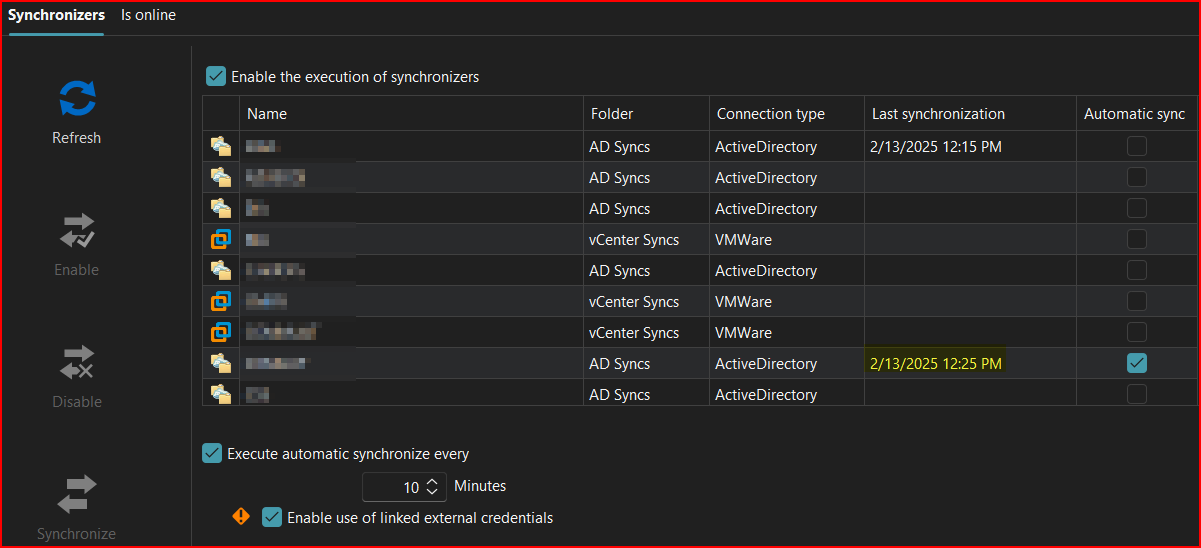

10 Minutes later: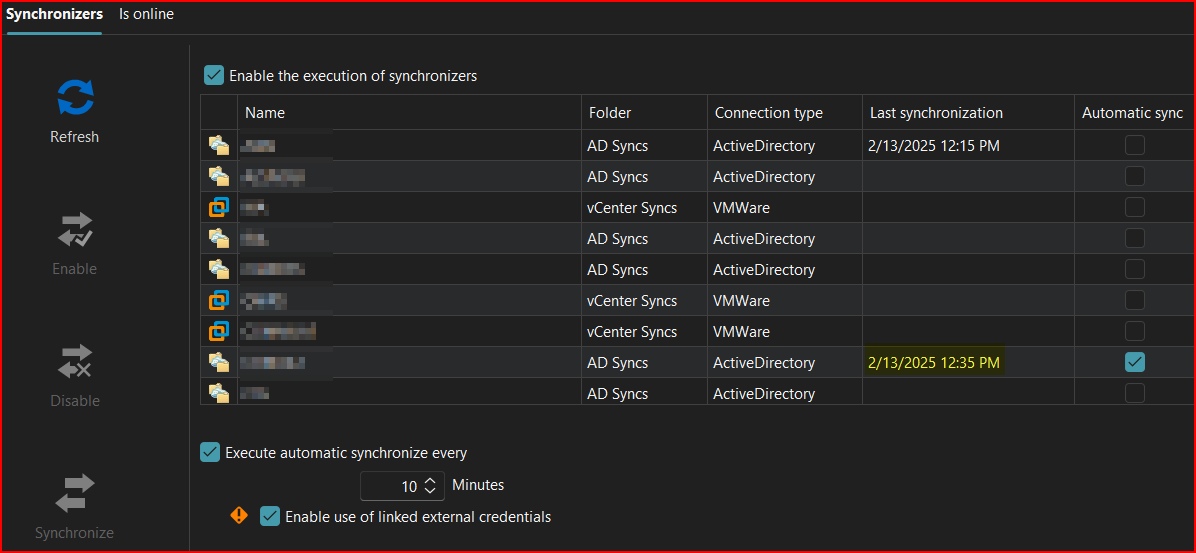

--- Chuck
Overgaard, AZ (-7 MST / Zulu Year-Round)
RDM Version: 2026.3.2.0 64-Bit - Free
de5f3f33-d0b3-43e7-b910-65e7db1bdba5.png
f9b0315a-ba72-45c5-9ee2-a411d2dfb6c0.png
b872d8d1-b981-4533-a71f-9104b6fdd37d.png
5660c95b-73f9-45aa-a0db-3259f3c589f7.png
Thanks for the feedback, Chuck. This is weird. I'll check with our QA department if they're able to reproduce this issue with Keepass specifically. It should be the exact same as Keeper (with which I tested), but maybe I missed something when making the change. I really hope the issue is reproducible here, as otherwise I'm really unsure what might be happening in your environment that prevents it from working.
Regards,
Hubert Mireault
I investigated some more on my end and I think I found the issue. It's specifically when doing a user specific link. This should be fixed with 2025.1.18.0 and latter.
Regards,
Hubert Mireault
I investigated some more on my end and I think I found the issue. It's specifically when doing a user specific link. This should be fixed with 2025.1.18.0 and latter.
Regards,
Good morning Hubert. You are the man!!!!
I upgraded to 2025.1.19.0 Beta yesterday and realized I hadn't tried the Background sync's yet.
I enabled two of my A/D Sync's and what do you know... They went off without a hitch utilizing KeePass credentials, and did not return an error code 49 like usual:
I then went ahead and disabled the Sync on the two A/D Sync's I have setup, and enabled two vCenter Sync's I have setup. Those also went off without a hitch:
So looks like this is finally fixed and working as expected.
I made sure to enable the new option you implemented for the Background Syncs:
There are six different Sync's I just cannot set up as Automatic, because those particular connections require a different VPN connection that I am not always connected to. Those will have to continue to be Manual Sync's.
Please feel free to mark this as resolved / implemented, and I really appreciate the patience and work on this.
--- Chuck
Overgaard, AZ (-7 MST / Zulu Year-Round)
RDM Version: 2026.3.2.0 64-Bit - Free
c6d8b238-09f5-4669-8a23-89ff5307ee2d.png
13bab787-e4fb-4af0-a494-3e3d2178a101.png
af1e4030-a401-4a2c-aeb8-2df129e1d81b.png
Hello,
That's awesome! Thank you for the feedback, I'm really glad we could finally put the finger on what was happening and that the solution works for you.
Don't hesitate to ask if there's anything else we can help with, I'll close this thread since this issue is resolved.
Regards,
Hubert Mireault