AD Synchronizers stopped working after 2024.1.20

Hi, I upgraded to the latest version earlier today. I just tried to run a couple Synchronizers and they are no longer working. Is there any sort of known issues related to this? I ran a sync this morning, before upgrading, and it worked fine.
Some of them have logs like this:
Double click triggered
Double click node:AD Sync (Domain1.net)
ActiveDirectorySyncDescriptor.Sync::Enter
ActiveDirectorySyncDescriptor.Sync::Resolved domain=dc04.Domain1.net
ActiveDirectorySyncDescriptor.CreateConnections::Host=dc04.Domain1.net
ActiveDirectorySyncDescriptor.CreateConnections::ActiveDirectoryComputerType=All
ActiveDirectorySyncDescriptor.CreateConnections::OrganizationalUnit=
ActiveDirectorySyncDescriptor.CreateConnections::ActiveDirectoryFilter=(operatingSystem=*windows*)(!userAccountControl:1.2.840.113556.1.4.803:=2)
ActiveDirectorySyncDescriptor.CreateConnections::SearchScope=Subtree
And some have this with an error as the last line:
Double click triggered
Double click node:AD Sync (Domain2.int)
ActiveDirectorySyncDescriptor.Sync::Enter
ActiveDirectorySyncDescriptor.Sync::Resolved domain=dc01.Domain2.int
ActiveDirectorySyncDescriptor.CreateConnections::Host=dc01.Domain2.int
ActiveDirectorySyncDescriptor.CreateConnections::ActiveDirectoryComputerType=All
ActiveDirectorySyncDescriptor.CreateConnections::OrganizationalUnit=
ActiveDirectorySyncDescriptor.CreateConnections::ActiveDirectoryFilter=(operatingSystem=*windows server*)(!userAccountControl:1.2.840.113556.1.4.803:=2)
ActiveDirectorySyncDescriptor.CreateConnections::SearchScope=Subtree
ActiveDirectorySyncDescriptor.CreateConnections::Bind failed with result code 49
I tried closing and re-opening the program but it didn't help.
Thanks
All Comments (30)
Hello,
Thank you for reaching out to us regarding this,
Could you confirm which version of RDM you were using previously?
To clarify, are the provided logs from under "Help" -> "Application Logs" or were they generated using the Profiler? If you used the profiler, could you confirm which level was used?
Let me know,
Best regards,
Samuel Dery
Hello,
We have reproduced the first issue which is caused by the LDAP filter which we are failing to parse correctly, the issue should be fixed in 2024.1.21.
As for your second issue, it appears to be some sort of Authentication issue, as it is returning error 49 from an LDAP Bind. What type of credentials are being used, are they custom credentials, or linked credentials or pam credentials? Can you trey opening the Active Directory Dashboard with the same credentials and domain?
Thank you,
Paul
I just upgraded to v21. While the Synchronizer is now running, it isn't looking at the filters I set up.
In the Other Filter area, I use this: (operatingSystem=*windows*)(!userAccountControl:1.2.840.113556.1.4.803:=2)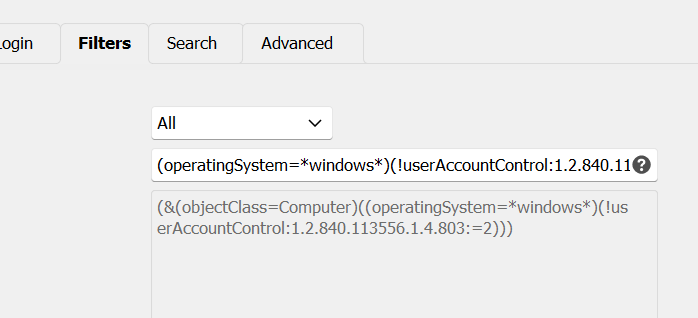
This only syncs Windows servers where the object is Enabled. I just ran a sync and it imported all the machines in AD. Including ones that are not Windows and are not Enabled.
If someone could fix that, that'd be great.
Thanks.
a985dfe7-f11c-4145-a754-2be1ef199f4e.png
I just upgraded to v21. While the Synchronizer is now running, it isn't looking at the filters I set up.
In the Other Filter area, I use this: (operatingSystem=*windows*)(!userAccountControl:1.2.840.113556.1.4.803:=2)
This only syncs Windows servers where the object is Enabled. I just ran a sync and it imported all the machines in AD. Including ones that are not Windows and are not Enabled.
If someone could fix that, that'd be great.
Thanks.
Kelemvor,
Just a tad bit of suggestion here.
Looks like you are missing the 1st AND ! include statement. I got caught on the same thing getting them in the right order.
I had an issue getting the filters to work properly myself. It's not an issue with RDM, it's an issue with making sure the filters are correct. I was setting mine up similar to what you are doing, and after about three days of messing with it, I came to this: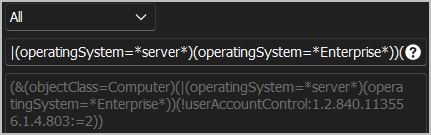
You must start off the filter with the AND include statement. Right now, you just have "Computers" as far as RDM see's the filters, which is correct.
Mine above is listed as this:|(operatingSystem=*server*)(operatingSystem=*Enterprise*))(!userAccountControl:1.2.840.113556.1.4.803:=2
which translates to this:!= include RDM filter of (&(objectClass=Computer) AND(operatingSystem=*server*)(operatingSystem=*Enterprise*)) = O/S type of Server or Enterprise wildcards(!userAccountControl:1.2.840.113556.1.4.803:=2 = Only active accounts for the filter listed.
For your filter to work correctly, it should be this I believe:|(operatingSystem=*server*)(!userAccountControl:1.2.840.113556.1.4.803:=2
You should not have the opening ( or trailing ), as RDM adds this the way it works. Just remember. However many ( must match the amount of ) you have, which I see you have correct in your screenshot.
Hope this helps.
In my honest opinion, there should be absolutely NO filter included by default from RDM when selecting "All". Either that, or there should be a "Custom" selection added where it is completely empty and the user can input what filter is needed.
Hope this helps!
--- Chuck
Overgaard, AZ (-7 MST / Zulu Year-Round)
RDM Version: 2026.3.2.0 64-Bit - Free
e206dd9a-ede3-4708-93af-696aff575091.png
Just a tad bit of suggestion here.
Looks like you are missing the 1st AND ! include statement. I got caught on the same thing getting them in the right order.
I've been using this filter for ages. It has always worked perfectly fine until a week ago when I upgraded to v20 and synchronizers broke.
The text in the screenshot is exactly how it's supposed to be. I don't know what you're talking about with opening and trailing parenthesis. I don't have any. I simply have two statements that get evaluated as AND statements along with the default Computer one. The filter itself is correct as I've used the same thing in Powershell to get the results I want.
Thank you for the details on these LDAP Filters. I can definitely make it work with all these filters just as it worked before. I will log the issue and submit the fix tomorrow to be included in the next build.
Best Regards,
Paul Dumais
Just a tad bit of suggestion here.
Looks like you are missing the 1st AND ! include statement. I got caught on the same thing getting them in the right order.
I've been using this filter for ages. It has always worked perfectly fine until a week ago when I upgraded to v20 and synchronizers broke.
The text in the screenshot is exactly how it's supposed to be. I don't know what you're talking about with opening and trailing parenthesis. I don't have any. I simply have two statements that get evaluated as AND statements along with the default Computer one. The filter itself is correct as I've used the same thing in Powershell to get the results I want.
My apologies for inconveniencing you with my response.
I hope you have a fabulous rest of your week.
--- Chuck
Overgaard, AZ (-7 MST / Zulu Year-Round)
RDM Version: 2026.3.2.0 64-Bit - Free
I just installed the latest version of RDM (.23). The notes said it should fix the ldap problem but it still doesn't work.
This is what's shown in the Filter section in RDM:
(&(objectClass=Computer)(operatingSystem=*windows*)(!(userAccountControl:1.2.840.113556.1.4.803:=2)))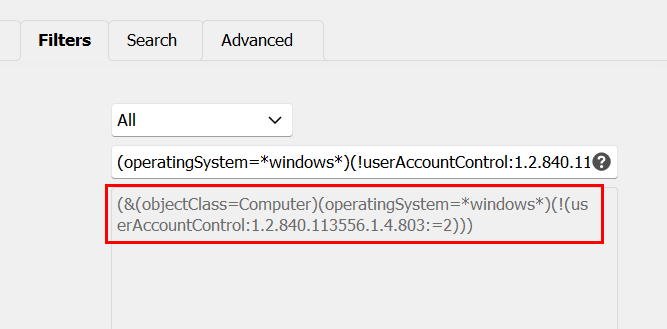
When I did a sync just now, it removed every entry I had so I'm guessing it didn't find anything when it searched.
If I put the exact same filter in a query in Powershell, it returns all my servers.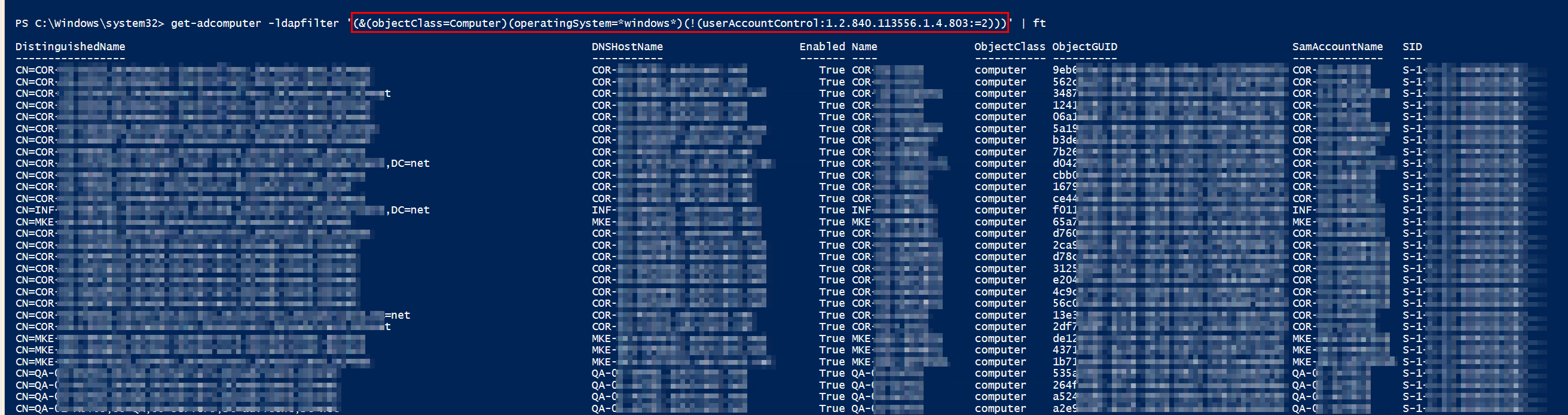
Something is definitely wrong. It seems like it has to do with the filter for Disabled computer. If I remove the userAccountControl section, it runs OK, but returns hundreds of items i don't want because they are Disabled.
Please take another look. If there's a different syntax I should be using to do the query in RDM, let me know.
Thanks.
c59d0d9c-031d-40d6-8dc3-fcd1eccffc54.png
aaae6c1e-d385-48ee-901d-43bab998304b.png
On the bright side, a sync only takes a couple seconds now, instead of 15 minutes, which is awesome!
I had the exact same issue this morning when trying the portable version before installing. It removed all my entries on the A/D sync only when the UserAccount LDAP filter is set. as kelemvor mentioned.
Just utilizing the built in "Server" filter of (&(objectClass=Computer)(operatingSystem=*server*)) returns the following: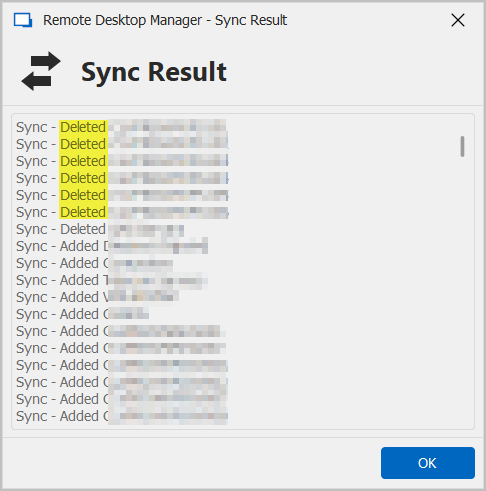
The highlighted are Windows 10 Enterprise Domain Joined machines, which obviously don't have the Server tag in A/D.
When doing the adding the tag for Windows 10 Enterprise (&(objectClass=Computer)(operatingSystem=*server*)(operatingSystem=*Enterprise*)) utilizing the built in "Server" filter, it returns this: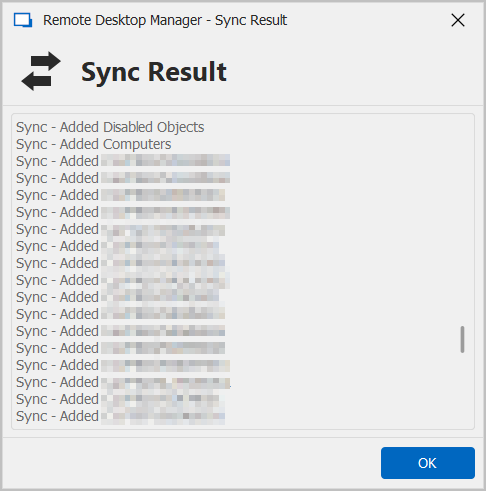
As you can see, it added the Disabled Objects and Computers O/U's, and did not follow the Filters as listed.
When again using the "Servers" built in filter and simply adding the UserAccountControl for disabled objects (&(objectClass=Computer)(operatingSystem=*server*)(!(userAccountControl:1.2.840.113556.1.4.803:=2))) it returns this, which deleted all correct objects: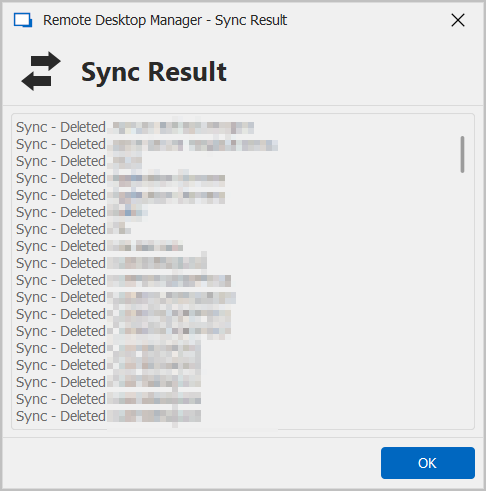
So it seems that the LDAP filter functionality is getting closer, as I see when adding a filter, if it does not compute, then RDM simply shows (&) where before it wouldn't indicate if there were any errors or not.
So it still seems that v2024.1.17.0 is the best program version for the LDAP filters and functionality of (|(operatingSystem=*server*)(operatingSystem=*Enterprise*))(!userAccountControl:1.2.840.113556.1.4.803:=2)) to work the best.
In v2024.1.23.0, the above filter displays an error unless it is changed to (operatingSystem=*server*)(operatingSystem=*Enterprise*)(!userAccountControl:1.2.840.113556.1.4.803:=2), which in turn deletes every single valid entry.
Hope this helps.
--- Chuck
Overgaard, AZ (-7 MST / Zulu Year-Round)
RDM Version: 2026.3.2.0 64-Bit - Free
92c2bd75-3688-4c9f-b6c4-ccbf328f75e7.png
1d2ecf8c-e56b-4559-937b-1174d091c35a.png
aa79ddb4-0015-440d-8bab-4c05f21971ca.png
Same problem here, I had to go back to 2024.1.17.0
Thanks for these details Chuck and Marco, I will bring this back to development and check those same filters in my test environment and get them fixed for our next build.
Best Regards,
Paul Dumais
It appears that we had an issue with the extensible match filter (not disabled), we have now fixed the issue, the fix should be in 2024.1.24.
Thanks,
Paul
It appears that we had an issue with the extensible match filter (not disabled), we have now fixed the issue, the fix should be in 2024.1.24.
Thanks,
Paul
Thank you sir. I know I really appreciate it.
I know you folks depend on us in the "real world" to help keep this software working correctly at its best.
--- Chuck
Overgaard, AZ (-7 MST / Zulu Year-Round)
RDM Version: 2026.3.2.0 64-Bit - Free
Hello,
The new version has been released please try it and let me know if it fixes the issues you are having with the AD Synchronizers.
Paul
At first glance, it looks like it's working again. I'll take a closer look when I have time later this afternoon.
Thanks!
Good afternoon,
I agree with @kelemvor that it seems to be working. Here's some testing results using v2024.1.24.0 - Portable:
Started with these folders for one domain: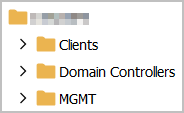
And filters set to the working ones from v2024.1.17.0:|(operatingSystem=*server*)(operatingSystem=*Enterprise*))(!userAccountControl:1.2.840.113556.1.4.803:=2
Which corelates to:
Before running the A/D Sync, I deleted all the folders under that specific client, which left me with the root folder where the A/D Sync stashes everything:
After running the sync, I see the following results: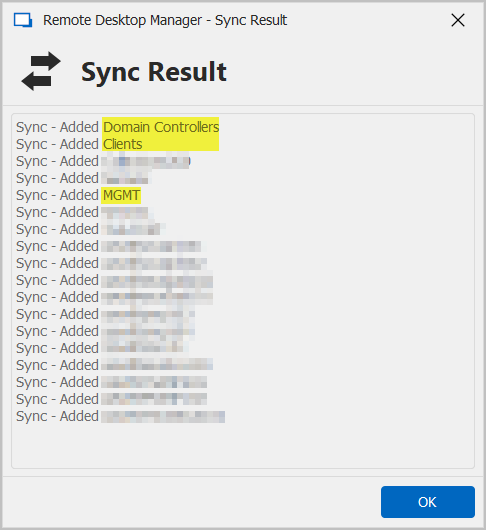
And folder structure seems to be back to the way it was: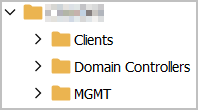
And the results of the Profiler also correspond with the process: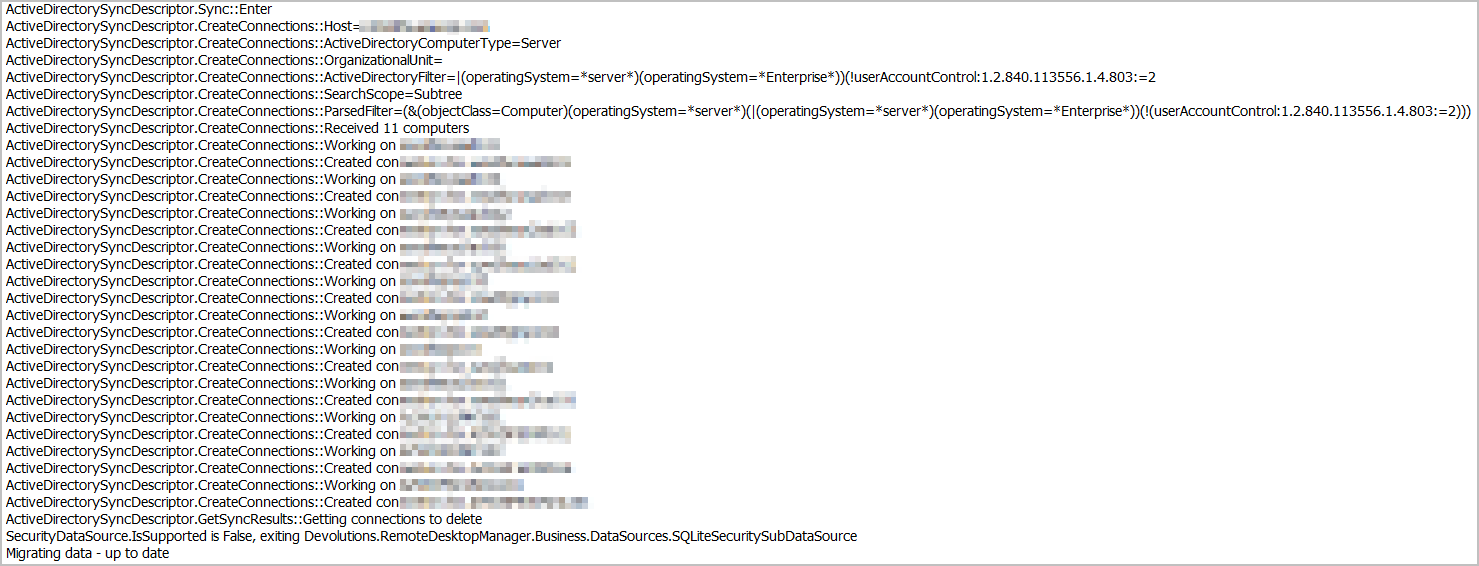
I also enabled the Background Syncs with a 10 minute sync for that same domain, which seem to have not worked since before v2024.1.17.0. I also enabled one other domain that only has one active server on it, and deleted that entry from RDM: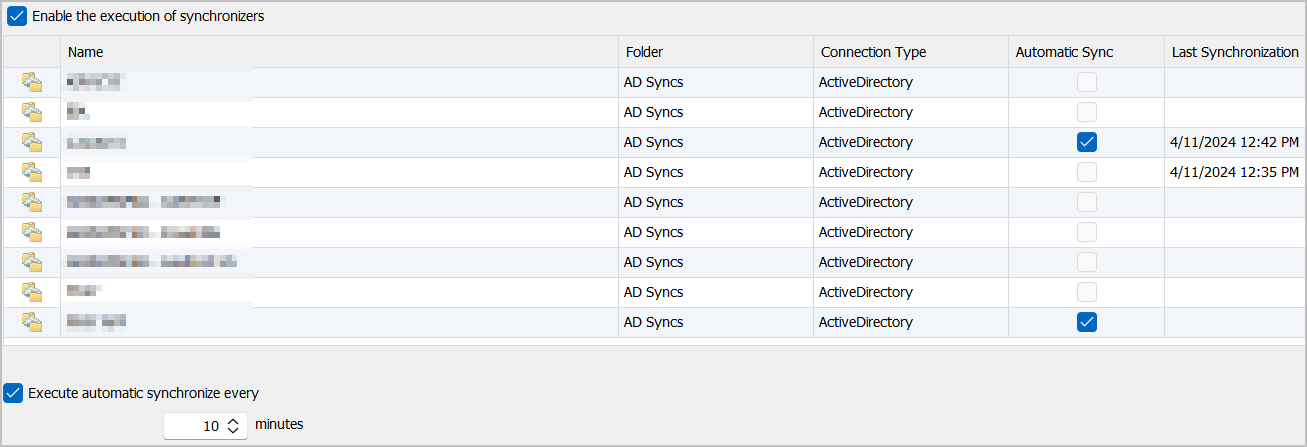
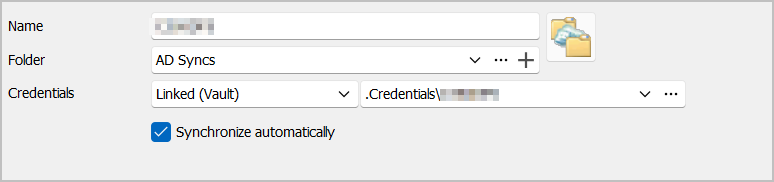
The Auto Sync kicked off as expected: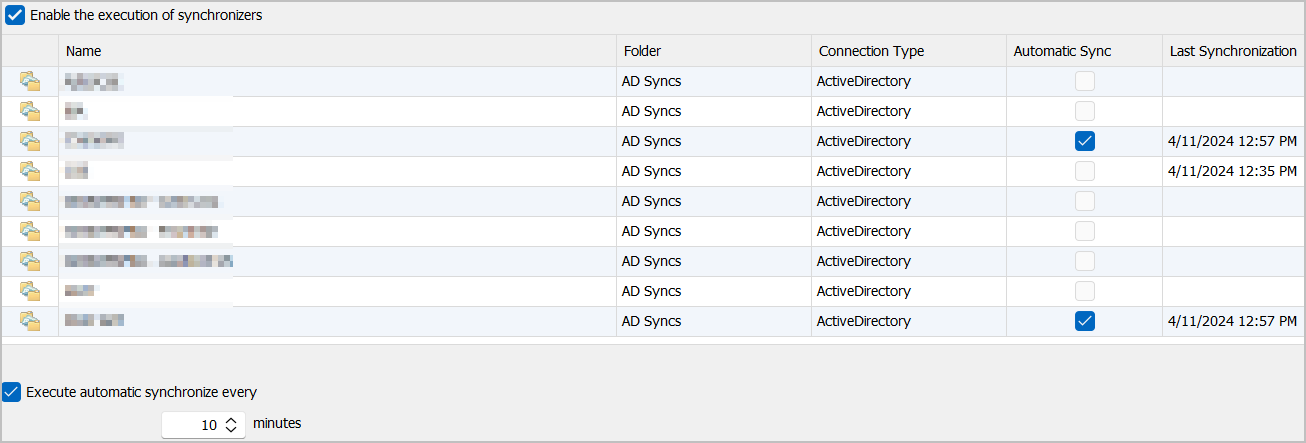
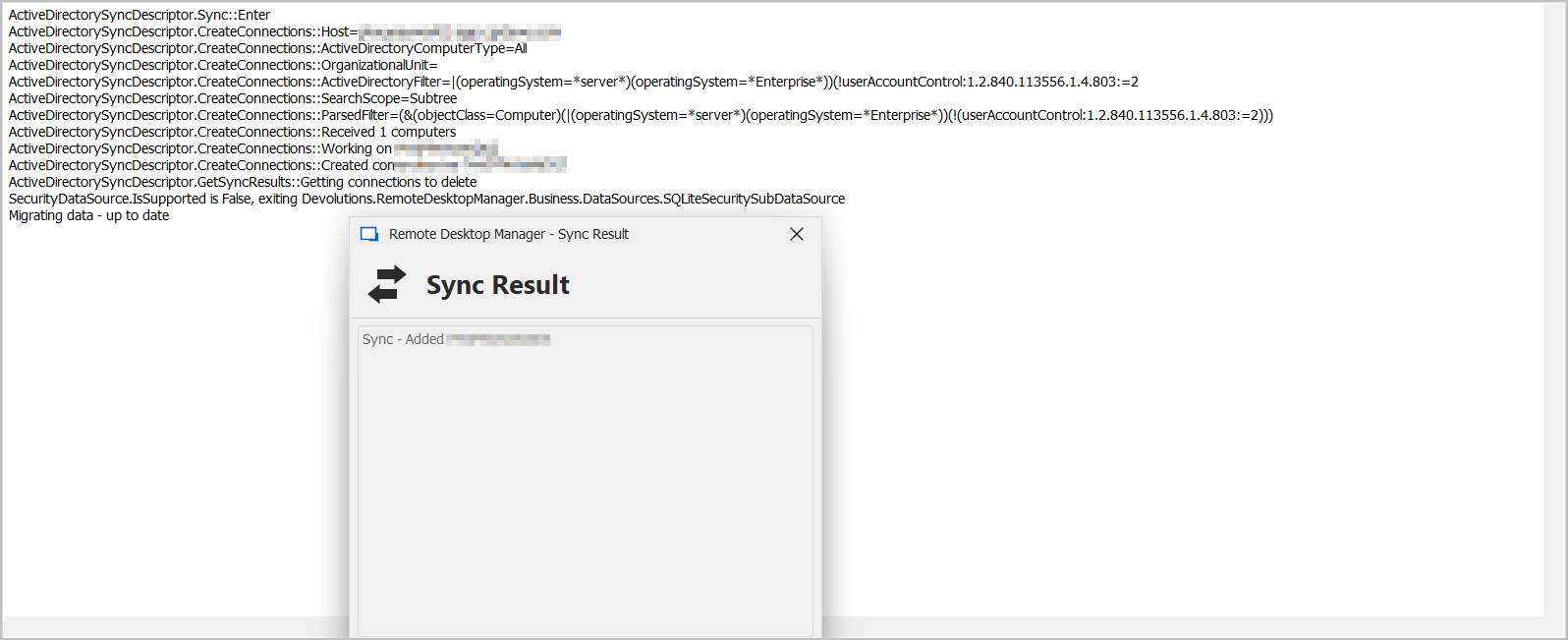
However, I received the following results via the Profiler: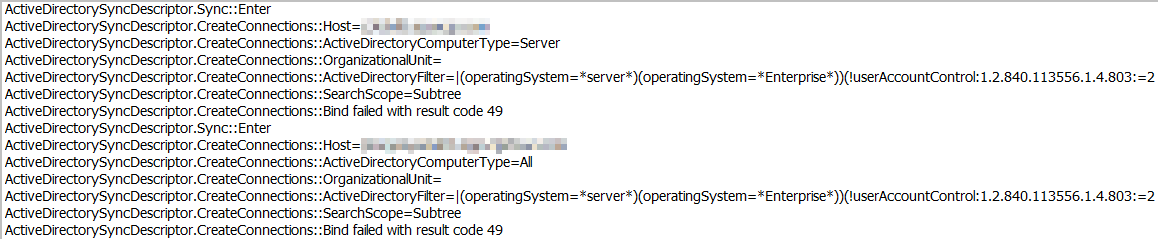
Without making any changes, I once again kicked off a manual scan for both domains I have set up to auto with the following separate results: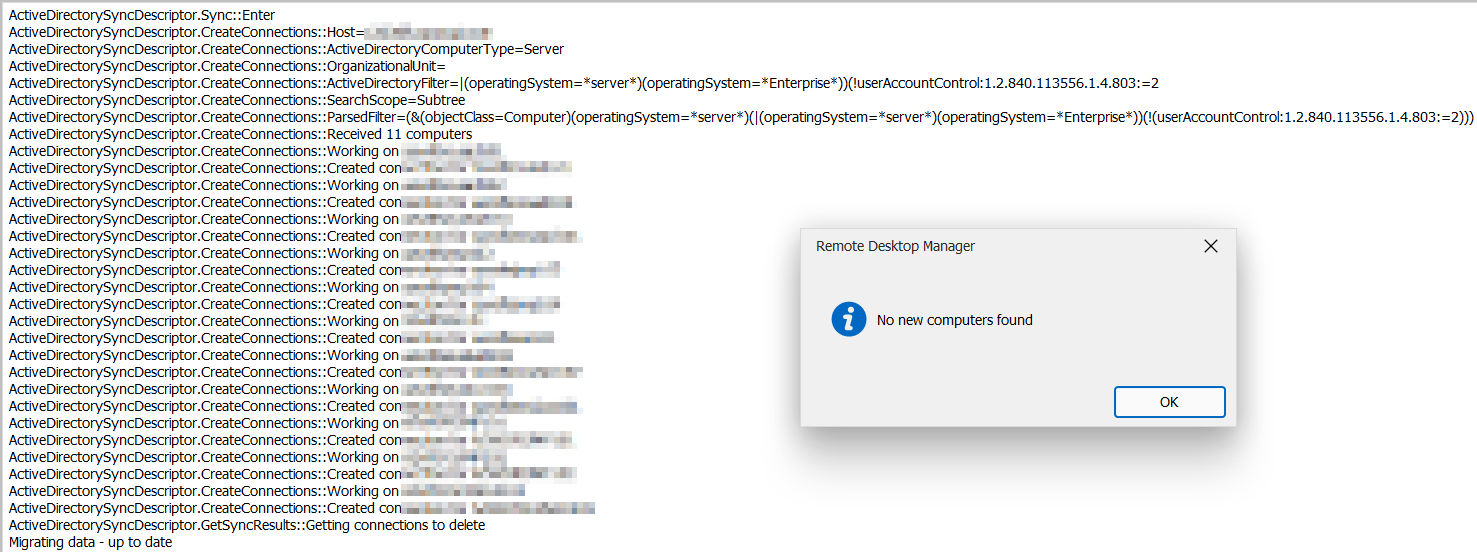
----------------------------------------------------------------------------------------------------------------------------------------------------------------------------------------------------------
Both results returned exactly what I expected.
Hope this helps with troubleshooting the Auto Syncs.
For the most part, the manual syncs seem to be fixed in this version.
Huge thank you for getting to this point with the syncs. Just a little bit of work left to do for the auto sync's, and then it'll be working like a champ once again!
--- Chuck
Overgaard, AZ (-7 MST / Zulu Year-Round)
RDM Version: 2026.3.2.0 64-Bit - Free
56159728-b0f4-4c90-85d1-13c978c31a09.png
1a088eed-1d41-4021-84db-19a24292af2a.png
aad05e1e-67af-468a-9574-cbe3c52b6dd0.png
e305119d-caa3-4196-a7c7-0b911193b9ad.png
056de2e9-7945-46a3-b30e-082de7d1d0db.png
0236ba7c-9175-43a8-9a89-a4029ca1ae97.png
ce3e3930-b14b-40ed-9b80-b55b0b4953bd.png
e8f753bb-1a26-4a51-93bd-e60274488fba.png
d61425ca-f32e-47f4-86a1-a8dc930c8e7d.png
c0156a07-9544-4b0a-be64-d3575ac89f0b.png
dcd7e540-1100-4aad-866b-36595cd92bd8.png
16da451e-3a4f-4e8f-b7c0-78494dcdce10.png
Hello Chuck,
Happy to hear it is mostly working! Error 49 is an authentication failure. I see you have linked credentials, I will test if this is an issue.
Thanks,
Paul
I did a couple more syncs and everything looks good from my end. Thanks for getting this fixed up.
Hello Chuck,
Happy to hear it is mostly working! Error 49 is an authentication failure. I see you have linked credentials, I will test if this is an issue.
Thanks,
Paul
Yes sir. I am using Linked Creds on those.
So I just let the A/D Sync kick off with the Linked Credentials from KeePass with these results:
Then I changed from Linked Creds to Username & Password with manually entered credentials and got these results: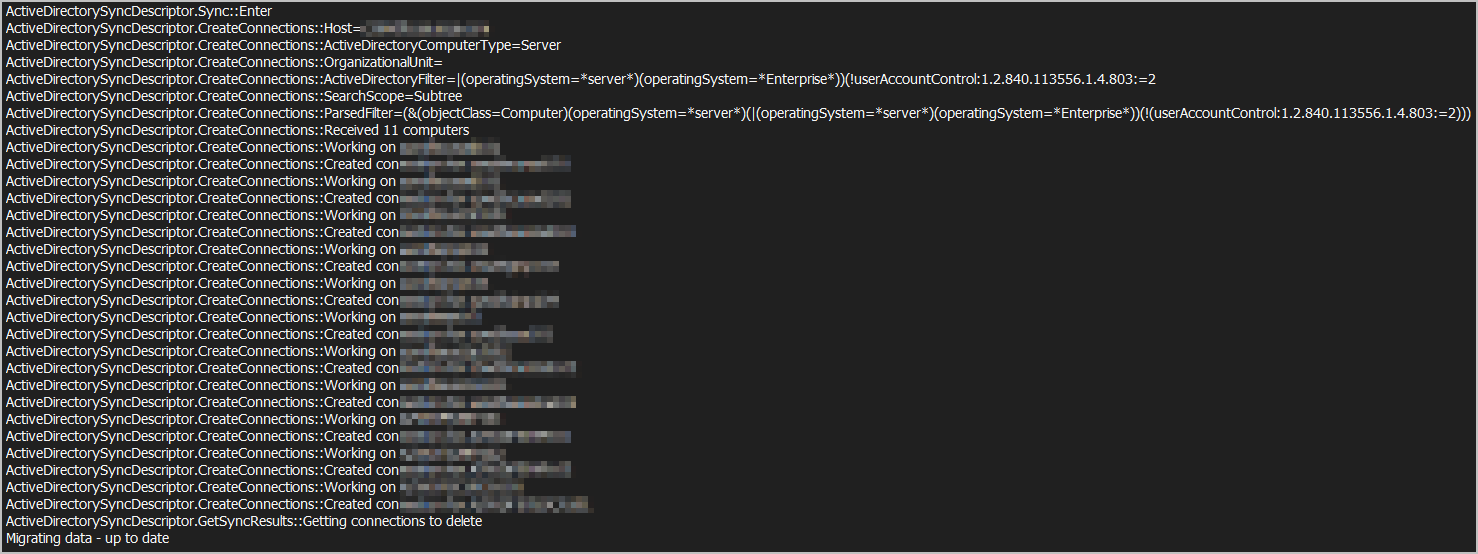
So yes, definitely seems to be an issue when the A/D Sync's are set up using Linked Credentials and Auto Sync.
Hope this helps.
--- Chuck
Overgaard, AZ (-7 MST / Zulu Year-Round)
RDM Version: 2026.3.2.0 64-Bit - Free
1d9582ef-1644-4a74-b743-4df863f02333.png
24a1e42d-0693-4752-843c-fa29347fbb8d.png
Hello Chuck,
I believe the issue is with the KeePass credential resolving, not necessary the linked credentials, as I tested that it works fine for me. When you run the manual sync do you get any KeePass prompts? When we run the auto-sync we run it in silent mode as to not prompt you for anything, since it's running the background, thus it could be that retrieving the KeePass authentication information is failing. Do you know if this worked correctly in previous versions to 2024.1.17?
Thanks again for your incredible help and patience while we resolve this issue.
Paul
Hello Chuck,
I believe the issue is with the KeePass credential resolving, not necessary the linked credentials, as I tested that it works fine for me. When you run the manual sync do you get any KeePass prompts?
Negative, sir. There are never any prompts for KeePass, as it always pulls the credentials correctly. Only time I ever get a prompt from K/P is when I haven't updated a new password after changing it on the domain.
When we run the auto-sync we run it in silent mode as to not prompt you for anything, since it's running the background, thus it could be that retrieving the KeePass authentication information is failing. Do you know if this worked correctly in previous versions to 2024.1.17?
The automatic syncs haven't worked all the way back to 2023.3.39. That is when I first started heavily utilizing this functionality. I had a couple Teams calls with support staff going over this, which I believe a couple of them have brought the A/D Sync functionality to where it is today in totality.
Thanks again for your incredible help and patience while we resolve this issue.
Paul
Absolutely, sir! I'm sure others on here also appreciate the assistance on y'all's end as well to get the function where is currently is in the software.
--- Chuck
Overgaard, AZ (-7 MST / Zulu Year-Round)
RDM Version: 2026.3.2.0 64-Bit - Free
One other thing as well Paul, that is a huge improvement from any previous versions...
On one of my VM's that I use RDM on, in v2024.1.17.0 it was taking almost 10 minutes for the A/D Syncs to manually run for three domains.
On that same VM, after upgrading this morning to v2024.1.25.0, it took less than one minute for the same three domains.
So please, whatever y'all do, don't mess with the LDAP structure calls you have on the backend of the software.
This so far seems to be the most efficient LDAP structure y'all are using since v17.0 which was extremely slow.
Thanks again!
--- Chuck
Overgaard, AZ (-7 MST / Zulu Year-Round)
RDM Version: 2026.3.2.0 64-Bit - Free
Hello Chuck,
Thanks for the vote of confidence on the new AD Sync implementation, we just need to work out these last few issues, but you are right we will stick with the new LDAP method, as it's much faster, more flexible and will allow us to do cool stuff in the future like running sync's over AD on remote networks using Devolutions Gateway.
Can you try using non-linked credentials or linked credentials to a local set of non-keepass credentials and see if you get the same issue? I'm going to try configuring my environment to use KeePass but it might take me a little while.
Thanks,
Paul
Hello Chuck,
I managed to reproduce your issue with KeePass linked credentials. I spoke with other members of the development team, and it appears that we do not support resolving credentials from external sources for background Synchronizers, the reason for this is that it may cause popups and user input while the app is in the background which could be undesirable, It would be quite difficult for us to enable the resolving for all synchronizers at the moment, but we may consider it in the future, would it be possible for you to use basic credentials instead of KeePass for the synchronizers?
Thanks,
Paul
The problem with not using linked credentials, is running the risk of locking out A/D account(s).
I have a plethora of domains that all have different requirements for password expiration. Adding manual credentials to the A/D Syncs, and running them on a manual basis, when passwords change and they are missed, the accounts will lockout.
This is the whole reason for utilizing linked credentials in KeePass, so that there is one specific place to update the password, and not risking forgetting other places where the manual accounts are listed.
If this is something that cannot be done, then I will just not utilize this feature.
I am not sure what popups are referred here, but there is obviously a good, valid reason for their decision.
Thank you for the update.
--- Chuck
Overgaard, AZ (-7 MST / Zulu Year-Round)
RDM Version: 2026.3.2.0 64-Bit - Free
Hello Chuck,
I managed to reproduce your issue with KeePass linked credentials. I spoke with other members of the development team,
and it appears that we do not support resolving credentials from external sources for background Synchronizers, the reason for this is that it may cause popups and user input while the app is in the background which could be undesirable,
Good morning, sir.
Would you mind elaborating on what "pop ups" you and the team mentioned that may be undesirable? Only time I ever receive any pop up from KeePass with RDM is when it is not open for the very 1st connection. That is a simple fix within RDM that has been there since almost the beginning of the software.
Thanks!
It would be quite difficult for us to enable the resolving for all synchronizers at the moment, but we may consider it in the future, would it be possible for you to use basic credentials instead of KeePass for the synchronizers?
Thanks,
Paul
--- Chuck
Overgaard, AZ (-7 MST / Zulu Year-Round)
RDM Version: 2026.3.2.0 64-Bit - Free
Hello Chuck,
Sorry about the delayed answer. We will keep this in mind as a future improvement for the synchronizers, but as Paul mentioned, it comes with its challenges, with two main ones:
- Automatic synchronization: The automatic synchronization feature can trigger at certain time intervals. An administrator that configures their synchronizers to point to an external password manager as the source of its credentials may be prompted by the password manager (for example to select a credential from a list, perform an SSO login, or like in your case with Keepass, to make sure the application is opened or the database is selected) when they synchronize. Having this behavior happen "out of nowhere" can be very jarring for a user and could create incomprehension and support cases on our end.
- Scheduler-based synchronization (Devolutions Server): If the synchronizer is configured with Devolutions Server to run through the scheduler, any external credential like this could not work, as Devolutions Server and its scheduler cannot resolve credentials like Keepass, Lastpass, etc.
Because of these two points, I'm hesitant about allowing these kinds of credentials, but I understand that this would be a good improvement in the flow and could avoid potential errors (different credential in RDM and Keepass) for you.
Regards,
Hubert Mireault
Hello Chuck,
Sorry about the delayed answer. We will keep this in mind as a future improvement for the synchronizers, but as Paul mentioned, it comes with its challenges, with two main ones:
- Automatic synchronization: The automatic synchronization feature can trigger at certain time intervals. An administrator that configures their synchronizers to point to an external password manager as the source of its credentials may be prompted by the password manager (for example to select a credential from a list, perform an SSO login, or like in your case with Keepass, to make sure the application is opened or the database is selected) when they synchronize. Having this behavior happen "out of nowhere" can be very jarring for a user and could create incomprehension and support cases on our end.
- Scheduler-based synchronization (Devolutions Server): If the synchronizer is configured with Devolutions Server to run through the scheduler, any external credential like this could not work, as Devolutions Server and its scheduler cannot resolve credentials like Keepass, Lastpass, etc.
Spot on explanation and transparency!!!
This makes complete sense for each. I myself have RDM set to check for KeePass on load, so I wouldn't ever get the popup "out of nowhere", but I could see how someone who doesn't have it loaded could. And, if I set the Synchronization to run in the background, would it just affect my creds? Or when it does run say every 30 minutes on a schedule within RDM, would it randomly pick someone else's creds?
Because of these two points, I'm hesitant about allowing these kinds of credentials, but I understand that this would be a good improvement in the flow and could avoid potential errors (different credential in RDM and Keepass) for you.
With the explanation you gave above, it makes complete sense as to why it does not work at present time, and completely understand why it would be difficult to implement.
Regards,
I appreciate the response, and if there is a way on your end to mark this as some sort of Resolved solution, or How-To, or whatever solution you would like, please do and have a wonderful day!
--- Chuck
Overgaard, AZ (-7 MST / Zulu Year-Round)
RDM Version: 2026.3.2.0 64-Bit - Free
No problem, I'm glad I could clarify the situation for you. For now we will consider this thread solved but keep an eye out for additional user feedback regarding this. We're always open to reconsidering this if we find a better solution and if there's a lot of requests for this.
Regards,
Hubert Mireault