Find/filter open Sessions/Connections in RDM Navigation
Find/filter open Sessions/Connections in RDM Navigation
0 vote

Hi,
is there a way to search/filter all open(!) Sessions/Connections in RDM Navigation vault tree like I can filter folder- and sessionobject names using the "search field" at the bottom of the navigator panel?
This would be great because using the Navigation "open connection" panel, i can't see the vault folder structure, so only the name of the connection object.
Best regards,
Daniel
All Comments (8)
Hello,
Thank you for reaching out to Devolution Support.
Currently, it seems that this feature is not available. I will transfer your forum post to the feature request section, where our developers can review and consider your idea.
Best regards,
Carl Marien
Hello,
We could add a navigation option for "show only opened sessions", similar to the one we have to show only favorites for example: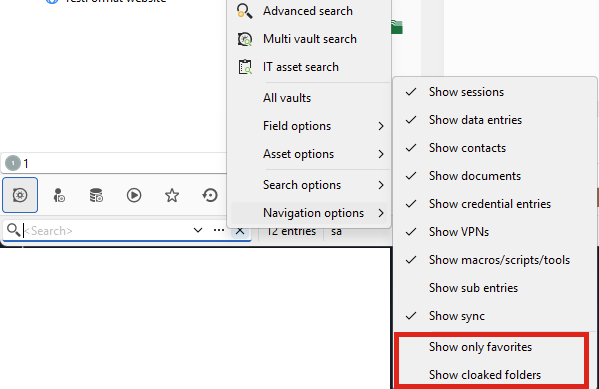
Just to confirm with you, are you looking to only filter the current vault? I'm thinking of a scenario where you have multiple entries opened and they come from different vaults. This solution would not work for this specific case as these filters only work for the current vault.
Let me know what you think. If this would work for you then I will open an internal ticket.
Regards,
Hubert Mireault
49d443e3-aefe-48ff-9eb2-6d1492df2258.png
Hi Hubert,
The filtered view should display open connections and there folders (including the entire folder hierarchy).
A keyboard shortcut to toggle (enable/disable) this new "Filter to Open Connections" feature would be very useful. This would allow us to easily focus on the connections we are currently working with and quickly switch back to the normal view to open a new one.
* Where to add this new filter
I would add this filter to "Search Options" instead of "Navigion options" because...
In "Navigation option", you view/hide static "object types/classes" or there static attributes, but not there "values".
In "Search options", you filter to the *values* of objects or there attributes like "Name of an object", current behavior ("open connection") or temp. calculated value like "disabled entries".
So, filtering to open connections is about the same than filtering a name (value).
* Search in multiple Vaults
When searching across all vaults, any open connection and corresponding folder structures from other vaults should also be added to the current Navigator view. In this case, the selected vault name at the top of the Navigation panel would no longer reflect the connections accurately. It should be replaced with something like "All Vaults" instead.
This potential new "show open connection in multiple vaults"-filter will be the first feature to utilize multiple vaults in Navigation panel. All other current implemented filter will filter objects in the current selected vault. Since this potential new "Multi-Vault Filter View" might not be familiar to users, filtering based on the currently selected vault might be a better approach.
Or, let's go the big approach an add a menu to "Search Options" like "(x) filter/search actions in all vaults".
So, each search/filter operation (e.g. for a name, open connections, ...) will search in all vaults.
Best regards,
Daniel
Hello Daniel,
I'll go over some of your points but overall this gives us enough information to open a ticket and eventually work on this, thank you for the details.
The filtered view should display open connections and there folders (including the entire folder hierarchy).
A keyboard shortcut to toggle (enable/disable) this new "Filter to Open Connections" feature would be very useful. This would allow us to easily focus on the connections we are currently working with and quickly switch back to the normal view to open a new one.
I've noted this in our ticket, it should not be a problem to have this behavior.
* Where to add this new filter
I would add this filter to "Search Options" instead of "Navigion options" because...
In "Navigation option", you view/hide static "object types/classes" or there static attributes, but not there "values".
In "Search options", you filter to the *values* of objects or there attributes like "Name of an object", current behavior ("open connection") or temp. calculated value like "disabled entries".
So, filtering to open connections is about the same than filtering a name (value).
The intended difference between the "search options" and the "navigation options" is when they apply.
Search options: these apply when you enter a value in the search field
Navigation options: these apply all the time, hence why the similar option "show only favorites" is here
I think the disabled/expired/archived settings located in the "search options" should have instead been located in the "navigation options". At the moment the split is confusing as it's not totally coherent. We'll revise this in the future, but at any rate it shouldn't affect the feature request here.
* Search in multiple Vaults
When searching across all vaults, any open connection and corresponding folder structures from other vaults should also be added to the current Navigator view. In this case, the selected vault name at the top of the Navigation panel would no longer reflect the connections accurately. It should be replaced with something like "All Vaults" instead.
This potential new "show open connection in multiple vaults"-filter will be the first feature to utilize multiple vaults in Navigation panel. All other current implemented filter will filter objects in the current selected vault. Since this potential new "Multi-Vault Filter View" might not be familiar to users, filtering based on the currently selected vault might be a better approach.
Or, let's go the big approach an add a menu to "Search Options" like "(x) filter/search actions in all vaults".
So, each search/filter operation (e.g. for a name, open connections, ...) will search in all vaults.
At the moment we'll go with showing only the current vault, due to technical limitations. Good news though, is that we're currently working on improving a lot of our architecture to allow loading multiple vaults at the same time. This will allow a lot of useful new features, and this is the kind of thing that we could eventually look into. The post by my colleague Stéfane here can give you a little more information as to what doors this will open.
I hope that the solution will work for you at the moment and that I could explain why we're going with this at the moment.
Regards,
Hubert Mireault
> I hope that the solution will work for you at the moment and that I could explain why we're going with this at the moment.
Thank you—your suggested solutions will work perfectly for us!
Best regards,
Daniel
Hallo Hubert,
is there a relase date or version for this new feature?
Best regards,
Daniel
Hello Daniel,
At the moment I can't give you an ETA, as we're working on stabilizing our 2025.1 release that is slated to come out in a few weeks.
Regards,
Hubert Mireault
Hello,
We've added an option to browse only opened sessions. You can find this option in the navigation options of the filter (as specified by Hubert Mireault).
You can expect these changes to take effect with the upcoming 2025.1.30 version.
Regards,
Jafran Majeau