Help with secret server interagtion (two login options)

Hi,
Been using the integration for SS for a while and its straight forward easy to use.
Today I was on boarding some new users to RDM who have a different way of working and they have two different logins for SS.
I had them create the SS entry and select SSO as per our usual process and it worked.. great.. However, that was only half of the logins they require.. the others are on the other login and can't figure out a way for them to sign out of the exist one or setup a second one with out it still signing to the first session..
Both accounts are pointing at the same SS session.
Thanks
Iain
Version 2026.1.20.0 64-bit
Data Source SQL
All Comments (3)
Hello Iain,
Thanks for reaching out to the Devolutions support team.
As far as I can see, there are no linked credentials in the entry or the My User settings.
Here is how I see this: there are two ways to make it work.
1- Configure the other credential entry in their user vault and use the credential configuration to find by name (user vault).
Like this, you can have multiple entries and use various authentication credentials to access the Secret Server.
https://docs.devolutions.net/rdm/kb/knowledge-base/credentials-find-by-name/
2- Create two or custom users in RDM and link those accounts together.
Having two different database information in RDM with different usernames will allow you to configure the My Account settings and keep the same configuration on your sessions.
https://docs.devolutions.net/rdm/kb/how-to-articles/implement-custom-login-mode/
https://docs.devolutions.net/rdm/kb/how-to-articles/link-account/
Let us know which scenario is more likely to fit your needs.
Best regards,
Patrick Ouimet
Hi Patrick,
Not sure either will work for us if I am honest.
I think this is due to me not explaining the issue very well so will try again..
The two accounts in question are the accounts used to log into secret server.
User has integration configured as follows: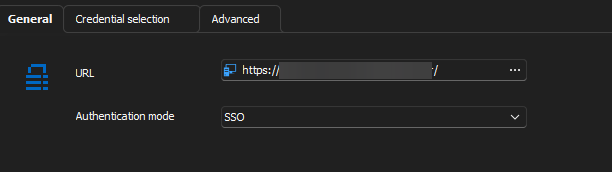 When the pop appears for signing in they have two choices. Depending on which account they select will determine which accounts will appear in the list.
Thanks
Iain
Version 2026.1.20.0 64-bit
Data Source SQL
0c1e6120-81db-431e-a373-91395c0aa0e2.png
Subject: Managing Account Sessions in Secret Server
Hello Iain,
The Secret Server manages the SSO (Single Sign-On) login is managed on their side.
Users who need to switch accounts during the day can simply log out and relaunch their sessions.
Alternatively, you can connect to a different server using another account to initiate separate sessions.
It might be useful to check with Delinea Secret Server to see if they support this type of multiple authentication. Additionally, exploring the token lifetime might offer a potential solution.
Best regards,
Patrick Ouimet