SSH with Kerberos (via MIT Kerberos)

Hello,
Setting: RDM Free 2024.3.27 64-bit on Win 10 Pro x64 Workstation (non domain joined) german OS
DC: dc1.sub.domain.zz
Host: vm1.sub.domain.zz
Username: account1
I have trouble getting SSH via GSSAPIAuthentication (valid TGT exists in MIT Kerberos for Windows 4.1 64-bit) to work.
I create an SSH-Terminal (with the SSH written in the logo), GSSAPI authentication setting ticked
When run, it gives a prompt to enter username (which was filled in already in the setting), when I enter it, it follows:
error Assertion failed!
Program ...
File: \threads.c
Line 334
Expressions: destructors_set[keynum] == 0
Then I hit "ignore" and log shows:
[22.01.2025 12:48:27] Devolutions Protocols version: 2025.1.15.1 Windows
[22.01.2025 12:48:27] Error initializing GSSAPI context: An invalid status code was supplied ()
[22.01.2025 12:48:27] Bytes sent: 1484, Bytes received: 1665
[22.01.2025 12:48:27] Packets sent: 6, Packets received: 7
[22.01.2025 12:48:27] Kex completed: 1
When I try this directly as SSH-Tunnel setting for the RDP-connection, it would tell me more
[22.01.2025 12:51:12] Devolutions Protocols version: 2025.1.15.1 Windows
[22.01.2025 12:51:12] Terminal font: Courier New [Courier New, fixed=True]
[22.01.2025 12:51:12] Starting SSH, verbose level: 2
[22.01.2025 12:51:12] Setting up connection
[22.01.2025 12:51:15] Connecting to port: 22 (IP any)
[22.01.2025 12:51:15] SSH banner: SSH-2.0-OpenSSH_for_Windows_8.1

[22.01.2025 12:51:15] Sending kex init
[22.01.2025 12:51:15] Received kex init
[22.01.2025 12:51:15] Selected algorithms: curve25519-sha256, ssh-ed25519, chacha20-poly1305@openssh.com, chacha20-poly1305@openssh.com, implicit by cipher, implicit by cipher, none, none
[22.01.2025 12:51:15] Sending Ed25519 kex init
[22.01.2025 12:51:15] Received Ed25519 kex reply
[22.01.2025 12:51:15] Successfully authentified server
[22.01.2025 12:51:15] Sending new keys message
[22.01.2025 12:51:15] Received new keys message
[22.01.2025 12:51:15] Sending userauth service request
[22.01.2025 12:51:15] Received extension info message
[22.01.2025 12:51:15] Server accepts public key types: ssh-ed25519,ssh-rsa,rsa-sha2-256,rsa-sha2-512,ssh-dss,ecdsa-sha2-nistp256,ecdsa-sha2-nistp384,ecdsa-sha2-nistp521
[22.01.2025 12:51:15] Received service accepted message
[22.01.2025 12:51:15] Using GSSAPI authentication
[22.01.2025 12:51:17] Using MIT kerberos library for GSSAPI
[22.01.2025 12:51:17] Sending userauth init request
[22.01.2025 12:51:17] Received userauth failure: publickey,gssapi-with-mic,keyboard-interactive
[22.01.2025 12:51:17] Starting GSSAPI authentication
[22.01.2025 12:51:17] Available mechanisms for GSSAPI:
[22.01.2025 12:51:17]     krb5 Kerberos 5 GSS-API Mechanism [2A864886F712010202]
[22.01.2025 12:51:17]     krb5 Kerberos 5 GSS-API Mechanism [2B05010502]
[22.01.2025 12:51:17]     krb5 Kerberos 5 GSS-API Mechanism [2A864882F712010202]
[22.01.2025 12:51:17]     iakerb Initial and Pass Through Authentication Kerberos Mechanism (IAKERB) [2B0601050205]
[22.01.2025 12:51:17]     spnego Simple and Protected GSS-API Negotiation Mechanism [2B0601050502]
[22.01.2025 12:51:17] Sending userauth GSSAPI: 5 OIDs proposed
[22.01.2025 12:51:17] Received userauth gssapi response
[22.01.2025 12:51:17] Selected mechanism: krb5 Kerberos 5 GSS-API Mechanism [2A864886F712010202]
[22.01.2025 12:51:17] Using host principal name: host/vm1.sub.domain.zz
[22.01.2025 12:51:17] Error initializing GSSAPI context: An invalid status code was supplied ()
[22.01.2025 12:51:17] Disconnection in progress
[22.01.2025 12:51:17] Bytes sent: 1484, Bytes received: 1665
[22.01.2025 12:51:17] Packets sent: 6, Packets received: 7
[22.01.2025 12:51:17] Kex completed: 1
[22.01.2025 12:51:17] Disconnecting
The ssh works with putty v0.82+MIT Kerberos just fine, also port forwarding with plink. But with RDM I can't see any success.
Am I missing some setting to change? Or does it not work with grabbing a TGT from MIT Kerberos? Do you need further information?
Let me know.
Cheers.
All Comments (23)
Hello Skyemu,
Thank you for contacting us on that matter!
Could you please provide us with a recording showing the steps that led to the issue? This will allow us to investigate and try to reproduce the issue and we will be better equipped to diagnose and resolve the issue. I sent you all the information in a Direct Message on where to provide us with the recording.
If you have any other questions, feel free to let us know.
Best regards,
Maxim Robert
Hello M. Robert,
thanks for your reply. I'm afraid, I am not allowed to install and use video recording software. But I think, I could build a pdf file, containing images and descriptions of every single step and setting, if that would do it as well.
Cheers.
Hello Skyemu,
Thank you for your response!
I wanted to let you know that I've created an internal ticket for your issue and sent you an email with details on scheduling a session. During this session, we’ll review your issue, observe the behaviour, and work to reproduce the problem on my end or try to resolve it directly.
Thank you for your collaboration. If you have any other questions, feel free to let us know.
Best regards,
Maxim Robert
Hey,
well, that might not be possible. Since it is not a LAB environment and I would have to create one (or ask to be created) and then ask our IT-Security Officer if they'd even allow someone having a remote looking session ... it's pretty restrictive here as part of public service infrastructure.
I found out why SSH was asking for auth. even though it has a username given and settings were set to "no" for interactive mode: I had set to use UPN for username format in the advanced settings on the left tree..
I guess it was something I originally intended for RDP with Kerberos, as it needs the UPN - so I wanted to make sure RDM uses that.
Though it does not make much sense to me, SSH tries to use UPN, given it does not even have a domain field.
Anyway since we tried and tried several things, we came to the conclusion RDPing over SSH with Kerberos simply does not work - if you access SSH with Kerberos and do a port forward with "localhost" then RDP tries to check localhost as SPN.
So we created a workaround:
- SSH with Kerberos to the FQDN of the target server (either putty or OpenSSH on Windows) for first contact and placing the public key into the user .ssh folder.
- change Windows hosts file for the FQDN of the target server to 127.0.0.2 on the Workstation
- create RDP entry with SSH tunnel in RDM, SSHing to the IP with key, port forwarding from 127.0.0.2 to target FQDN in local mode with dynamic port and RDP entry target FQDN with full credentials given
Weird workaround, but this way we do not need to grab a TGT before and transfer it over the tunnel, as it is done at target's side - and we also do not need to worry about RDM's SSH with Kerberos as a side effect.
I have not tested yet, if getting the Kerberos ticket via klist on the Windows workstation and then use RDM's SSH with Kerberos would end up in an error, too or not (compared to using MITK)
So for now, it is not on my priority list and since it is a big project atm, I won't find time to create a LAB env and see that we might go through the original issue together.
I'll keep in on my list for this year, because in general I prefer to set it all up with RDM instead of having some putty stuff next to it, even for one time use.
Thank you for your time and the support, and the possiblity for deeper support.
I hope, we can resolve it when there is time this year, then.
Cheers!
Hello,
I have the exact same issue, where trying to login into an SSH host using Kerberos authentication fails with those errors posted above being shown by RDM.
When using putty to do SSH or when using Windows command line SSH it authenticates correctly using GSSAPI (GSSAPIAuthentication=Yes).
Technical setup:
- SSH Client: Latest version of Devolution RDM on Windows 11 Pro (with September Windows updates installed). MIT Kerberos 4.1 installed
- SSH Server: Linux Debian 12 VM with OpenSSH_9.2, OpenSSL 3.0.17 1 Jul 2025
- Domain Controllers: Windows Server 2022
What additional information should I provide to help diagnosing this?
Regards,
Hello,
To complement the previous information here is the log from RDM when connecting: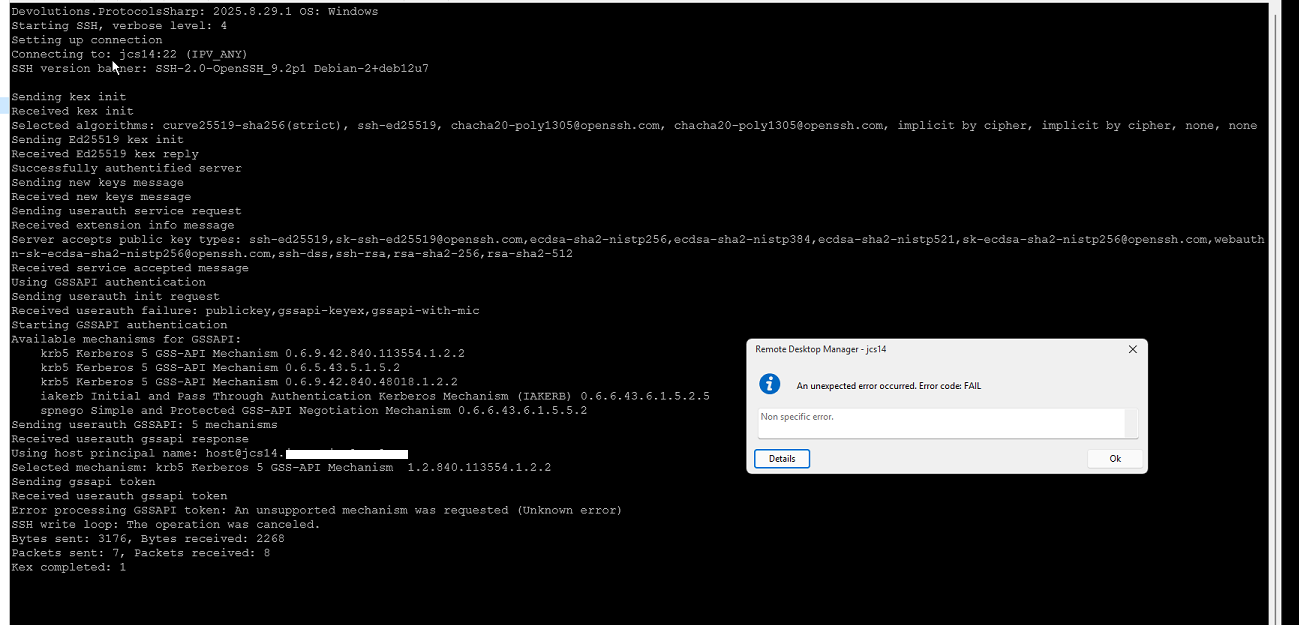
Server side I get this on the log:
When I authenticate with Putty or Windows SSH command line I get:
Hope this helps. I'm happy to do this in a meeting or something similar if needed so you can see exactly what happens if it helps to further diagnose and solve the problem.
Regards,
c2f7c733-f258-4b5c-963b-d01e2aea44fd.png
89f3fdac-96ac-4de0-9a5f-6bc6af812a6f.png
89caf081-085c-452b-b2b2-17e3adee0ef0.png
Hello,
Thank you for your reply,
I see, could you confirm if the workaround provided by the other user encountering this issue also works for you in this case?
Let me know,
Best regards,
Samuel Dery
Hello,
No, I can't use the workaround describe above.
That workaround revolves around an RDP session, which in this case is not the goal. I'm simply trying to use GSSAPI to login to a terminal SSH session.
Also we have several Linux hosts so it would be impractical to use this convoluted workaround for connecting to each on of those when putty is able to achieve it (but I really would like to use RDM since it would enable to have all the sessions to both Windows and Linux hosts in a single application).
I believe that the issue here lies with
1 - RDM is not using the Windows GSSAPI DLL correctly (if I don't have MIT Kerberos installed then the whole authentication fails with very different messages - namely complaining about the missing DLL that MIT Kerberos installs - I can provide a screenshot if necessary)
2 - When using MIT Kerberos the credentials are not properly forwarded to the ssh server and therefore the authentication fails.
I can try to investigate further with wireshark and I'm happy to setup a remote call with somebody so that we can debug this more thoroughly.
It would be really great if we could get this working, preferably using the Windows native API (without installing MIT Kerberos), if possible (but I'm happy to use MIT Kerberos if it worked correctly as well).
Also, I'm not entirely sure, but I could almost swear that I did manage to use GSSAPI against an SSH server with an older version of RDM - but, again, I can't be sure and I haven't really tested older versions again to confirm.
Feel free to contact me directly or through this thread and I'll be happy to provide further details that can help you get this working. If I get the chance to test and get more info with Wireshark I'll post the details here.
Regards,
Hello,
Thank you for your reply,
I see, could you generate some logs by following the steps in this knowledge base article:
https://docs.devolutions.net/rdm/kb/how-to-articles/send-ssh-logs-verbose/
I will send you a private message with a link so that you can upload the logs securely.
Best regards,
Samuel Dery
Hello,
I've reached out to you (@Samuel Dery) on the private chat and have already sent the logs files, but have not received an acknowledgement or any reply.
Can you please just check if the files were received correctly and if they are enough or if you need more information from me to help diagnose further?
Regards,
Hello,
Thank you for your reply,
My apologies for the delay. Let's keep our communication in this thread directly to avoid this in the future.
I can confirm that I have received the files, I will reach out to our development team with them to discuss your issue,
I will keep you updated with any news I receive,
Best regards,
Samuel Dery
Hello,
Are there any news on this?
Do you have an estimation on when the issue would be sorted? Do you need any further information from my side to better track and identify the issue?
Regards,
Hello,
Thank you for your patience,
A fix for the issue should be included in the latest version of RDM:
https://devolutions.net/remote-desktop-manager/download/
Could you confirm if the problem persists for you?
Best regards,
Samuel Dery
Hello,
I've just tested again, both with and without MIT Kerberos, and with 2025.3.22.0 RDM version (the latest available on your site).
The issue still persists, unfortunately.
Reading through the release notes for this version I haven't seen any mention of Kerberos or anything like this.
Maybe it will be fixed in the next version (.23, I assume). Can you confirm internally which version will this be in or if it was supposed to be fixed in version .22?
Also, should I use MIT Kerberos or not with the fixed version?
Regards,
Hello,
Thank you for your reply,
I have discussed this with our development team and they have confirmed me that the fix should have been included in this version.
Could you generate some news logs and provide them to us so that we can validate whether the issue is still caused by the same problem?
Let me know
Best regards,
Samuel Dery
Hello @Samuel Dery,
I have just sent you a direct message with the description of the steps I took and the corresponding log files.
The issue still persists in version 2025.3.25.0 of RDM.
Regards,
Hello,
Thank you for your reply,
I have forwarded the logs to our development team and will keep you updated with any news I receive,
Best regards,
Samuel Dery
Hello,
Any news on this topic?
I have just updated to version .29 released a few days ago and tested it but the issue persists.
Best regards,
Hello,
Thank you for your reply,
Would you be able to generate some new logs for us with the latest version? You can provide them to me using the link in our private messages or in a file in private messages directly as you did before.
Let me know,
Best regards,
Samuel Dery
Hello,
I have provided you with a new set of log files via private message.
Using version .29 there are now some situations where connection does work but it still requires MIT Kerberos installed.
Some fatal exceptions are still generated in specific situations.
Let me know if you need any further information, either via private message or on this thread.
Regards,
Hello,
Thank you for your reply,
I appreciate you notifying me here also!
I will reach out to our development team with the new logs and keep you update with any news I receive,
Best regards,
Samuel Dery
Hello,
I have just tested the latest version of RDM (2026.1.10.0) and it works with GSSAPI without MIT Kerberos correctly.
Thank you a lot for this. It made my life a lot easier and now I can use RDM to connect to the entire infrastructure using SSO.
Let me know if you need anything further. I'll be glad to help.
For now you can consider this issue as resolved.
Regards,
Hello,
Thank you for your reply,
I'm glad to hear this is now working as expected!
Best regards,
Samuel Dery