Workspace (with DVLS) and beeing offline

Hi
My general experience is that when I open Workspace in all flavours and my data source is unreachable - Workspace becomes unusable, is this by design?
My data source is DVLS I don't know if the behaviour is different with Hub's.
On iOS it seems that the offline download makes autofill entries still work in password autofill.
In the Browser extension it "sync" the vaults, but if DVLS is unreachable it invalidates the login and becomes unusable.
Workspace for Windows is just unusable.
Is my above statement "by design"?
Is offline cache not meant for Workspace? - or am I overlooking something?
Regards Lars
Remote Desktop Manager connected with Devolutions Server running newest versions.
------------------------Signature------------------------
Sorry if any of above sounds harsh or provoking, it is NOT meant as such, but I have Asperger's and don't always know.
My intentions is always to be friendly.
-------------------------------------------------------------
All Comments (16)
Hi Lars,
To address your concerns:
- Design Behavior: Yes, the behavior you described is by design. However, please note that both the mobile and desktop applications do support a local cache for offline usage. To enable this feature, you’ll need to activate the offline mode setting within the administration section:

- Browser Extension: Regarding the browser extension, we understand the inconvenience, and we’ll review what improvements can be made in this area to enhance the offline experience.
- Windows Usability: Could you please elaborate on what you mean by "Workspace for Windows is just unusable"? Additional details would help us better understand the issue and provide further assistance.
Looking forward to your reply.
Best regards,
Sébastien Aubin
Product manager - Password Management
8e7289e3-d65e-453f-8d66-96b9e632d31a.png
Hi
Workspace offline mode is enabled for my user.
iOS Offline cache is working in the extent, that I can autofill passwords when data source is offline, but I can't “browse” the content of my vaults by clicking on my DVLS space. Then it wants a connection to DVLS.
Regarding Windows, the statement was in the context of DVLS being unavailable.
It seems like the same issue as iOS. The offline cache is created but when I go to my DVLS space, Workspace can only show the content of my vaults if it can connect to DVLS. So how should I even use the offline cache? - Is there an autofill capability I have missed?
Regards Lars
Remote Desktop Manager connected with Devolutions Server running newest versions.
------------------------Signature------------------------
Sorry if any of above sounds harsh or provoking, it is NOT meant as such, but I have Asperger's and don't always know.
My intentions is always to be friendly.
-------------------------------------------------------------
Hi Lars,
Could you please check the settings in your vault to confirm if the security level is set to "Standard"? You can find this option by navigating to:
Administration -> Vaults -> Edit vault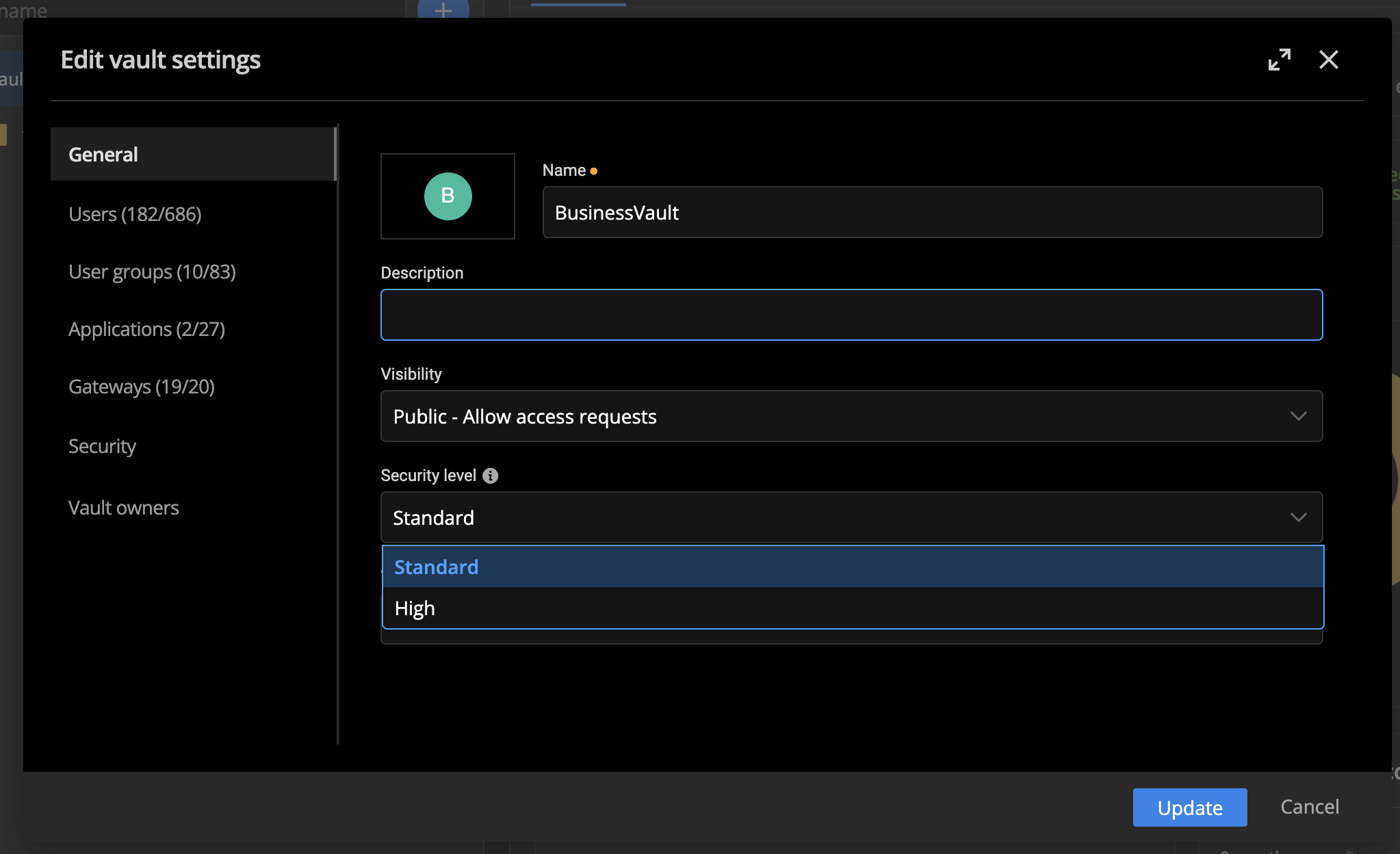
Best regards,
Dany Galarneau
472c4f65-85db-40b6-af28-0ee605082817.png
All is in Standard, precisly to allow offline mode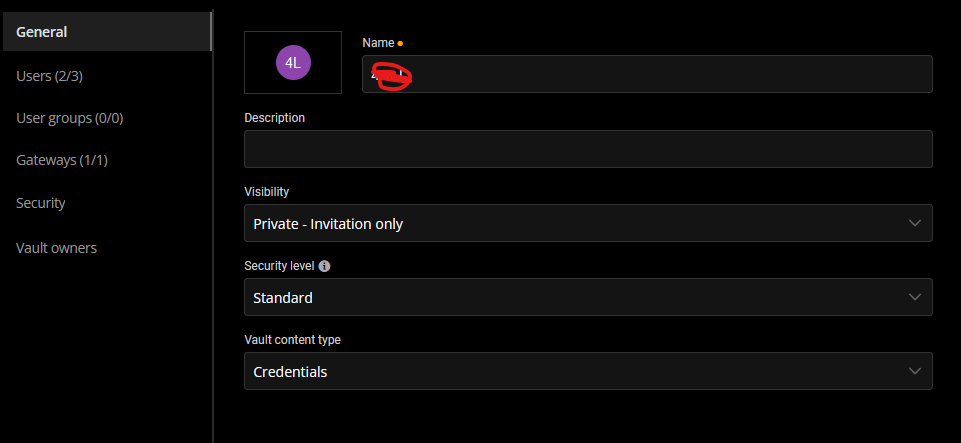
Remote Desktop Manager connected with Devolutions Server running newest versions.
------------------------Signature------------------------
Sorry if any of above sounds harsh or provoking, it is NOT meant as such, but I have Asperger's and don't always know.
My intentions is always to be friendly.
-------------------------------------------------------------
5911e0a4-004a-4532-b61a-6da7d7070fa4.png
Hi,
To better understand the issue you're encountering, could you please provide a recording of the behavior you're experiencing? This will help us diagnose the problem more accurately and provide a quicker resolution.
Thank you for your cooperation!
Best regards,
Dany Galarneau
Hi
Hope this quick one is sufficient.
https://streamable.com/7rtgad
So, basically at the start I show that DVLS can be pinged.
Then I login in workspace and closes workspace again.
Disconnects so DVLS isn't reachable.
Opens Workspace igen, and can't connect to the DVLS server.
Regards
Remote Desktop Manager connected with Devolutions Server running newest versions.
------------------------Signature------------------------
Sorry if any of above sounds harsh or provoking, it is NOT meant as such, but I have Asperger's and don't always know.
My intentions is always to be friendly.
-------------------------------------------------------------
A quick follow-up
https://streamable.com/0iqdb3
Even when I set Workspace to be offline it can't connect. But the instant DVLS is online, workspace connects (while still being in offline mode.)
Remote Desktop Manager connected with Devolutions Server running newest versions.
------------------------Signature------------------------
Sorry if any of above sounds harsh or provoking, it is NOT meant as such, but I have Asperger's and don't always know.
My intentions is always to be friendly.
-------------------------------------------------------------
Hi,
Thank you for providing the videos. I've created a task for our team, and we will investigate the issue. I’ll keep you updated on our progress and provide any findings or resolutions as soon as possible.
Please don’t hesitate to reach out if you have any additional questions in the meantime.
Best regards,
Dany Galarneau
and, sorry if I state the obvious, but manually activating offline mode should preferably not be necessary :)
Remote Desktop Manager connected with Devolutions Server running newest versions.
------------------------Signature------------------------
Sorry if any of above sounds harsh or provoking, it is NOT meant as such, but I have Asperger's and don't always know.
My intentions is always to be friendly.
-------------------------------------------------------------
Hi Lars,
To better understand your concern, could you please clarify if you’re referring to going offline when the internet connection goes down (which is currently supported) or when the DVLS server becomes unreachable? If it’s the latter, we could consider adding it to our roadmap based on your needs.
Looking forward to your response!
Best regards,
Dany Galarneau
Ahh, that is a difference I didn't think of.
It could be awesome if the latter could be possible as well.
Previously I had some server issues (Non-DVLS related!) which caused DVLS to be unavailable. If I hadn't had RDM with cached vaults, I could have been i serious trouble retrieving credentials to fix those problems because Workspace constantly failed to autofill. (Yes I know, I should have a disaster recovery plan, I do now :) ). So for Workspace to be able to autofill when online but DVLS unreachable would have helped a lot there.
Secondly, as threads levels keep rising, I have taken DVLS off the open internet and put it behind VPN. So every time I access Workspace and isn't connected, I need to go through the hassle of finding my username and password in my “Disaster recovery” solution to be able to log in to Workspace again.
I might switch from auto generated password to a password sentence so it's still a strong password but rememberable, but I'm still hanging on to the fact that auto generated is better.
Regards Lars
Remote Desktop Manager connected with Devolutions Server running newest versions.
------------------------Signature------------------------
Sorry if any of above sounds harsh or provoking, it is NOT meant as such, but I have Asperger's and don't always know.
My intentions is always to be friendly.
-------------------------------------------------------------
Hi Lars, we have created a ticket on our roadmap regarding the offline issue when the SERVER is unreachable.
Best regards,
Sébastien Aubin
Product manager - Password Management
Hi
That sounds great! - Do you have an estimated ETA? H1- 2025 or ?
Regards
Lars
Remote Desktop Manager connected with Devolutions Server running newest versions.
------------------------Signature------------------------
Sorry if any of above sounds harsh or provoking, it is NOT meant as such, but I have Asperger's and don't always know.
My intentions is always to be friendly.
-------------------------------------------------------------
Hi Lars, this is planned for the version 2025.1.2. Our next release (2025.1.0) will include multiple offline fixes but not this feature yet. I will let you know when it's available.
Best regards,
Sébastien Aubin
Product manager - Password Management
Adding myself to this thread as we have the same need.
We operate in an environment where we need to provide 24/7 support to our clients. If the DVLS goes down unexpectedly, our supporters can't access their vaults. This brings operations to a halt with many safety and financial consequences in our business context.
In our case the use case would be:
As a System Owner I want my Devolutions vaults to be accessible at all times so that users in my organization can provide 24/7 support to our clients.
Expected behaviour:
When vault is set to Standard Security Level, and user has Read-Only permission set for Offline Mode, RDM and Workspace sync / refresh vault on a regular basis, and if DVLS stops responding, entries in RDM and Workspace can still be used to read or connect.
For extended outages, RDM and Workspace will need to allow the user to access entries even though authentication is not available via DVLS.
Hi, that's totally understandable and it should be like that. This task is one of our priority for the next few weeks.
Best regards,
Sébastien Aubin
Product manager - Password Management