Backup and Restore RDM to a new PC

I have searched and can't seem to find any docs on how to backup RDM on pc1 and restore all of it on pc2. Can someone point me in the right direction? Thanks
All Comments (14)
Hello,
If you are using an advanced data source I would suggest in using the Custom installer with an RDI file to generate an MSI package:
- RDI file generation: https://docs.devolutions.net/rdm/installation/client/custom-installer-service/option-selection/
- Custom installer: https://docs.devolutions.net/rdm/installation/client/custom-installer-service/custom-installer-manager/
If you are using an individual data source, you can export your settings and data source under File > Settings: https://docs.devolutions.net/rdm/commands/file/options/export/
Best regards,
So, I can't just install new, and "restore from backup"?
bump,
Hello,
Sorry for the delay. Yes you will need to install the RDM client and then import the config file.
Best regards,
Hello,
Sorry for the delay. Yes you will need to install the RDM client and then import the config file.
Best regards,
Thanks! what good is the backup file? what does it do? when I see "backup/restore" i tend to think that all is being put in a backup file. I can use that file to restore everything back the way it was before the issue. Is this not the case? should I be doing manual weekly exports to ensure I can "restore" my RDM back to working order if something were to happen to it on my pc?
Hello,
What do you mean by the backup file?
I was not able to find the option in RDM.
Best regards,
it's the 2nd or 3rd option on the menu 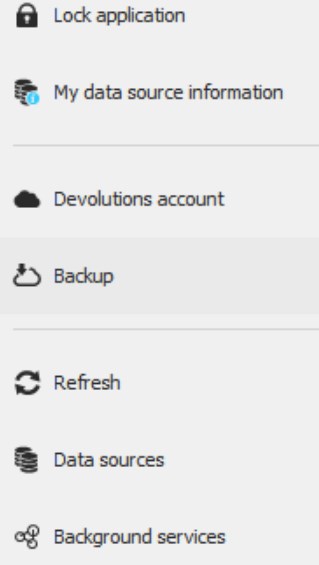
2025-01_17_25_10_17-2972.jpg
Hello,
Would it be possible to confirm the version of your Remote Desktop Manager and the Data source you are using?
I'm not seeing this option on my side.
Best regards,
I am using local data source. and the latest version of RDM 2024.3.26.0 64-bit
Hello,
Would it be possible to specify which type of local data source?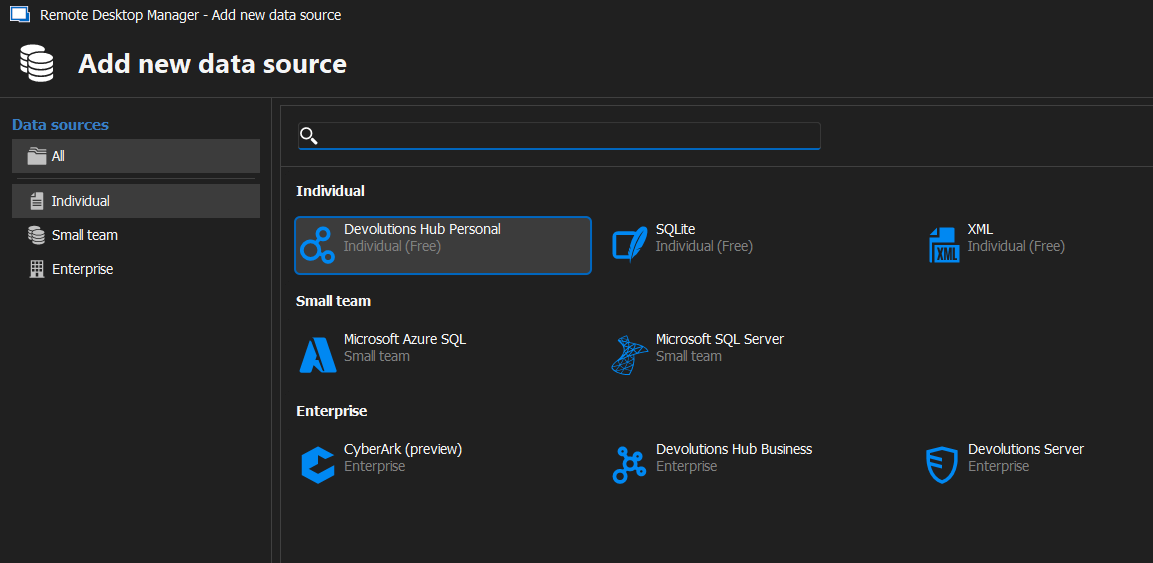
Best regards,
0b35ae24-965e-45cd-988b-a1de395dcf83.png
Hello,
Would it be possible to specify which type of local data source?
Best regards,
nothing so fancy, it just using the "local data store" which is a subdirectory on my local hd". I was using "cloud" till you guys decom'ed that option. so I pointed my backup to the local HD (onedrive )on my pc. the files are almost 2megs each and update every time I make a change and exit RDM, new backup file created. Thanks
Hello,
Thank you for the confirmation.
I was made aware that this option was deprecated and we recommend moving over to our Hub Personal data source instead.
Here is our documentation on how to move to the Hub personal: https://docs.devolutions.net/rdm/kb/how-to-articles/deprecated-cloud-backup/
The Hub personal will allow you to access your data source from anywhere.
Best regards,
Hello,
Thank you for the confirmation.
I was made aware that this option was deprecated and we recommend moving over to our Hub Personal data source instead.
Here is our documentation on how to move to the Hub personal: https://docs.devolutions.net/rdm/kb/how-to-articles/deprecated-cloud-backup/
The Hub personal will allow you to access your data source from anywhere.
Best regards,
thanks, but I will be installing this on an "no-internet" workstation. can I just use my backup file from my local data source to restore all my settings. mostly need my sites, and cred vaults. for my internet accessible pc, will go to hub personal
Hello,
I would then suggest creating a .rdm (backup) file of your entries and importing them on the no internet PC in a local data source either a SQLite or XML data source.
Best regards,