Where is the Password Generator now?

Hi,
In previous versions there was an icon for the password generator in the ribbon. Now in the version I use it's not there anymore.
It was really simple to access it when it was there. Is it a way to get it back to the ribbon?
Best regards
Johan
All Comments (5)
Hello Johan,
Thanks for reaching out.
I can see mine in Tools > Password Generator.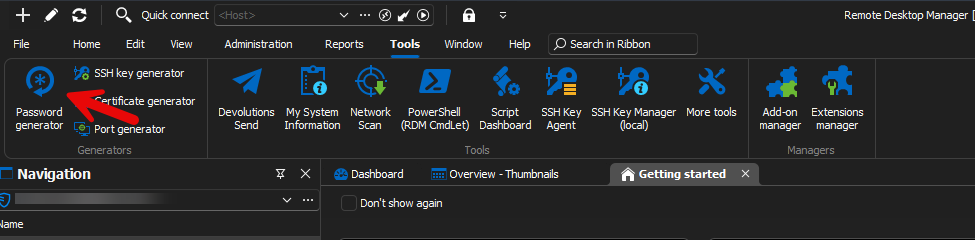
Can you send us a screen capture of what you're seeing?
We're assuming you're using RDM 2024.3.25, please confirm.
Best regards,
Alex Belisle
8b74aa1d-5f5a-4dd3-b8f4-8b0ed5790f9e.png
Hi,
I see now that I don't even have the tools menu...
I'm using version 2024.3.26.0
Best regards
Johan
2d5f3238-d0f9-456b-83f9-20f5af534f58.png
Hi again,
I'm sooo sorry. I just had to change to profile "IT Professional" to see the tools menu again. :)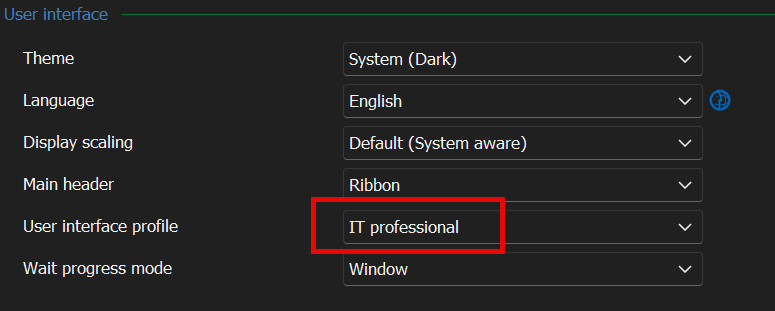
599ee5a4-9dbc-47e4-9d66-6cf0801a8e76.png
Good catch, Johan! The Business User interface profile excludes many features and options. Happy to read of your resolution.
Kind regards,
Kelly Fortin
As an additional note to what my colleagues have posted, we'll revise the "Business user" mode to allow certain tools like the password generator since they make sense to have for this type of user. We've opened an internal improvement ticket for this.
Regards,
Hubert Mireault