Password Protect Folders

Hello,
I would like to know how to protect a folder and the contents inside with a password. I see the option to set a password, but it doesn't do anything.
Thanks,
Thomas
Recommended Answer
Hello,
Thank you for the confirmation. I moved your thread to the RDM forum section.
Since you are using an individual Data Source, you can't create other vaults. If you would like to use an advanced Data Source and have the ability to share your entries with your team, this will require an RDM license.
I would recommend configuring an application password on your RDM under File > Settings > Security: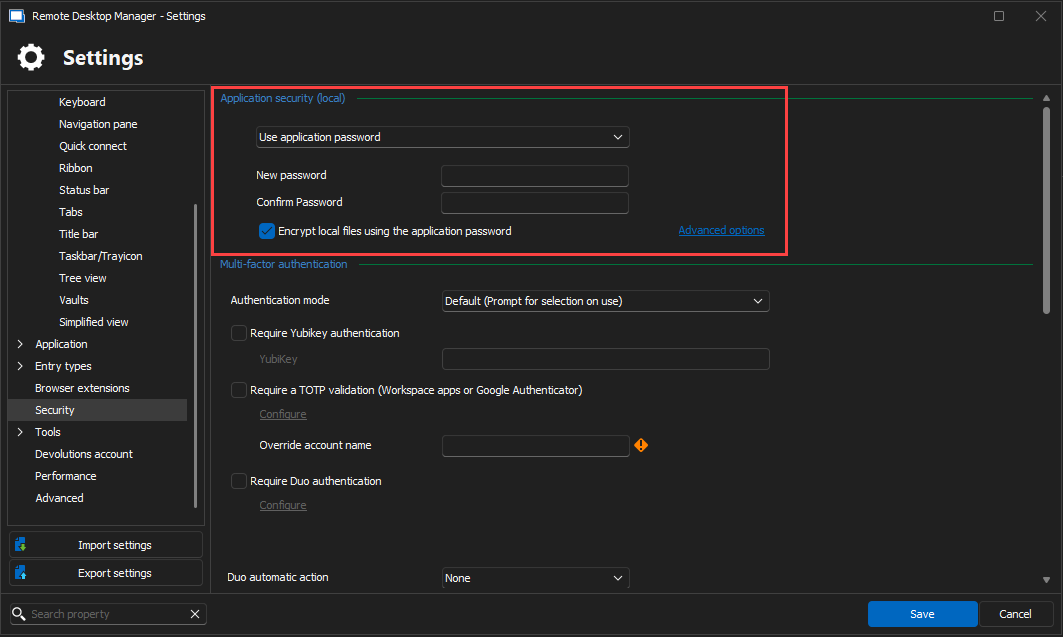
Best regards,
7d61506a-3e83-4e3e-8e36-58327bfad944.png
All Comments (7)
Hello,
Thank you for reaching out!
My name is William, and I'm here to assist you in any way I can.
It is not possible to protect a specific folder with a password in RDM.
Setting a password on the folder only configures a credential, so child entries can use it when set to inherited.
Depending on your Data Source, I would suggest creating a different Vault and protecting the Vault with a password instead: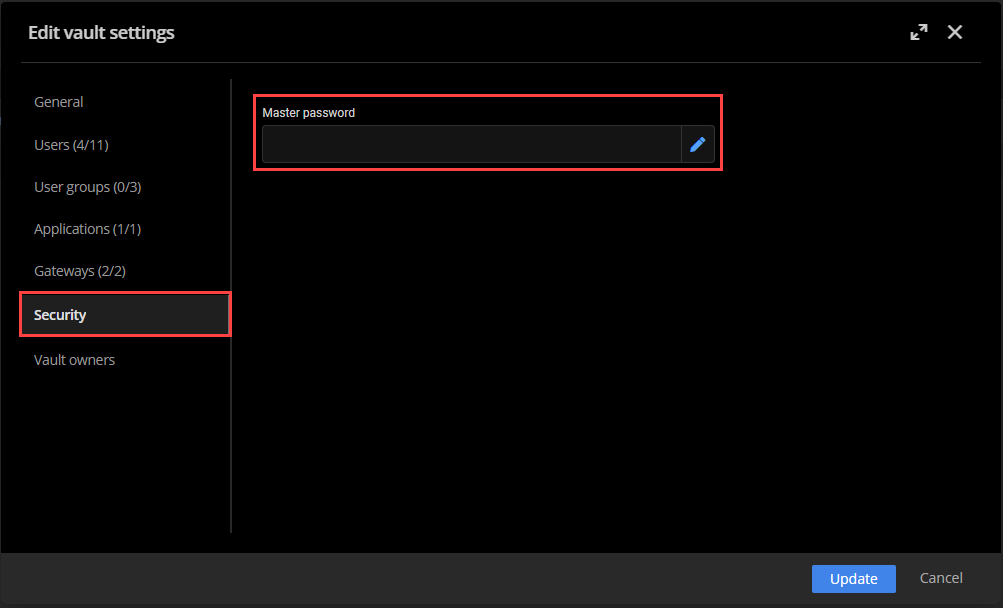
If you want to protect a folder, we suggest doing this with the permission of the folder by making sure only the required users have access to that specific folder.
Best regards,
d7bc8409-f69b-4773-94a7-a88b6fbbf8b8.png
Hello,
Thank you for the information. For 5 vaults, I would need 5 individual licenses?
Thomas
Hello,
We do not charge for vault creation.
Would it be possible to specify your Data Source type? You can verify this from RDM under Help > Diagnostic > Data source: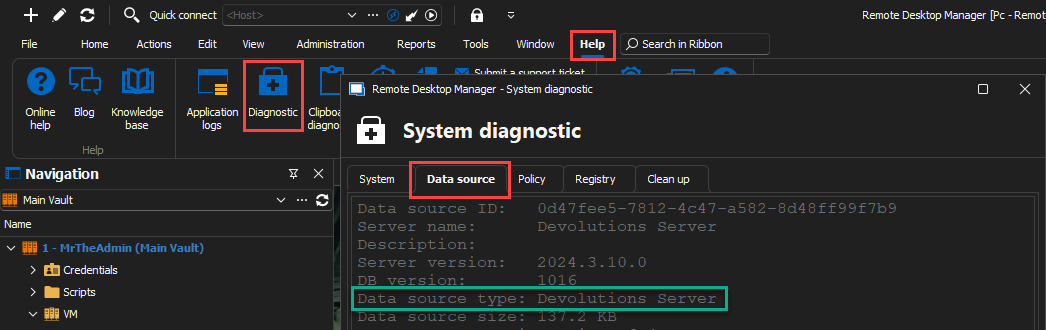
We are currently in the Devolutions Server forum thread, if this is the Data Source you are using, creating different vaults can be done from the web interface under Administration > Vaults.
Feel free to reach out if you have any questions or need further clarification.
Best regards,
b8f6727e-f51c-4982-8bcd-5ab2443eb18a.png
Hello,
We do not charge for vault creation.
Would it be possible to specify your Data Source type? You can verify this from RDM under Help > Diagnostic > Data source:
We are currently in the Devolutions Server forum thread, if this is the Data Source you are using, creating different vaults can be done from the web interface under Administration > Vaults.
Feel free to reach out if you have any questions or need further clarification.
Best regards,
The data source is SQLite
Hello,
Thank you for the confirmation. I moved your thread to the RDM forum section.
Since you are using an individual Data Source, you can't create other vaults. If you would like to use an advanced Data Source and have the ability to share your entries with your team, this will require an RDM license.
I would recommend configuring an application password on your RDM under File > Settings > Security:
Best regards,
7d61506a-3e83-4e3e-8e36-58327bfad944.png
Thank you for your help. Much appreciated.
Hello,
You are welcome. I'll set this thread as resolved.
Feel free to reach out if you have any questions or need further clarification.
Best regards,