Prevent the Ont-time password (OTP) window from closing automatically
Prevent the Ont-time password (OTP) window from closing automatically

Hello
Is there a way to prevent the Ont-time password (OTP) window from closing automatically after a certain time? As I always need a certain OTP on my test VMs on day a, this would simplify my workflow if I didn't have to regularly search for the entry in the RDM and open it again.
Kind regards
Martin
All Comments (10)
Hello,
Originally we did this because we received feedback that when users left the OTP window opened, it generated a log every 30 seconds (since the OTP is regenerated on a timer). This caused issues when people forgot to close that window for long periods, for example overnight, so we added a 5 minute timer that will close it automatically to avoid this, as we figured it would work for most scenarios.
We could add an option in File > Settings to disable this behavior, but you would have to go change it as the default behavior would stay the same. Would this work for you?
Regards,
Hubert Mireault
Hi Hubert
Yes of course, that would simplify my workflow when testing.
It would help me if the window only closed itself after 1 or 2 hours, it doesn't necessarily have to be open for 8 hours if that leads to problems.
Kind regards
Martin
Hi Hubert
I was able to solve the problem with a system tray app from the Microsoft Store.
This is completely sufficient for my test VMs and from my point of view you don't have to make any more adjustments here that could lead to a problem.
Kind regards
Martin
Hello Martin,
Thank you for the feedback. Out of curiosity, what features does this app provide? While I'm glad you were able to find a solution, maybe there are some features that this app provides that we could add to RDM to make it a better experience.
Regards,
Hubert Mireault
Hello Martin,
Thank you for the feedback. Out of curiosity, what features does this app provide? While I'm glad you were able to find a solution, maybe there are some features that this app provides that we could add to RDM to make it a better experience.
Regards,
Hi Hubert
I installed the OTP 2FA app from the Microsoft Store and added the account I need with the MFA.
The app runs in the tray and if I need the OTP on one of my VMs, I can simply copy/paste it.
Kind regards
Martin
Hello,
RDM should also allow you to copy the OTP from the tray, although it might be more tedious than an application strictly dedicated to that, especially if you have a lot of entries, as it could be difficult to find the OTP entry you want to copy.
If there's anything else we can help you with, let us know!
Regards,
Hubert Mireault
Hello,
RDM should also allow you to copy the OTP from the tray, although it might be more tedious than an application strictly dedicated to that, especially if you have a lot of entries, as it could be difficult to find the OTP entry you want to copy.
If there's anything else we can help you with, let us know!
Regards,
Ok, I hadn't thought of that... Do I have to set something so that the user vault is also available in the tray? In my case, only the entries from the shared vaults are displayed and I can't select the user vault either.
I looked and at the moment it's not possible.
The closest we have is a setting in File > Settings > User interface > Taskbar/trayicon that makes it so only favorite entries will show in the tray: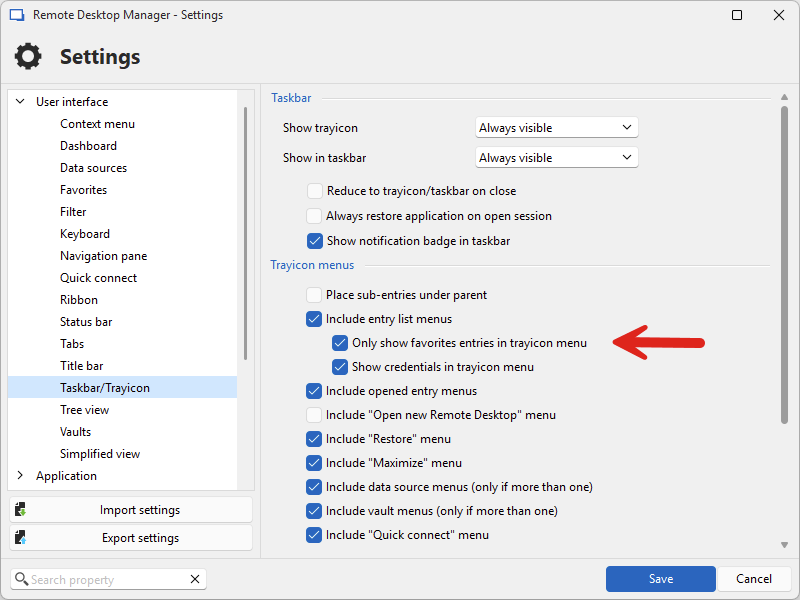
When this option is checked, it will also include favorites from the user vault, so that could be a possible way to achieve this at the moment.
We discussed in the past about adding the user vault to the tray, but I remember we hit some technical limitations, though I don't remember what they were. I will re-open a ticket for this, as I think it would be a nice thing to have.
Regards,
Hubert Mireault
236b504e-cd5a-423e-b899-ca6968646459.png
Yes, that works too, I will definitely use the feature more.
In my particular case, however, I am significantly faster with the other app as I can save myself a few clicks.
Thanks for the support.
No problem, I think it's still worthwhile to make as a change since it will benefit the application in other ways as well. Again, thank you for your feedback!
Regards,
Hubert Mireault