Missing 'Security settings' for My Personal Credentials

I noticed that with a new fresh install of the latest versions, the Security settings option for My personal credentials is missing.
Fresh/new install (latest 2024.3.25):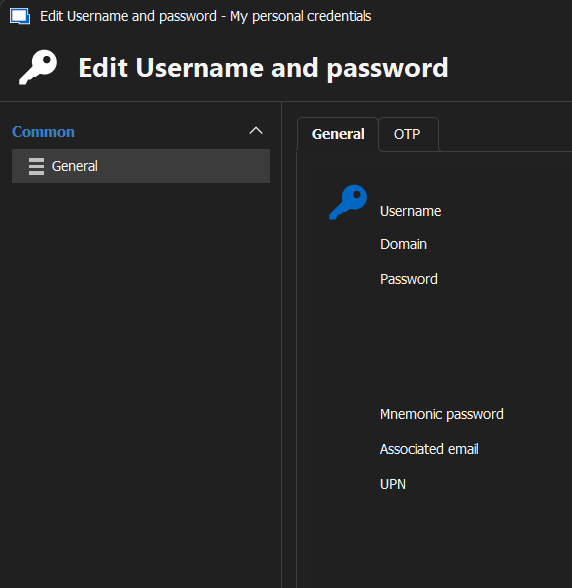
If you update an existing version (where this setting was visible before in the previous one), then it will be available/visible.
Updating from 'older' (for example 2023.2.17) to latest (2024.3.25):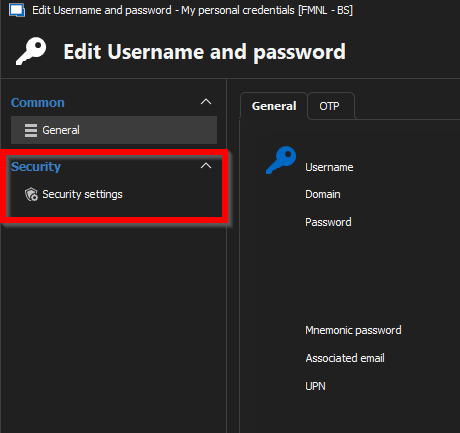
Regards, Marcel
Before.png
Latest.png
All Comments (4)
Hello,
Thank you for reaching out to Devolutions Support.
I was able to recreate the issue you are experiencing. However, at this time, I am unsure whether this is a bug or a remnant from an older version that persists between updates.
I will reach out to the development team regarding this matter and keep you informed of their response.
Best regards,
Carl Marien
Hello,
Thank you for your patience.
We have identified a bug where disabling the advanced option in any entry property causes the issue you mentioned. Since this option is disabled by default in new installations, it has been determined as the root cause of the issue.
As a workaround, we recommend enabling the advanced option in any entry property by clicking on "Show All Properties."
A ticket has been created on our end, and we will keep you updated on its progress.
Best regards,
Carl Marien
Thnx for the feedback!
Hello,
A fix for this issue will be included in version 2024.3.26.
Regards
Jonathan Del Signore