Accessing test systems without Password
0 vote

Hi,
I have multiple system for testing, sometimes more than 10, and its not feasible to have each system with a password to access.
I was working with Jacob to troubleshoot an issue where a Linux was set up with a Root account, but no password, but it did not work with RDM. Jacob and his team instructed I submit a feature request.
Accessing SSH System With No password
All Comments (16)
Hello,
We've investigated and we have code that should handle this but it seems not to work properly. To help us diagnose this, could you do the following:
- In your SSH terminal entry, configure the log section. Make sure that the verbose level is set to 2:
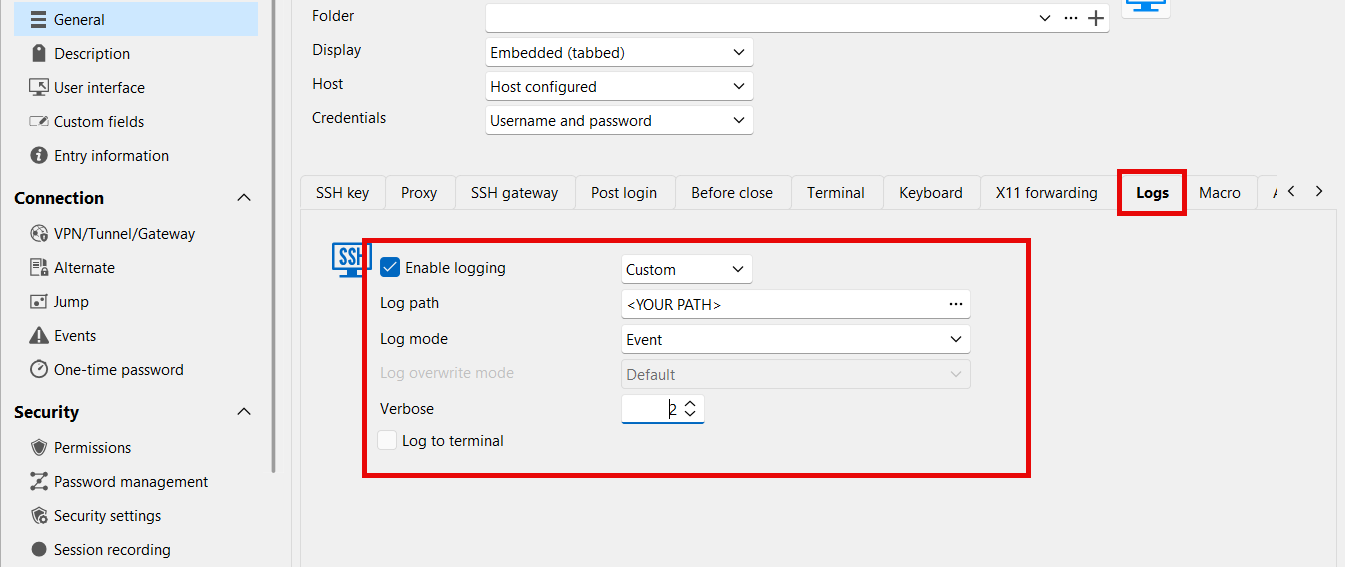
- Open your SSH terminal entry, and receive the password prompt. Press enter to accept it and be logged in.
- Close the SSH terminal entry. A log should have been generated where you configured the path.
- Send us the log securely through our sharefile link: https://devolutions.sharefile.com/filedrop
Additionally, it would be helpful if you could let us know another application where the prompt is not shown and it automatically logs you in. For example, does it work with PuTTY?
Regards,
Hubert Mireault
9c6c73e4-ec38-45cc-9120-1a96b209eb0d.png
Hi Hubert,
Thank you, I have followed as instrcuted, and uploaded the log.
I'm afraid I do not use any other application for testing my systems.
Thank You
Thank you for sending your logs. We analyzed them and from what we can see, this is actually an issue with the environment variables that are failing. Could you try checking "skip environment variables setup" in the advanced tab: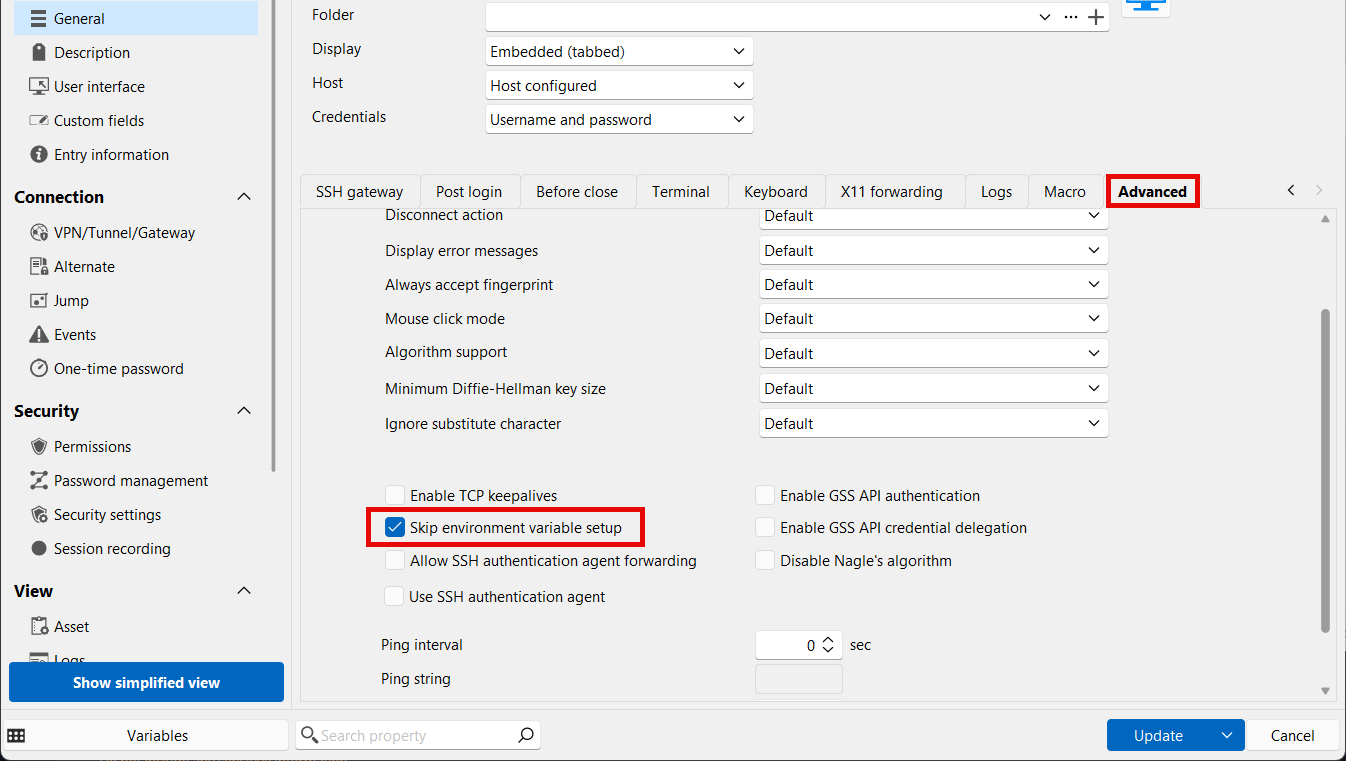
From what we can tell, this should fix the issue and you won't be prompted for the password when not required. Let us know if it helps in your case.
Regards,
Hubert Mireault
a90e76aa-9155-4e68-9f18-60aa0a3358fd.png
Hi Hubert,
Thanks for taking the time.
I was informed to make some other changes in my actual query, unsure if those changes had to be reverted.
Anyway, I tested this with the changes in my actual query, and reverting them back as well, either way it did not work, I still receive a prompt for Password.
Hello,
Another thing to test, could you configure a password (anything works) in the entry, to see if the terminal connects without prompting for a password?
We're suspecting that the SSH server is configured in a way where it doesn't accept the "none" authentication method, which means it asks for a password, despite having none configured on your user. Sending any password should work in this scenario.
Regards,
Hubert Mireault
Hi Hubert,
I added a hello as password to the ESXi Entry in RDM, and that shows the below error when connecting with RDM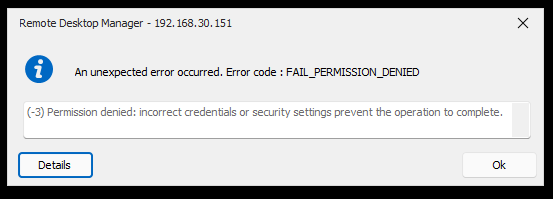
Below is the SSH configuration from ESXi if it helps..
[root@esxi1:~] cat /etc/ssh/sshd_config
# Version 7.0.3.1

# running from inetd
# Port 22
HostKey /etc/ssh/ssh_host_rsa_key
HostKey /etc/ssh/ssh_host_ecdsa_key

# Fips mode restricts ciphers to only FIPS-permitted ciphers
FipsMode yes

# vPP FCS_SSH_EXT.1.7: rekey after 1GB, 1H (instead of default 4GB for AES)
RekeyLimit 1G, 1H

SyslogFacility auth
LogLevel info

PermitRootLogin yes

PrintMotd yes

TCPKeepAlive yes

# Key algorithms used in SSHv2 handshake
# (ed25519 not allowed by current FIPS module)
KexAlgorithms ecdh-sha2-nistp256,ecdh-sha2-nistp384,ecdh-sha2-nistp521,diffie-hellman-group-exchange-sha256,diffie-hellman-group16-sha512,diffie-hellman-group18-sha512,diffie-hellman-group14-sha256
HostKeyAlgorithms ecdsa-sha2-nistp256,ecdsa-sha2-nistp384,ecdsa-sha2-nistp521,rsa-sha2-256,rsa-sha2-512
Ciphers aes256-gcm@openssh.com,aes128-gcm@openssh.com,aes256-ctr,aes192-ctr,aes128-ctr
MACs hmac-sha2-256,hmac-sha2-512

UsePAM yes
# only use PAM challenge-response (keyboard-interactive)
PasswordAuthentication no

Banner /etc/issue

Subsystem sftp /usr/lib/vmware/openssh/bin/sftp-server -f LOCAL5 -l INFO

AuthorizedKeysFile /etc/ssh/keys-%u/authorized_keys

# Timeout value of 10 mins. The default value of ClientAliveCountMax is 3.
# Hence, we get a  3 * 200 = 600 seconds timeout if the client has been
# unresponsive.
ClientAliveCountMax 3
ClientAliveInterval 200

# sshd(8) will refuse connection attempts with a probability of "rate/100"
# (30%) if there are currently "start" (10) unauthenticated connections.  The
# probability increases linearly and all connection attempts are refused if the
# number of unauthenticated connections reaches "full" (100)
MaxStartups 10:30:100

# ESXi is not a proxy server
AllowTcpForwarding no
AllowStreamLocalForwarding no

# The following settings are all default values. They are repeated
# here to simplify auditing settings (for example, DoD STIG).
IgnoreRhosts yes
HostbasedAuthentication no
PermitEmptyPasswords no
PermitUserEnvironment no
StrictModes yes
Compression no
GatewayPorts no
X11Forwarding no
# AcceptEnv
PermitTunnel no

# The following settings are disabled during the OpenSSH build.
# They are commented out to avoid spurious warnings in log files.
#GSSAPIAuthentication no
#KerberosAuthentication no
ca837cbd-a5aa-44c2-bc55-db80a1bdf53e.png
Is your problem solved?
I'm afraid not yet..
Hello,
We've investigated further and we have an idea of what it might be. The server only specifically seems to accept an empty password, rather than not requiring a password, which was what we first suspected.
I think we'll have to have add a way to specify an empty password to the server rather than not sending a password.
I've opened an internal ticket, if we need additional information we will post back here. Thank you for your patience.
Regards,
Hubert Mireault
Hi Hubert,
Appreciate clarifying that, will wait to hearback.
I anything is needed from my side kindly let me know.
Thank You
Hello,
Good news, we've added support for sending empty passwords in our next minor update, 2024.3.27.0. This has been added to our SSH terminal, SFTP and SCP entries. Once this version is out, let us know if it solves your issue. You should be able to simply keep the Password field empty while specifying a username.
This version will most likely release within 1-2 weeks.
Regards,
Hubert Mireault
Thanks a lot Hubert,
Appreciate that, will be on the look out..
Hi Hubert,
The version you mentioned (2024.3.27.0) is now released, and its working exactly as expected, no password prompt, and logs me straight in, both SSH and SFTP.
Very much appreciate this.
That's great, thank you for the feedback! I'm glad it now works for you.
Regards,
Hubert Mireault
Hello,
After further testing and feedback from our users, and due to the unfortunate way the SSH protocol works, we will be reverting this change in 2024.3.28.0. I would recommend you stay on version 2024.3.27.0 for now to keep this feature working in your scenario. If you upgrade to 2024.3.28.0, it will not send the empty password anymore.
In 2025.1 we will be adding a new checkbox "Send empty password" to achieve this instead. You will need to modify the SSH terminal entries that need to send an empty password to have this setting enabled.
Sorry about the inconvenience.
Regards,
Hubert Mireault
Hi Hubert,
Appreciate the clarification, on the matter.
Will follow as instructed.
Thank You