How can I get Stored Creds to pass the Domain and the Username?
How can I get Stored Creds to pass the Domain and the Username?

Hi,
We have a new domain that is trusted to our main domain. In my stored credentials, I have the domain, username, and password. When we remote into one of those machines (Linux), we have to specify our full username, with domain name, because it's a different domain. However, when I try to connect to one of the remote machines, it gives me an error.
If I edit the session and set it to Username & Password, and then enter in my full info directly as username = domain\username, it connects fine. However, if I set it to Linked, and pick my Creds from my vault, then it doesn't work right.
If I right-click the sessions and choose Copy Username, it only copies the actual username, without the domain prefix. How can I set something so that it passes the full domain\username instead of just the username when trying to log me in?
Thanks.
All Comments (6)
Hello,
Could you try to modify the Username format property in the Advanced settings of the entry you are using?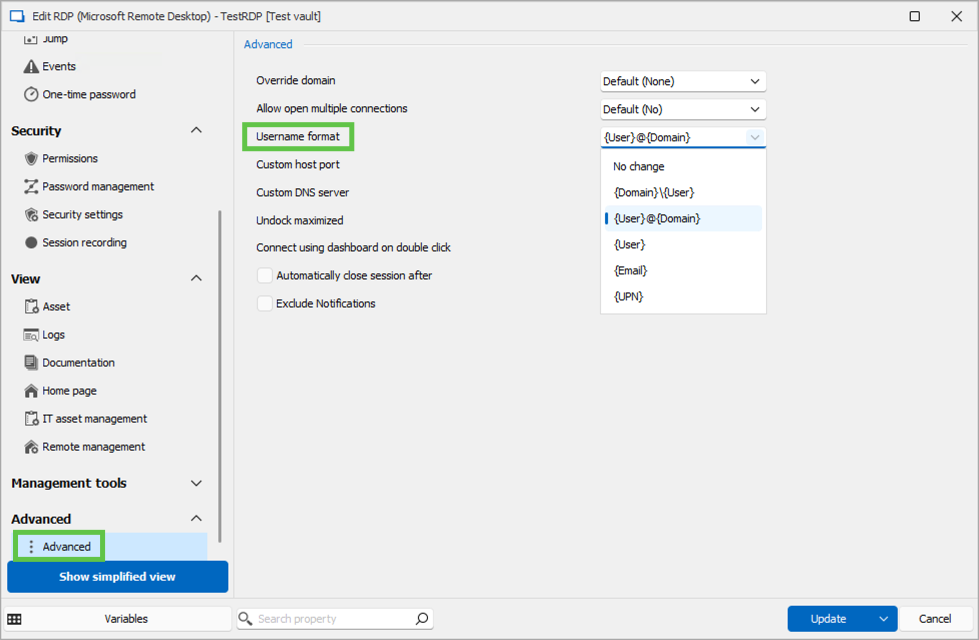
Let us know if that helps.
Best regards,
Érica Poirier
cd37f887-14ad-4d4a-9829-9fb890b542f9.png
Hi. That did work for the specific session I tested it on. Is there a global settings I can change so it affects everything at once? I can't think of any reason adding in the Domain would break anything, so we'd like to just change it to Domain\User for everything if possible.
Thanks.
Hello,
Thank you for the follow-up.
You can batch-edit all your RDP sessions by following these steps:
- Use the search bar at the bottom-left corner of the interface.
- Click on the ellipsis "..." and select the Advanced Search.
- Set up the following search conditions:
- For Condition #1, select Connection Type.
- Choose RDP as the connection type.
- Click Search at the top-right corner.
- Select all the connections listed below, right-click, and choose:
- Edit > Batch Edit > Edit Entries (General Settings).
- Navigate to Advanced > Advanced.
- Override the Username Format setting and select the desired format.
Once completed, you can either:
- Create an entry template for RDP sessions with these settings
- Set this as the default in your local application settings so future entries are automatically configured to your preferences.
If you have further questions or need additional assistance, please reach out.
Best regards,
Jacob Lafrenière
Yeah, I can do that. Just didn't know if the only place to set this was directly on each session. I'll have to update our templates and things.
The option that you had me change has a default of "No Change". I assume that means no change from whatever the default is. If there was a way to change the default, then we wouldn't have to change it on every session.
You could maybe look into creating an option for this within the main Settings area somewhere to be able to easily apply it globally. Or even treat it like Credentials and make an Inherited option so I could set it on the folder I want and have it flow down.
Thanks.
Thank you for sharing your idea—it’s an excellent suggestion! I encourage you to post it on our forum’s Feature Request page, where it can gain visibility and consideration for future development.
In the meantime, there is another way to achieve a similar setup:
You can create a credential entry configured with the desired username format and link it to your RDP sessions. This approach can save you time by eliminating the need to manually adjust templates or default properties.
If you have any questions or need further assistance, feel free to reach out!
Best regards,
Jacob Lafrenière
I’ve created a post on our feature request forum, which you can find here: https://forum.devolutions.net/topics/43692/add-inheritence-to-advanced-settings-on-rdp-session.
Please feel free to add any additional information or insights you think might be helpful!
Best regards,
Jacob Lafrenière