SophosXG WebAdmin Login

With RDM on MacOS, we're unable to login to SophosXG WebAdmin.
There's always "Login failed" message from the firewall.
The same Firewall accessed with RDM on a Windows machine works fine.
MacOS: 15.2
RDM: 2024.3.5.1
All Comments (11)
Hello,
Do you see any errors in the logs of the SophosXG application?
What data source type are you connected to?
Have you tried the latest RDM Mac version 2024.3.8.4?
Best regards,
Érica Poirier
Hello,
Do you see any errors in the logs of the SophosXG application?
What data source type are you connected to?
Have you tried the latest RDM Mac version 2024.3.8.4?
Best regards,
Hello,
The SophosXG logs say: admin couldn't sign in to web admin. wrong credentials
I've just updated to the latest RDM version 2024.3.8.4, but the issue still persists.
The datasource type is "Devolutions Server".
Regards
Hello,
Thank you for your feedback.
Could you send us a screenshot of the SophosXG settings from RDM Windows? Please make sure you hide sensitive information.
Is the credential stored in the SophosXG entry or bound to a credential entry?
Best regards,
Érica Poirier
Hello,
We also think that if the password contains special characters, this could be the problem.
Do you have the possibility to create a temporary account on SophosXG with a password that doesn't contain special characters?
Thank you for your collaboration.
Best regards,
Érica Poirier
Hello,
I've tried creating a new user on the SophosXG with a password that only contains uppercase and lowercase letters, but I still couldn't log in
The credentials are not stored. We enter them manually at login.
And here's the requested screenshot: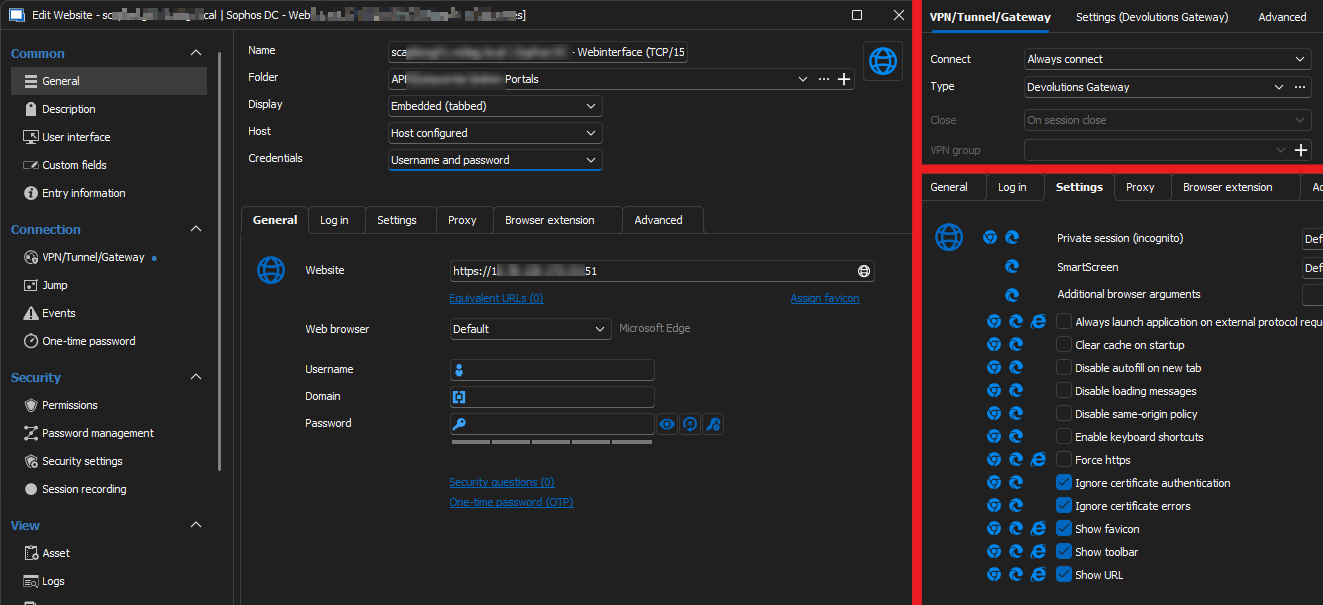
Regards, Roland
1.png
Hello,
Thank you for your feedback.
Could you try to connect to this SophosXG website from your browser directly without using RDM? Is it working or do you get the same behavior?
Best regards,
Érica Poirier
Hi
Direct access and also from a browser inside a RDP jump host are both working.
Regards
Hello,
Thank you for your feedback.
Our developer team will investigate this and get back to you.
Thank you for being so patient.
Best regards,
Érica Poirier
Hello,
Could you try the latest 2024.3.9 version?
The developer team told me that they made some fixes in that version, and a member of the QA cannot reproduce this problem with that version.
Thank you for your collaboration.
Best regards,
Érica Poirier
Good day,
Great news - with version 2024.3.9.0 the problem is solved.
Thank you for the support.
Best regards,
Roland
Hello,
Thank you for your feedback.
That's good news the newest version is now working as expected.
Best regards,
Érica Poirier