tried a 3270 session to z/os and rdm falls over

Hi I tried to use the tn3270 session option to log onto a local z/os system. when i try it, the 3270 session outline is displayed (ie i can see the pfkeys etc). There is no info inside the 3270 screen display and 5 seconds later the whole rdm application falls over. i attached a .wer file which seems to get created at the same time. its windows 11. i'm running - 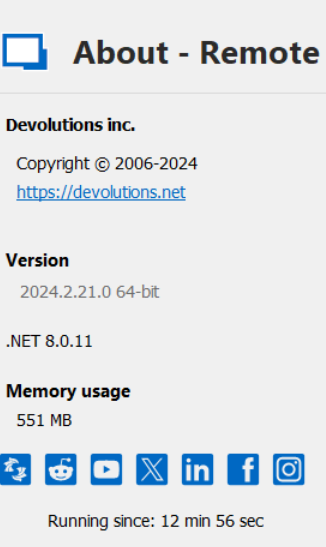
8ed60b5e-233f-4df9-9a7b-4ab1de196ecb.png
Report.wer
All Comments (10)
Hello,
Do you have more information about the issue under Help - Application Logs?
Best regards,
Etienne Lord
Hi,
I recreated the issue and looked in the application logs display and there were no files displayed after i did a search covering the last 5 days. Where else can i look for evidence of what happened? Regards Dave
Hi, this is an intriguing topic! Prog's evolution over time shows its versatility, adapting to new influences while retaining its essence. Genres like neo-prog and progressive metal illustrate how prog balances innovation with tradition. Curious to hear how others feel about its journey! During a particularly challenging semester, I came across https://canadianwritings.com/ and it turned out to be a lifesaver. I needed help with an essay on modern literature, and the service provided a well-researched and perfectly structured paper. The writer followed my instructions to the letter, and the final result was impressive. Plus, they delivered the essay ahead of the deadline, which gave me time to review it properly before submitting it.
Hello,
We've replicated a similar issue, and will begin investigating. We will keep you updated when we have more information.
However, from testing, this seems to only happen the second time we attempt to launch a a TN3270 entry.
Could you confirm if this is also the case for you? Or does your connection hang from the first launch?
Regards,
Jafran Majeau
i just retested it.
It happens on first invocation for me. I get the outline of a 3270 screen (ie pfkeys get displayed) and then after 5 ish seconds the app gets blown away.
event viewer says :-
Application: RemoteDesktopManager.exe
CoreCLR Version: 8.0.1124.51707
.NET Version: 8.0.11
Description: The process was terminated due to an unhandled exception.
Exception Info: exception code c0000005, exception address 00007FFDC98B1E58
Stack:
Then -
Faulting application name: RemoteDesktopManager.exe, version: 2024.2.21.0, time stamp: 0x66960000
Faulting module name: ntdll.dll, version: 10.0.22621.4541, time stamp: 0xe7035eba
Exception code: 0xc0000005
Fault offset: 0x0000000000021e58
Faulting process id: 0x0xC480
Faulting application start time: 0x0x1DB609BE69FB530
Faulting application path: C:\Program Files\Devolutions\Remote Desktop Manager\RemoteDesktopManager.exe
Faulting module path: C:\Windows\SYSTEM32\ntdll.dll
Report Id: e16e4da4-270f-48ba-b9dc-bde6e4f86703
Faulting package full name:
Faulting package-relative application ID:
Then -
Fault bucket 1180182712128615517, type 4
Event Name: APPCRASH
Response: Not available
Cab Id: 0
Problem signature:
P1: RemoteDesktopManager.exe
P2: 2024.2.21.0
P3: 66960000
P4: ntdll.dll
P5: 10.0.22621.4541
P6: e7035eba
P7: c0000005
P8: 0000000000021e58
P9:
P10:
Attached files:
\\?\C:\ProgramData\Microsoft\Windows\WER\Temp\WER.1b599e1e-924c-4a77-ba1e-9f35a22ecba8.tmp.dmp
\\?\C:\ProgramData\Microsoft\Windows\WER\Temp\WER.e5ae44ed-8182-48a3-b436-e35fa33ecaf1.tmp.WERInternalMetadata.xml
\\?\C:\ProgramData\Microsoft\Windows\WER\Temp\WER.c0f6f1eb-1469-45e3-bc13-cf3f4adc694d.tmp.csv
\\?\C:\ProgramData\Microsoft\Windows\WER\Temp\WER.ad0ac246-02db-467d-86e6-6fd1f204467b.tmp.txt
\\?\C:\ProgramData\Microsoft\Windows\WER\Temp\WER.95ab67e6-9e8a-4255-acf0-10dc26a8c4f6.tmp.xml
These files may be available here:
\\?\C:\ProgramData\Microsoft\Windows\WER\ReportArchive\AppCrash_RemoteDesktopMan_21e5576b8483d63382bf6f78a48177a7872b378_39d0592f_4b477974-b0ae-46ed-8097-209ac5a6bcc9
Analysis symbol:
Rechecking for solution: 0
Report Id: e16e4da4-270f-48ba-b9dc-bde6e4f86703
Report Status: 268435456
Hashed bucket: baf93ea632bceea30060d9ec7e7bb45d
Cab Guid: 0
Hope that helps.
Regards Dave
hi,
on second invocation it stays up for me.
But i could not get it to work.
Here is my setup: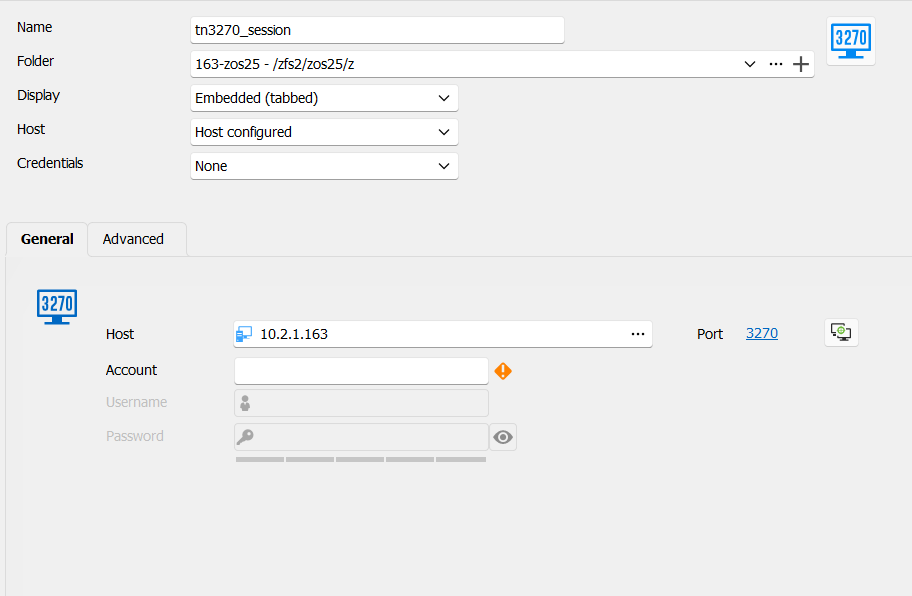
The thing that would need to be available for it to work (ie for z/os to understand what type of terminal request it is seeing) would be to define a terminal type for the screen (at least mod type - mod 2,3,4,5).
Here are the options another app gives me in a similar situation.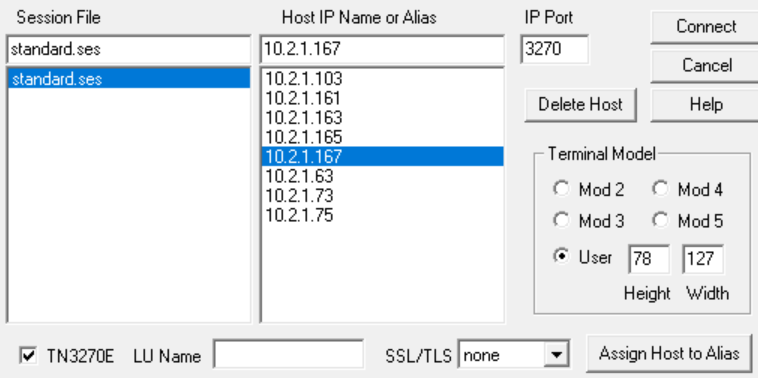 User defined is a bit fancy for now.
c7ff571d-54fb-4e57-ba0c-be8b34a0e40b.png
23177e95-8d81-481c-a2c2-a906da215df4.png
Hello,
Thank you for the details; a ticket is open, and we are investigating the behaviour!
Best regards,
Etienne Lord
Hello,
We've done some fixes that should fix your particular problem. You can expect these to take effect with the upcoming 2024.3.27 version.
Regards,
Jafran Majeau
Hey,
Well done.
Thanks for that.
Hello,
The RDM version 2024.3.27 is now available for download.
Let us know if this fix helps to solve your issue.
Thank you for your collaboration.
Best regards,
Érica Poirier