Custom Terminal Emulator for SSH Sessions
2 votes

Hello,
Not sure if anyone has suggested this yet or not (I couldn't find any threads mentioning it) but I think it would be really cool if we could be able to customize the terminal emulator used by the SSH functionality in RDM. Currently it appears it uses PuTTY (or something based on PuTTY), which is OK, and I know there are some settings (similar to those available in PuTTY) that we can use to customize behavior. But I use CYGWIN all the time which uses MinTTY - I much prefer that emulator for various reasons. Is there any chance we could add support for a custom terminal emulator (or just add the MinTTY emulator as a choice we could choose in the settings)?
Thanks in advance for the consideration, and Happy New Year!
Best regards.
David Willis
All Comments (7)
Hi,
This is something we could look into. I would like to know about some of the reasons you like MinTTY, in order to understand what kind of behaviour customization you are looking for.
And for information, we used putty as the base for our terminal in the past, but we moved away from it years ago. We did keep the settings to look like the settings of putty because our users were already accustomed to it. And it is still a reference used by many users for features and bugs.
Regards
Denis Vincent
Thanks for the reply and information, didn't realize it was not actually the PuTTY engine being used (as it did look quite a bit like it, as you mentioned).
I think the main reasons I like MinTTY (Cygwin being my primary use case for it) is it seemed to have better compatibility with/support for Linux-based environments and CLI apps (e.g. vim). PuTTY always just seemed clunky. The fact that MinTTY is a full terminal emulator in and of itself and essentially provides a "full mini Linux environment" on a Windows box when used with Cygwin, as opposed to PuTTY just being a "remote session terminal emulator" that can only open terminal sessions to remote boxes, meant we could have standard Linux configs like .bashrc which could be used to customize the environment. But after thinking about it some more I suppose the majority of that benefit is when using the terminal locally (not so much when SSH'ing into other machines, because then you're getting whatever CLI config the remote user that you connected as has setup).
After playing around with the configuration options in RDM I've managed to get the built-in terminal configured mostly the way I want (where right-click doesn't auto-paste, selecting doesn't auto-copy, etc.). Also Ctrl+Shift+C and Ctrl+Shift+V work for copy/paste respectively which is cool since that aligns with the configuration I use in Cygwin (though I'm not sure exactly how this is configured - I don't see that being configurable anywhere in the terminal options so I guess its a default, but either way it works for me).
I think my main issue remaining with the current terminal, after some testing is its inability to use readable colors when editing text files in vim in SSH sessions. I have my .vimrc and .bashrc (on the remote server) setup in a way that seems to work when SSH'ing in from just about any other terminal emulator (e.g. setting $TERM to xterm-256color as many suggest). And in the RDM settings I've gone into entry types -> terminal and set the default terminal mode there to xterm-256color. Still though, no luck. Not sure why its so different, though from what I've read many others have had trouble getting vim to properly colorize in PuTTY (and based on my testing it seems the same issue may exist in RDM's current terminal).
Screenshots of each can be found below (this is logged into the same server as the same user, opening the same file in vim, and vim's color scheme is "default" in both cases):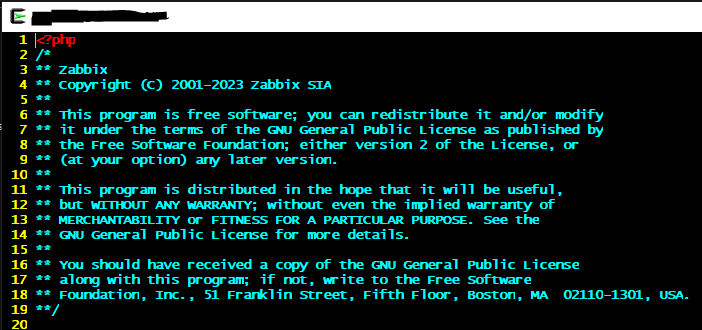
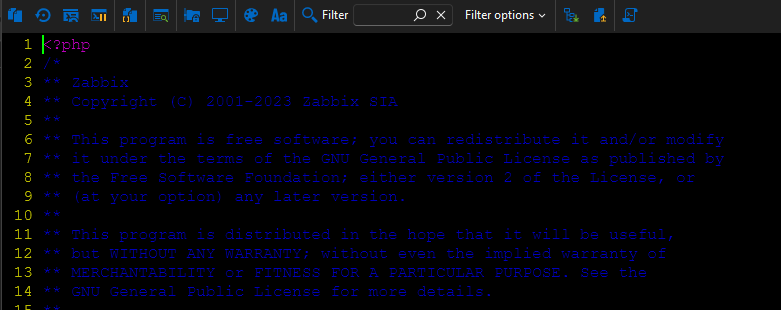
The blue is just one example, but the majority of colors in vim in the RDM console are similarly almost unreadable. It does appear we can adjust specific colors in the entry types -> terminal -> colors settings, though I'd rather not go down that rabbit hole of editing individual colors if I don't have to (and haven't had to in order for things to be readable in MinTTY - it "just works").
In the big scheme of things its a relatively minor issue, however much of the work I do on Linux boxes that I SSH into is editing configs and scripts and such so I do spend a fair amount of time in vim. If this problem could be solved w/ the existing RDM terminal I think I'd be good with it the way it is (as I mentioned above, most of the other initial issues I had with it have been resolved either by tweaking some settings or perhaps by enhancements made to the terminal in RDM over the past year or two of updates).
Any advice you have on the color issue would be much appreciated! As always thank you for your support and for delivering such an amazing product!!
Best regards,
David Willis
2f0f2ffa-1ffc-42f5-9a67-9b927b6a0070.png
f4079790-bfb5-4efe-9b09-f0186a0275b5.png
Thanks for the feedback. It is really appreciated.
As for the colours, I will need to investigate to understand why they look so different than what they look in other terminals. RDM built in terminal advertises itself as an xterm-256color (by default) but something else might lead the remote shell to use only the first 8 colours (which are of a darker tone) from the 16 colour palette.
For now, I have sadly no advice to address this problem, but I will try to find the time to do some research on this when possible.
Regards
Denis Vincent
I would love this update as well, or at least a chance to set a global color. This is the only thing still keeping me on another app is i spend more time than I care editing files in vi.
Hello,
Just wanted to follow back up here, as I believe I found the root cause and solution for this. The TLDR is to make sure your terminal "bold mode" setting in RDM is set "change font and color" and then make sure your "background" setting in vim is set "dark". For more details on how I came to this conclusion, read on...
So PuTTY (and RDM's emulator as well it seems) have a "bold mode" setting that determines what changes they apply to bold text - it can be either "change font", "change color" or "change font and color":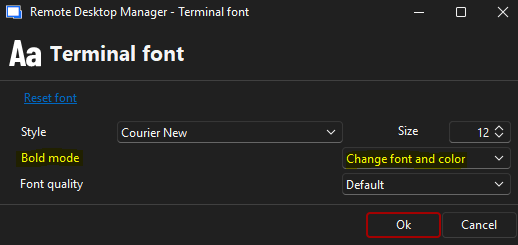
This setting can be configured at the SSH entry level or in the local RDM settings, or you can even change it on a per-session basis via the font and color toolbar buttons while connected to an SSH session.
Something I did not know until today is there is a "bold" variant for each color which contains a different shade of that color (we can see this in the color palette settings) - if the "bold mode" setting is set to either "change color" or "change font and color", then it will use these "bold shades" instead of the regular colors for bolded text. Thinking about this and the symptoms I had been seeing, I realized the issue was due to the bold text not being properly applied.
So changing the "bold mode" setting noted above to "change font and color" worked to fix the issue in the basic terminal.
However text was still dim in vim - after some poking around I realized the "background" setting in vim was set to "light" instead of "dark" for some reason; once I changed it to "dark" then the bold text was properly applied. To do this permanently I added a line to my .vimrc on the server:
set background=dark
Hopefully this could help someone else trying to solve the same problem.
Best regards,
David Willis
d073e5ed-b0fe-4485-9691-6268c82b050f.png
Hello all,
Will be really great to have something like this: 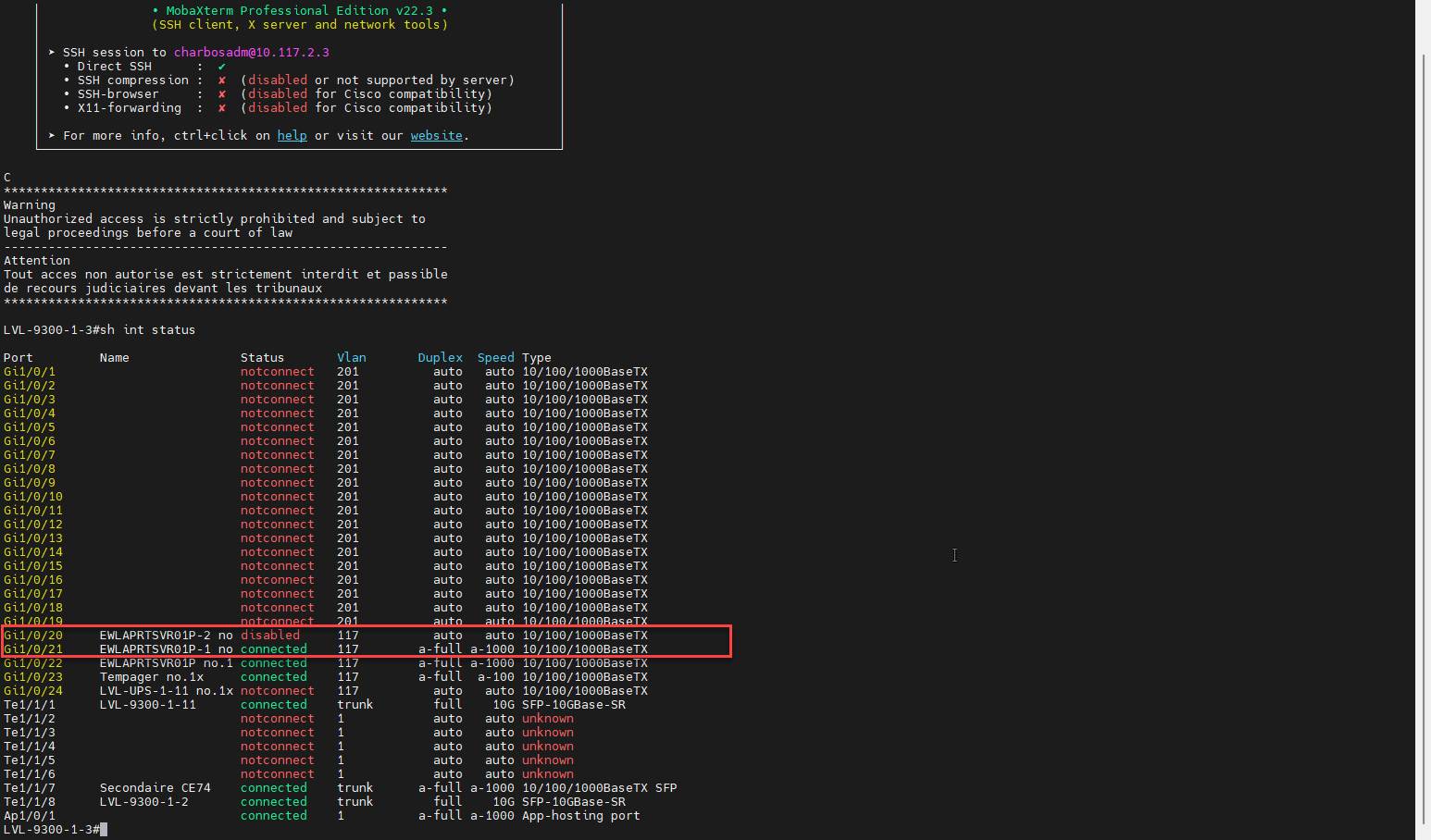
e660c9c4-8e09-4d8c-b7e2-051f3867994e.png
Hey all,
Well I found and understood a way to customized each output but will be great if we have some libraries ready to be imported. Anyway for now this is the method that works for me "Syntax Highlighting"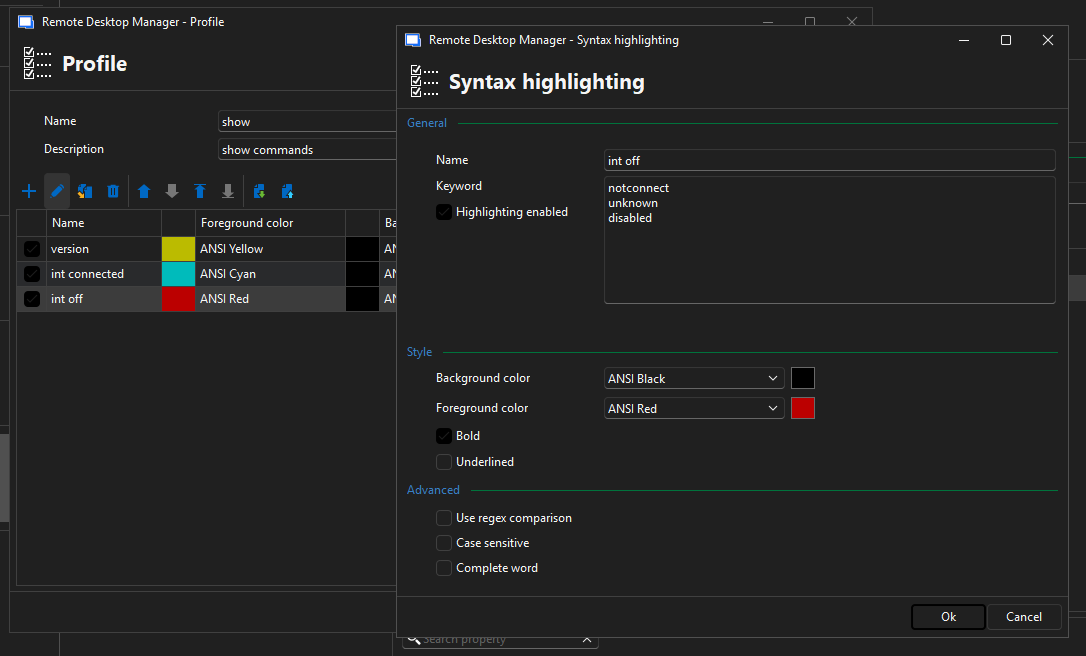
1a0bf912-4282-4931-a15a-c920ed6bb4b9.png