RDP connection after Windows 11 24H2 udate

II just upgraded my Windows 11 to the 24H2 update. I also have a 52" curved monitor. Now when I open an RDM session I get an oversize black border on the Server screen which can be manually shrunk to the size of the Normal RDM screen. I have tried multiple combinations of choices on the Display set up menu.
I didn't have any problem prior to the Windows 11 upgrade.
I also tried with just mstsc.exe and configured it manually. I had the same oversize black surround.
Any ideas?
All Comments (9)
Hello,
Thank you for reaching out to us.
Could you please try this setup and keep me updated on the outcome?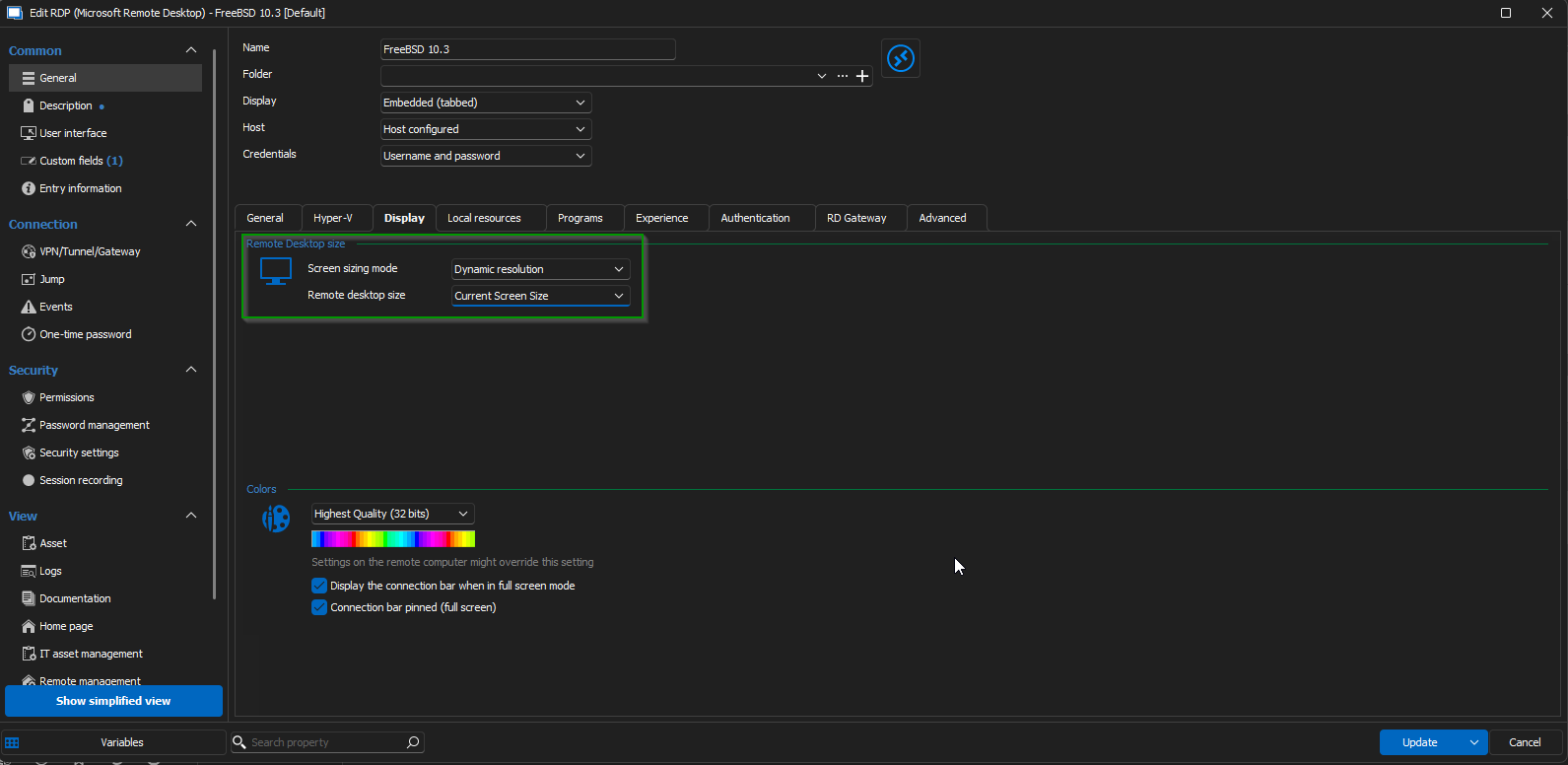
Best regards,
Jacob Lafrenière
87158980-e55d-46bb-9ae1-b92ac1de0606.png
Hello,
Thank you for reaching out to us.
Could you please try this setup and keep me updated on the outcome?
Best regards,
I have added a screenshot of what I get when the RDC loads on a Windows 11 2024H2 latest version computer.
I can right click on the top left corner and choose extra -> Resize to fit window and it shrinks the black portion to the screen size. I seems to be using a screen size that is set on the server in question, not the screen size that is in the Display set up of the RDP connection. I have tried every combination I can think of and cannot get the original functioning of RDC to work properly. I have also tried to set the version of RDC in RDM to a previous version, but that didn't do anything.
Hello,
Thank you for following up.
Could you please let me know the resolution you are using with your 52'' screen?
Best regards,
Jacob Lafrenière
I normally use something like 2560x2048. It has been working for my monitor for about 1 year before this change has occurred.
Hello
Thank you for your prompt response.
Could you please confirm if this could be linked to a scenario such as an RDM software update or a Windows update?
Additionally, could you share the version of RDM currently in use, as well as the datasource type and version being utilized?
Best regards,
Jacob Lafrenière
It seems to have started just after I updated Window 11 to 24H2 update.
RDM version: 2024.3.20.0
DataSource: MS SQL server 2014.
I think I mentioned creating an RDC connection using mstsc.exe and had the same result as when I connect to a server from with RDM.
Hello,
Thank you for sharing this information.
If the same behaviour is occurring with MSTSC, this is concerning since RDM uses the same protocol. To address this, I suggest trying the following steps to see if we can resolve the issue:
- Update RDM to the latest version (2024.3.22.0).
- Ensure your graphics card driver is updated, as this could potentially resolve related issues.
Additionally, there are some settings within your RDP session properties that we can experiment with:
- Testing with FreeRDP.
- Trying an earlier version of RDP to compare results.
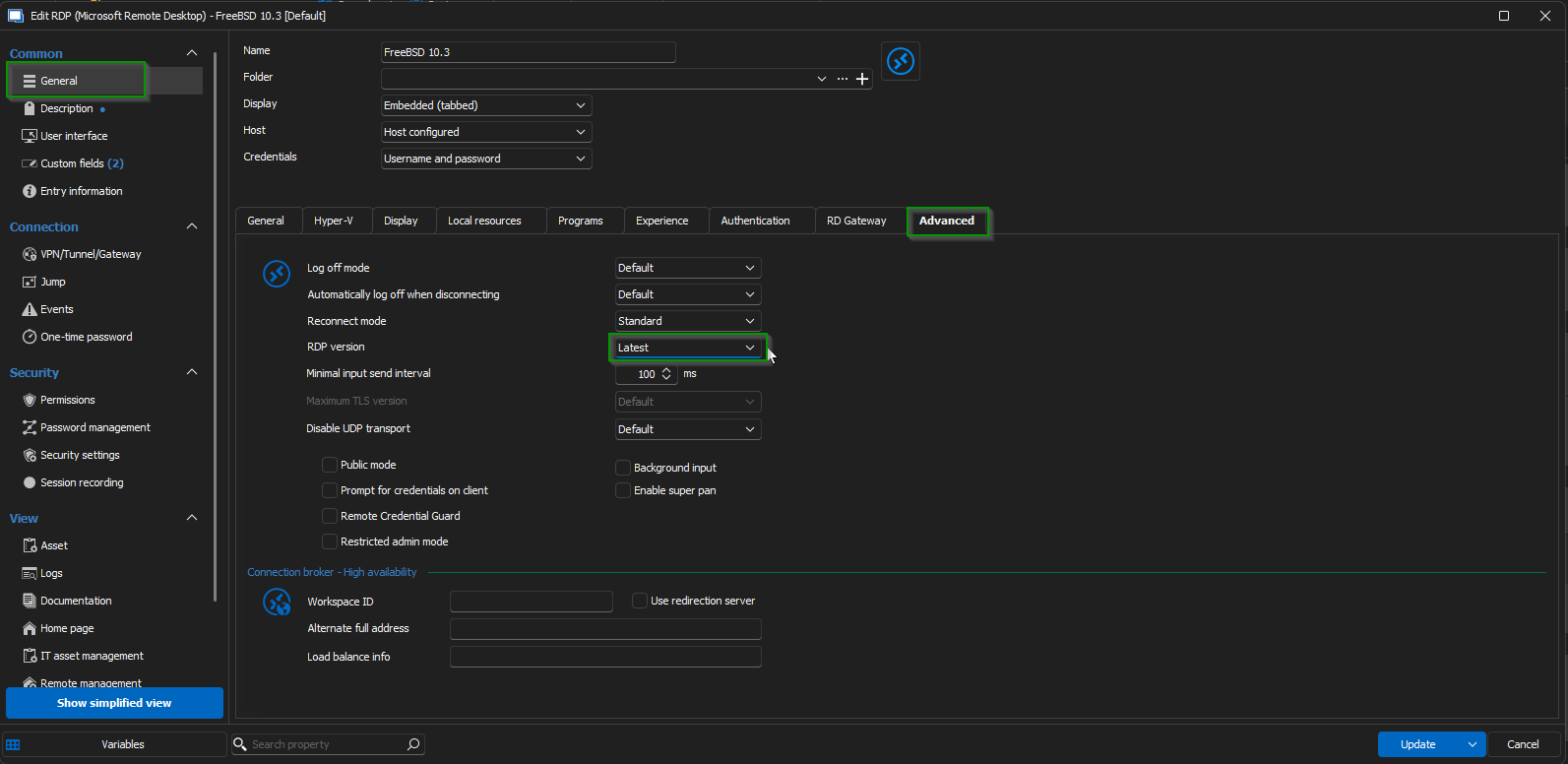
Please try these updates and settings and let me know the outcome. I’m happy to assist further if needed.
Best regards,
Jacob Lafrenière
5dad1c64-8857-4c94-b002-012b137c635f.png
With an update to RDM and update to NVIDA graphics card and a computer reboot, the result is the same.
Hello,
Thank you for your response.
Could you try using a portable version of RDM? Testing the default configuration will help determine whether the issue is related to your current RDM settings.
For guidance, please refer to the first part of the article on our documentation website.
https://docs.devolutions.net/rdm/kb/how-to-articles/portable-rdm-installation/
Note that you will need to reconnect your datasource, to test it out.
Best regards,
Jacob Lafrenière