Offline Vaults

I'm trying to make our vaults offline available. The Group has the rights and for one vault it works, but for others it doesn't.
Here's a screenshot from the vault that works...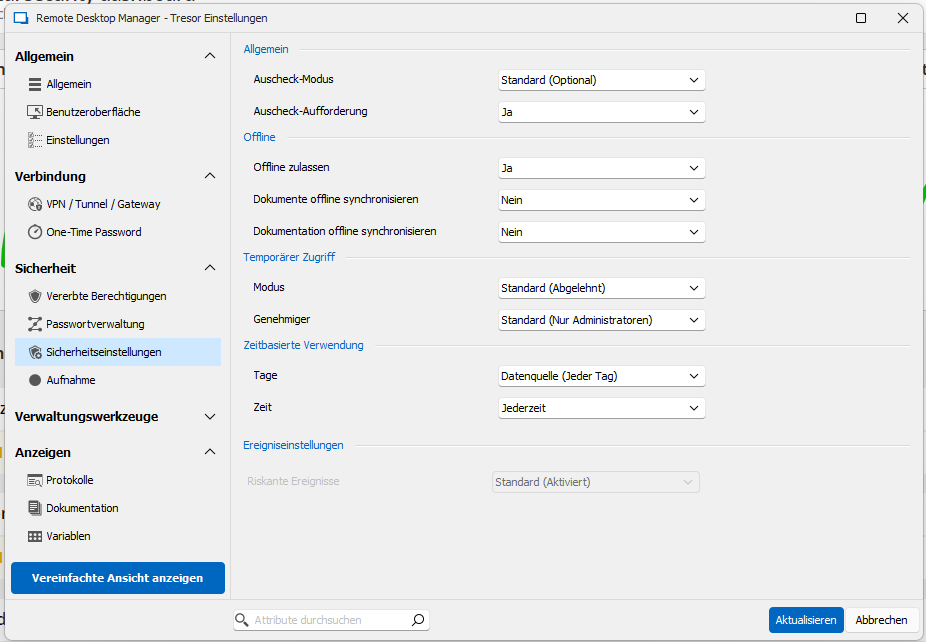
Here's the screenshot from a vault that doesn't...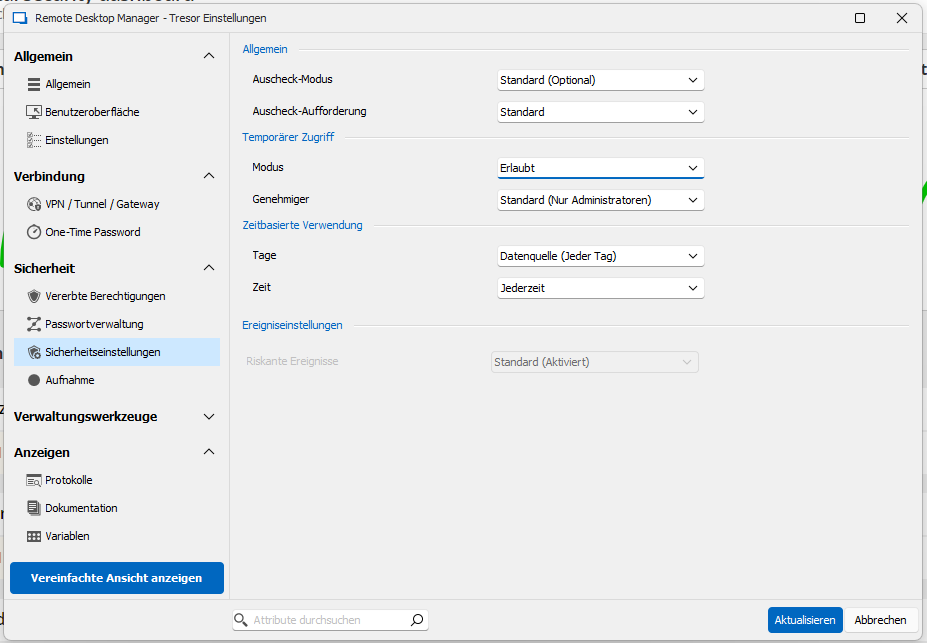
Whats the difference? Because the UI looks different...
And is there a way to set offline as default for all vaults?
Thanks and best regards
Daniel
Screenshot 2024-12-06 144146.png
Screenshot 2024-12-06 144125.png
All Comments (11)
Hello Daniel.
I assume for the second vault the option Offline zulassen is not enabled at
Administration => Tresore => Bearbeiten
https://docs.devolutions.net/rdm/commands/administration/vaults-overview/#create-a-vault
Regards,
Min
This is the second vault...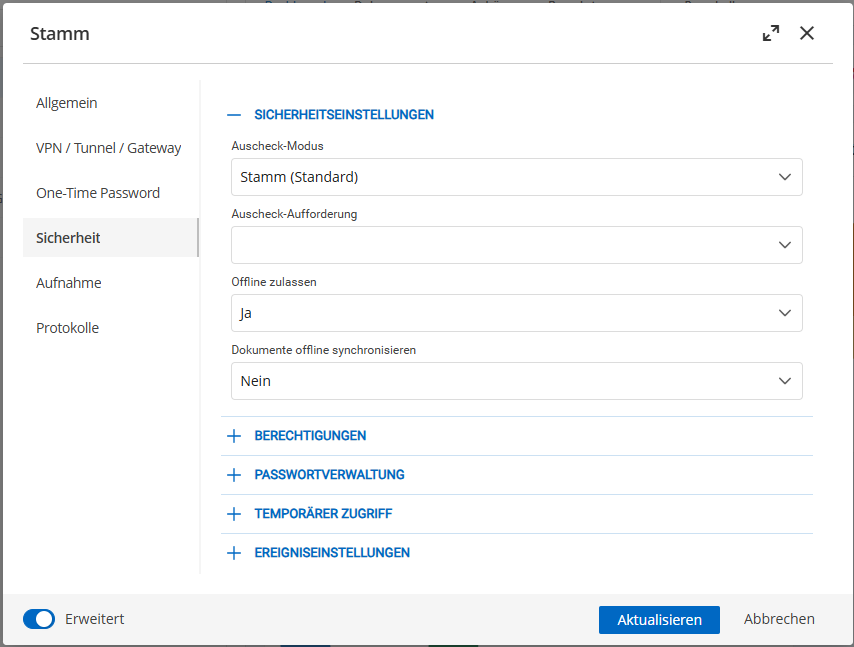
Screenshot 2024-12-09 084304.png
Hello Daniel,
As I can see, you're using Devolutions Server as data source and it seems the Sicherheitsstufe for this vault is set to Hoch.
If yes, this prevents the usage of the offline mode: https://docs.devolutions.net/server/web-interface/administration/security-management/vaults/general/#edit-vault-settings
Regards,
Min
Ok, that was the problem. Thanks!
Is there a way to change this for all vaults or do I have to change the settings for all 140 vaults manually?
Hello Daniel,
It is possible to change the values at once with the PowerShell module
https://www.powershellgallery.com/packages/Devolutions.PowerShell/2024.3.6
New-DSSession -BaseUri https://URLofYourDVLS -UseOAuth
after you've successfully authenticated with an (admin)user you can execute the following PS command:
$vs = Get-DSVault -All
foreach ($v in $vs){
  $v.RepositorySettings.VaultSecurityLevel = 'Standard'
  $v.RepositorySettings.VaultType = 'Vault'
  update-DSVault -InputObject $v
}
It selects every vault and changes the security level to Standard
Please create a database backup before you run the script, just in case! 😉
Regards,
Min
Installed Powershell Module, but get the following error...
New-DSSession : Der Befehl "New-DSSession" wurde im Modul "Devolutions.PowerShell" gefunden, das Modul konnte aber
nicht geladen werden. Wenn Sie weitere Informationen wünschen, führen Sie "Import-Module Devolutions.PowerShell" aus.
In Zeile:1 Zeichen:1
+ New-DSSession -BaseUri https://URLofYourDVLS -UseOAuth
+ ~~~~~~~~~~~~~
    + CategoryInfo          : ObjectNotFound: (New-DSSession:String) [], CommandNotFoundException
+ FullyQualifiedErrorId : CouldNotAutoloadMatchingModuleHello Daniel,
Please run the following command to import the module to your PS session:
Import-Module Devolutions.PowerShell
PS: in the New-DSSession command please also adjust the https://URLofYourDVLS string according to your DVLS URL
Regards,
Min
Thanks, but the problem was, that Windows always started the old 5.x Powershell instead of 7.x
Hello Daniel,
Thanks for the hint! Yeah it could be indeed necessary: https://docs.devolutions.net/powershell/rdm-powershell/change-default-powershell-version
But after this adjustment the PowerShell command worked on your side?
Regards.
Min
Yes, didn't have to import the module. I didn't test the vault security code yet, was was able to authenticate.
Besides the security level, is there also a way to bulk enable offline?
Thanks and best regards
Hello Daniel,
After executing the provided script, the vaults are all set to allow offline (this setting is handled by the vaults' security level)
You can also create an Application identity for the authentication (please note, for the above script, the identity need administrator permissions)
https://docs.devolutions.net/server/web-interface/administration/security-management/applications
https://docs.devolutions.net/powershell/dvls-powershell/powershell-connectivity/#method-2-using-devolutions-server-cmdlets
Regards,
Min