Edit parameters for quick password generator?

Hi,
Is there any way to edit the parameters for the password generated via the quick menu entry?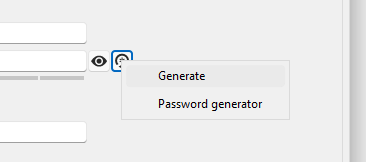
I would like to at least adjust the length. I do not want to use the full Password generator tool.
bild.png
All Comments (1)
Hello,
You can adapt the quick password generator by setting a "Password Template" in the "Password management" section of your entry.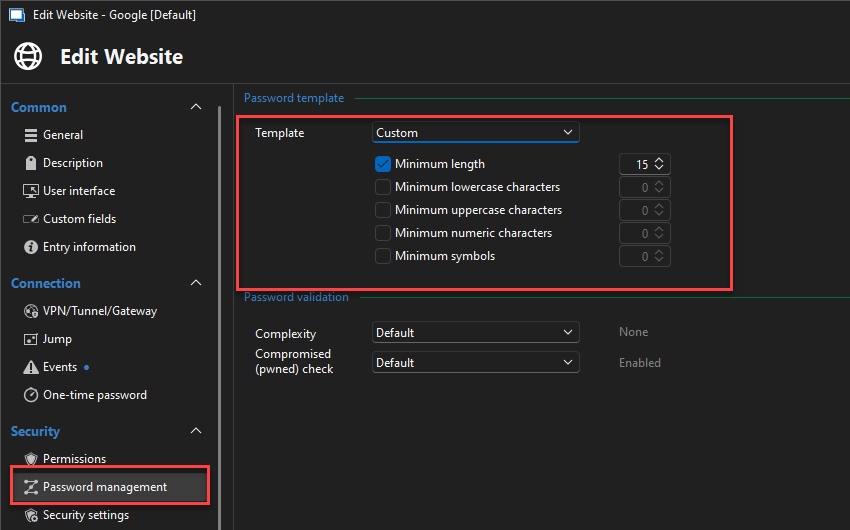
You can see the result will be as follows : 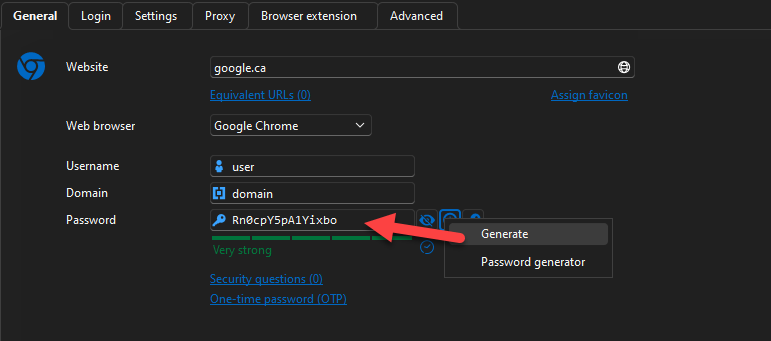
If you wish to not always do a custom password generator template then you can also create a password template and use the "List" mode to select it quickly.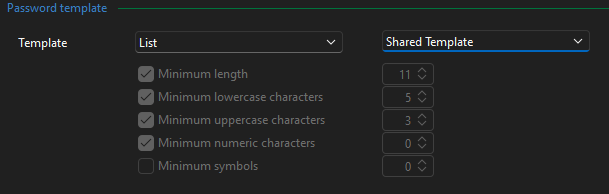
You could even set the template mode to "Inherited" and adapt your folder structure so that this inheritance process goes up to an appropriate password template.
Another useful tip would be to create an "RDP" entry template (or any other entry type) and configure the password template section in that template. After that, you could create all your entries using that specific entry template and it would be configured properly by default.
To create entry templates you simply have to go in File -> Templates -> Entry templates and add your template.
Best Regards,
Michaël Beaudin
236dd1ba-af65-4c77-aa2e-37df263fbccc.png
be886a86-ba52-4c15-8ff7-71e9040ee48c.png
66ca5a4b-e44e-4870-8537-5467e45f525e.png